👋 Hey there, I’m Lenny. Each week, I answer reader questions about building product, driving growth, and accelerating your career. For more: Lenny’s Podcast | Lennybot | How I AI
P.S. Get a full free year of Lovable, Manus, Replit, Gamma, n8n, Canva, ElevenLabs, Amp, Factory, Devin, Bolt, Wispr Flow, Linear, PostHog, Framer, Railway, Granola, Warp, Perplexity, Magic Patterns, Mobbin, ChatPRD, and Stripe Atlas by becoming an Insider subscriber.
One of the most frequent questions I’ve seen bubbling up in this community is how AI is impacting the interview process, both for interviewees and for hiring managers.
To find out, my Community Research Lead, Noam Segal, interviewed dozens of current and recent job seekers as well as hiring managers to learn how AI is transforming both sides of the hiring process.
Part 1 of the results from this research (below) focuses on job seekers—and the approach Noam took here is quite extraordinary. When he started analyzing what he’d learned, he realized the findings didn’t condense into tidy advice or tips. The best candidates had built interconnected systems to arm themselves for every step of the interview process. So Noam did something unique with this post: he encoded the results of his research—the successful techniques from over 30 participants—into a Claude Code–based coach you can plug-and-play into your interview process today.
Once you give it a go, if you have any feedback or suggestions to make this even more useful to you, feel free to email Noam at [email protected] (or ping him in our community Slack, @Noam Segal).
Let’s get into it.
For more from Noam, find him on LinkedIn.
Logan hadn’t interviewed for a new job in eight years. He’d been at one of the hottest companies in San Francisco, been promoted several times, and never felt the need to look elsewhere. When he decided to pursue a senior architect role at Anthropic, he hit a wall experienced engineers know well: interviewing is its own skill. Day-to-day, Logan solved architecture problems with full context and ample time. Interviews required him to grind LeetCode, whiteboard system designs on the spot, and compress years of expertise into rehearsed stories that fit a rubric.
Normally, preparing for senior engineering loops takes months. Logan had two weeks.
But Logan got the job. When I asked what mattered most, he pointed to his AI workflows as the primary reason he pulled it off.
He’s not alone. I interviewed over 30 tech professionals about how they use AI throughout the interview process. What I found went far beyond polishing resumes. People had built entire systems tailor-made for their own situations: ways to get feedback on what they actually said in interviews, methods to predict questions before walking in, workflows to surface stories they didn’t know they had. Each person I spoke with had figured out how to use AI for one or two pieces of the interviewing puzzle.
I started pulling together a research report from these conversations, but I quickly realized that most people on the job market are stressed and anxious enough. The best value I could offer wasn’t a list of tips but, instead, a way to plug-and-play the hard work these participants have already done. So I changed direction and took every interview AI technique that worked for these participants. Then I added a layer of professional coaching techniques and built a Claude Code–based coach that guides you through how to prepare for job interviews and reach your peak performance.
The Interview Coach I’m offering in this post will give you the critical feedback and real-world reps you need to confidently walk into your next interview room—and succeed.
But first, let’s talk about what’s broken about interview prep today, and how AI solves it.
Interviewing before AI
Interview prep hasn’t changed much in the past decade. You rehearse your stories, maybe run through a mock interview with a friend, and walk into the real thing, hoping everything clicks. But afterward, we’re left with nothing more than a vague sense of how it went, guessing at what to fix. Companies don’t tell you why they passed. Your friends and mentors don’t know what your interviewers were looking for. You’re prepping blind, and the post-interview experience is mostly confusing. There’s simply no usable feedback loop in the interview process.
Of the issues that participants raised in my conversations, three stood out (and all stem from a lack of feedback):
- The impostor spiral. Lindsey, a senior PM who’d been at the same company for 10 years, sent out applications and heard nothing. “I started having creeping impostor syndrome,” she told me. “Am I actually a good PM? What’s going on?” Without feedback, you can’t tell if it’s your resume, your approach, your skills, or just bad luck.
- The blind grind. Charles spent hours tailoring each resume, hoping to highlight the right experiences. Joan researched companies thoroughly but had no way to know if she was focusing on what interviewers actually cared about. Neither had any signal that their effort was pointed in the right direction.
- The practice gap. You can’t get better at something you only do once every few years. And the common advice—to interview at companies you don’t care about to get your reps in—is bad for everyone.
How the most successful candidates used AI to close the feedback loop
Participants who landed roles at top companies all closed the feedback loop themselves by building AI tools.
Greg fed his interview transcripts to Claude, trained it on best practices, and got line-by-line feedback on answers he thought went well but didn’t. Ella built a workflow where she’d paste a job description alongside her resume and have ChatGPT surface the exact gaps a hiring manager would flag and then help her close them before the review. Sean stopped guessing which experiences to highlight. He’d simulate the interview beforehand, test which stories landed, and refine them before the real thing.
Some participants’ systems overlapped; some didn’t. All took real work to build. The problem: assembling those puzzle pieces for yourself would take weeks, and turning them into a successful system is a challenge most people can’t or won’t take on.
The tool you’ll find below pulls all that research together into an AI job interview coach that also leverages best-practice coaching techniques—self-reflection before feedback, powerful questions over prescriptions, co-creation over telling.
Until now, this level of coaching was reserved for those of us who could afford $300-an-hour career coaches. But even a great coach has limits: they can’t analyze a full interview transcript in minutes, track your weak spots across every session, or be there at 11 p.m. when you’re anxious about tomorrow. AI has no such limits, and it’s essentially free.
An AI job interview coach:
- Is always on. An AI coach is free, instant, and omnipresent, whenever you need it.
- Remembers everything. AI tracks your patterns across sessions, from your weak spots to your standout strengths.
- Keeps it real. You can feed call transcripts of your interviews and get feedback on what you said, rather than what you think you said.
So let’s get you set up with an AI interview coach and help you land your next role.
The AI Interview Coach: a free tool to put all this into practice
The Interview Coach is a Claude Code project: a set of instruction files that turn Claude into a rigorous interview coach. You run it by opening the project folder, and it takes over from there.
The coach handles everything that the participants I interviewed were doing (and much more):
- Scores your interview responses and tells you exactly what to fix, based on what you said, not what you think you said
- Runs a quick company research brief (culture, interview style, and whether the role is a fit) before you even have an interview scheduled
- Generates company-specific prep with predicted questions, story mapping against your story bank, interview format guidance, and likely concerns about your background
- Runs full mock interviews (4-6 questions, no feedback until the end) and targeted drills that push back, interrupt you, and force you to think on your feet
- Mines your experience for stories you didn’t know you had
- Coaches you on standing out so you don’t sound like every other candidate who prepped with AI
- Helps you strengthen weak stories and retire ones that aren’t landing
- Debriefs rejections so you learn something from every no
- Rewrites your weakest answers at interview-winning quality, side by side with the original, so the improvement is concrete—not just “add more detail”
- Tracks your self-assessment accuracy over time—the gap between how you think you did and how you actually did
- Coaches post-offer salary negotiation with exact scripts and fallback language
Let’s get it set up (5 minutes)
We’ll use the Claude desktop app to run our AI interviewing coach.
Here’s how to get started:
- Install the Claude desktop app.
- Download the project from GitHub (click Code → Download ZIP and unzip, or Git clone if you prefer).
- Rename SKILL.md to CLAUDE.md (just right-click → Rename in your file browser).
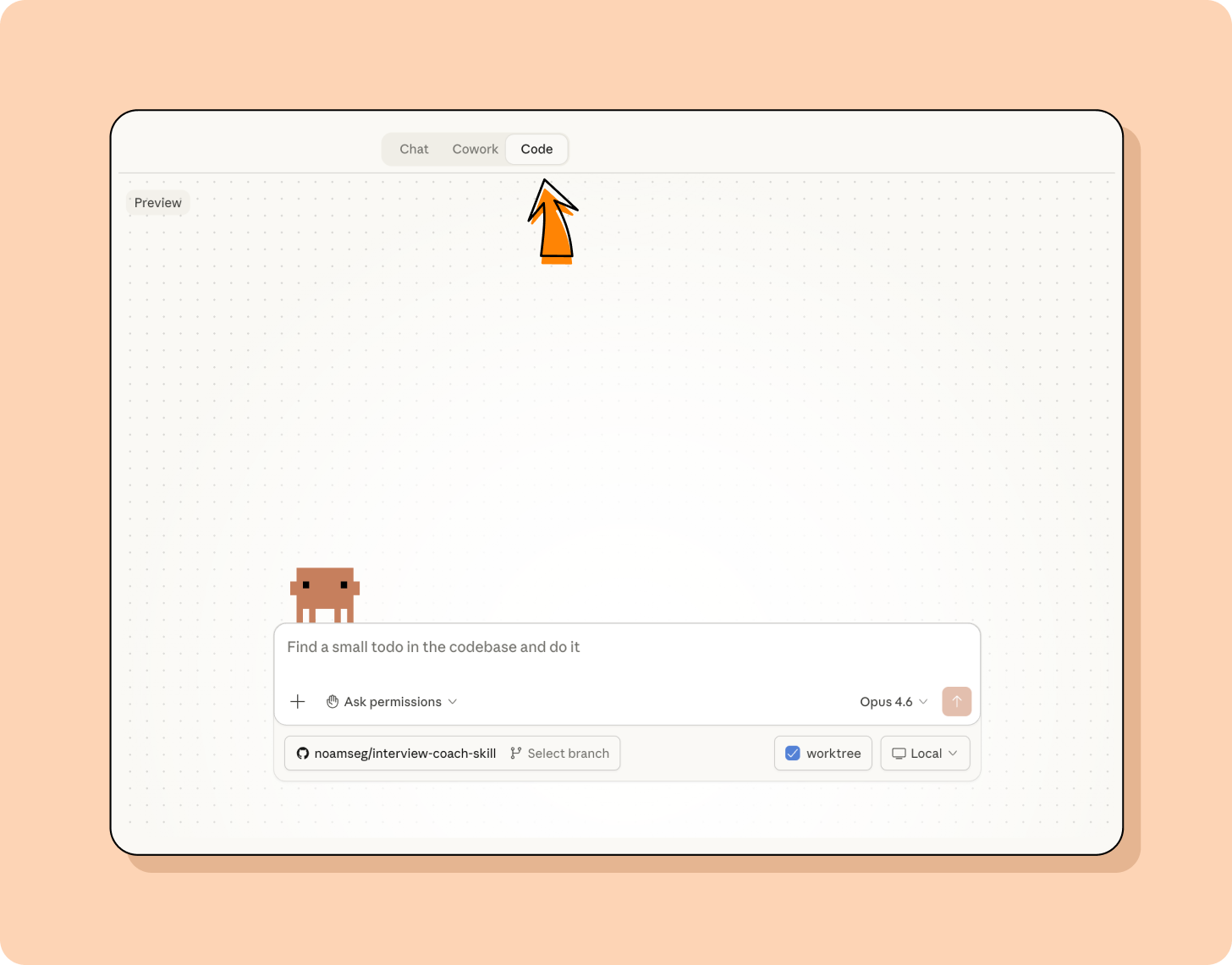
- Open the Claude desktop app. If you’re already using Claude or Claude Cowork on desktop, you’ve probably encountered Claude Code. Select the “Code” tab.
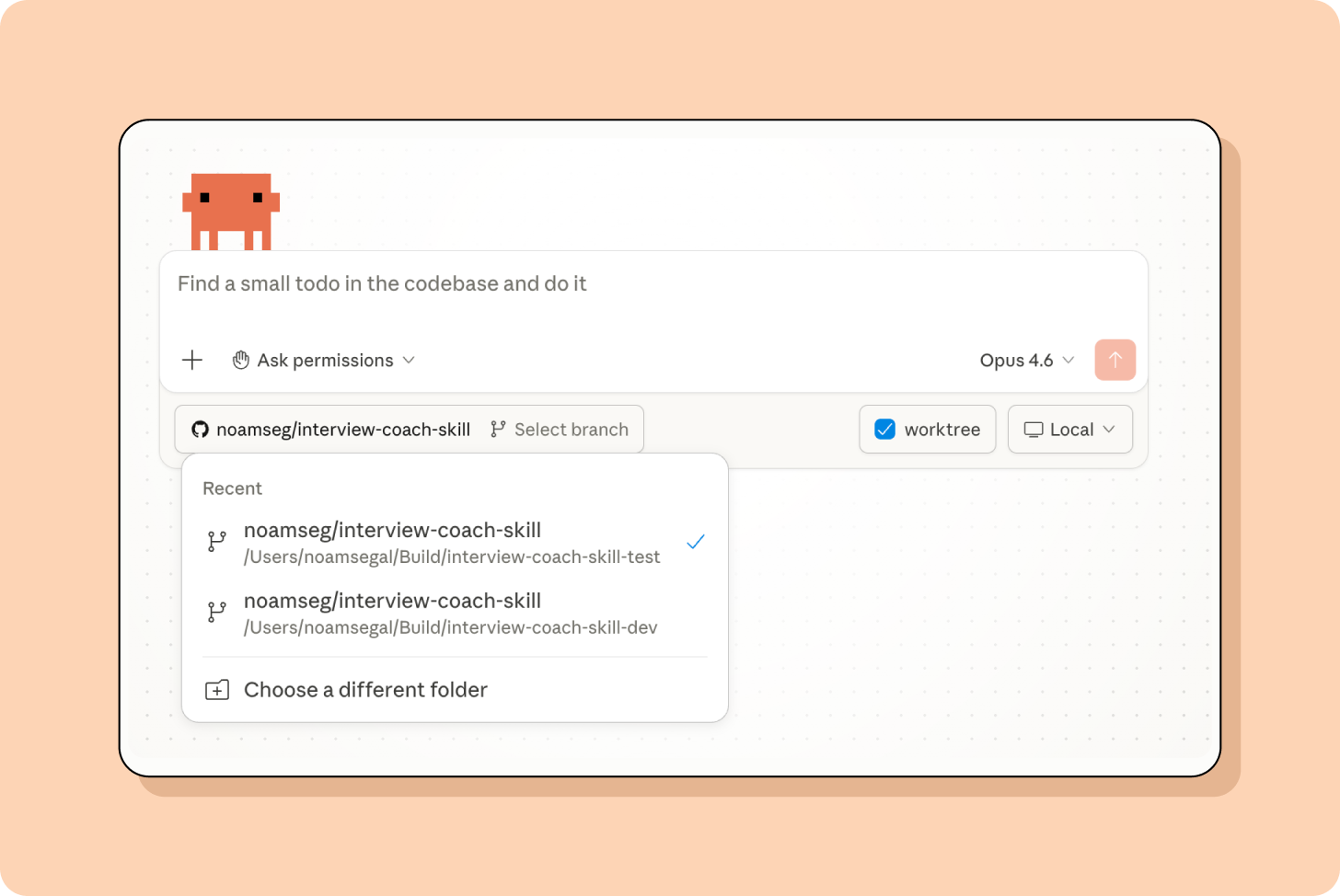
- Open the relevant folder.
 6. Type kickoff and your coach will load.
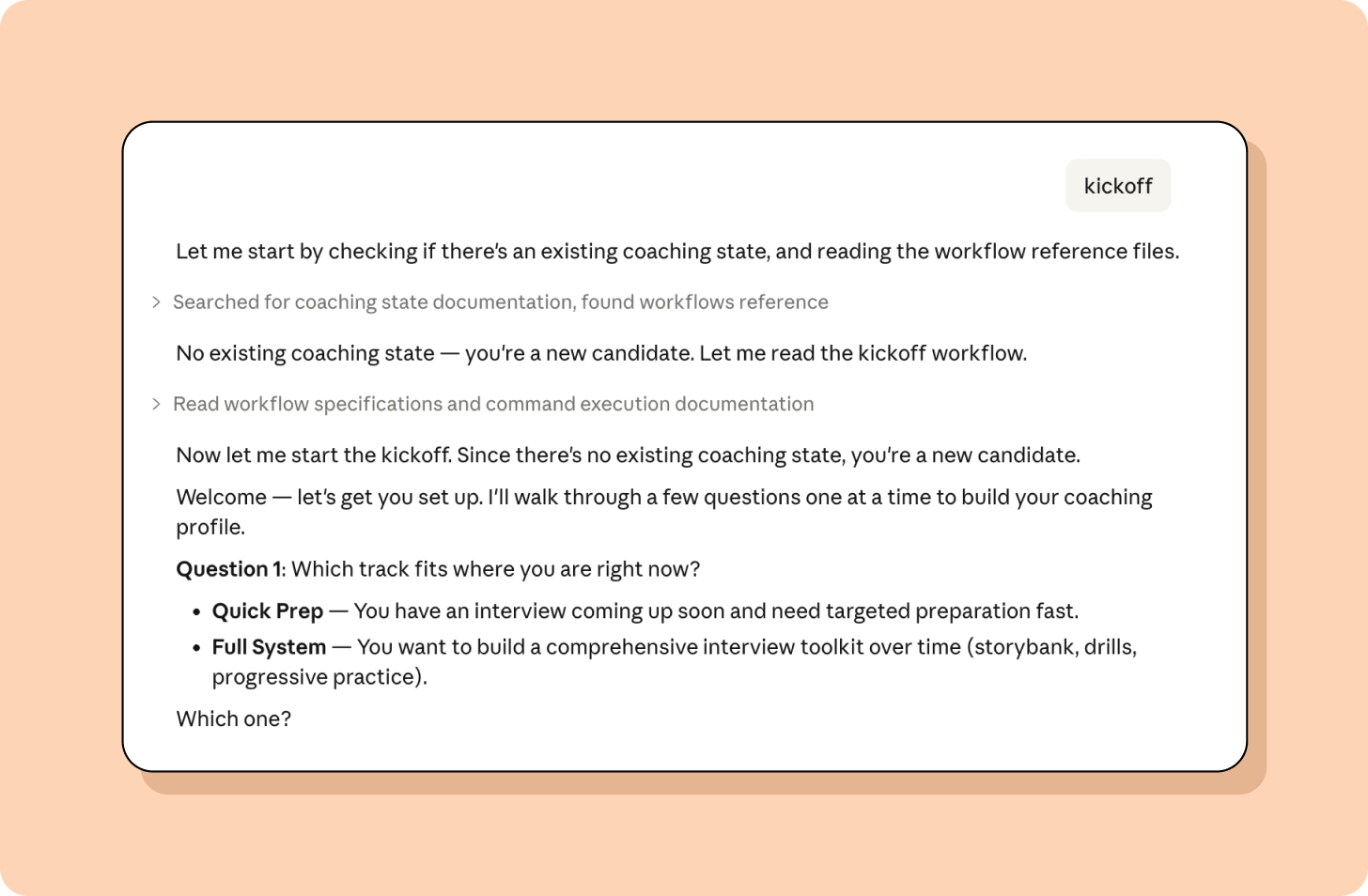
Claude walks you through the rest, one question at a time.
The whole setup takes about five minutes, and Claude writes a coaching_state.md file that tracks everything across sessions: your stories, scores, patterns, and progress.
Need help using the coach? Type help and you’ll get this:
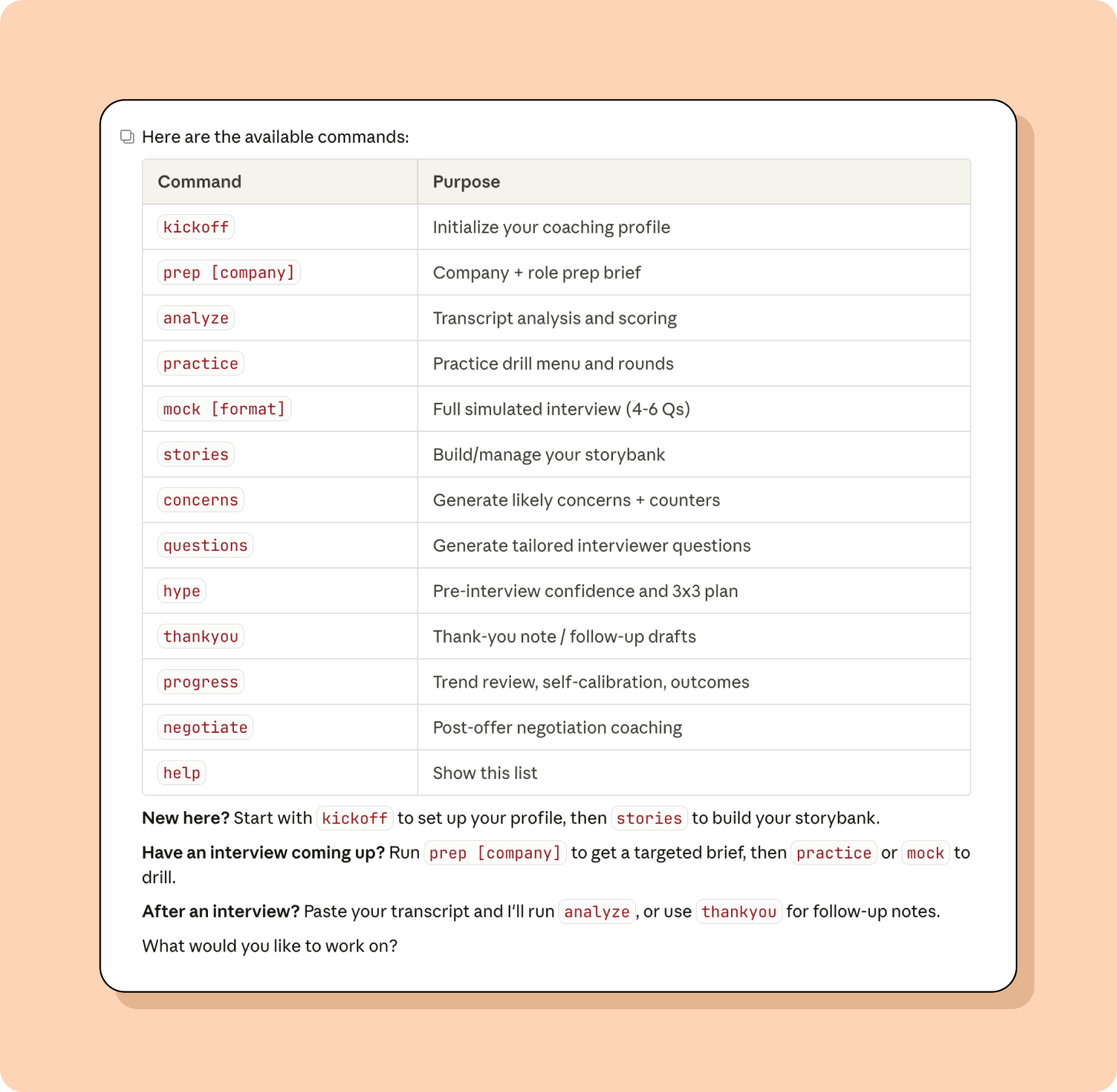
Let’s take it for a spin!
Once you’ve run kickoff, everything else works through simple commands. Here’s how to use the coach for an upcoming interview.
Basic setup
- Quick Prep vs. Full System: Decide if you want to quickly use it for an upcoming interview or want to spend a bit more time setting it up as a comprehensive interview system.
- Role selection: Tell it what kind of job you’re looking for.
- Feedback directness: Tell it how direct you want feedback to be (1-5 scale, default: 5).
- Interview timeline: Share where you’re at in the interview process.
- Interview history: Share whether you’ve been interviewing already, how many interviews you’ve done, and how they’ve gone.
- Biggest concern: Finally, brain dump what’s stressing you out right now.
At this point, you’re done with the configuration, and Claude Code will ask to learn about your candidate context. Specifically:
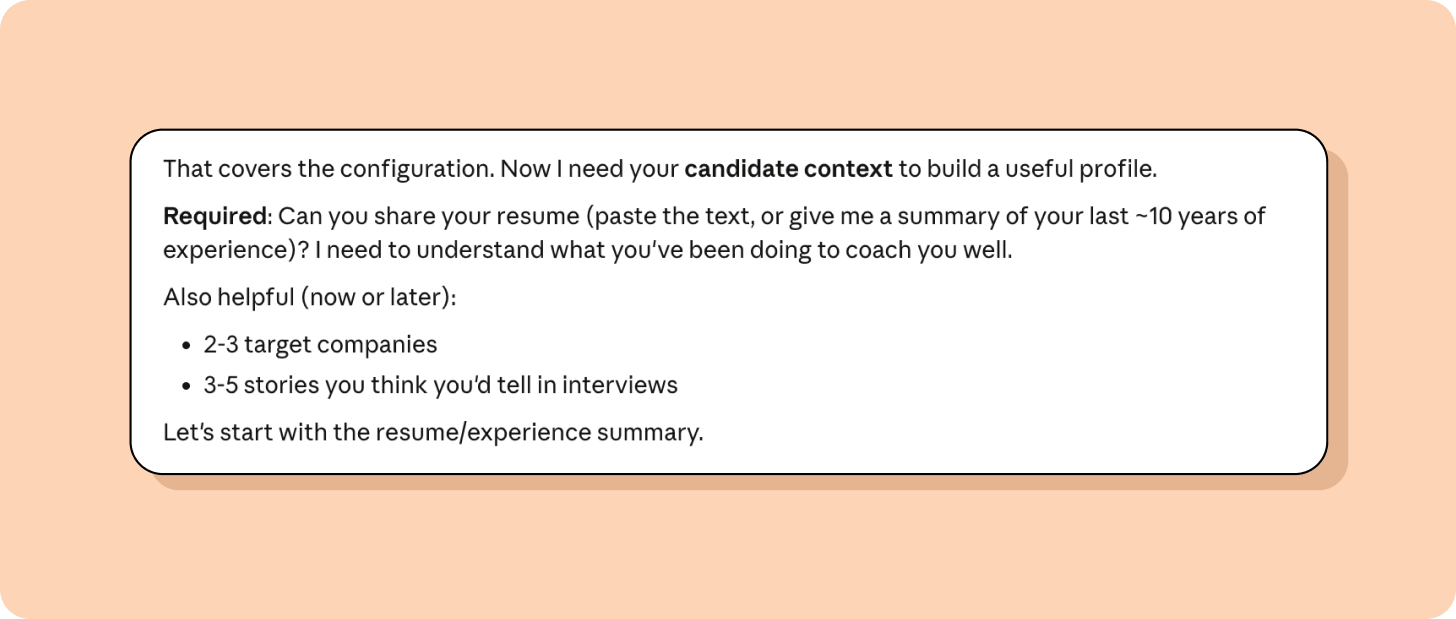
Once you provide these details, Claude Code will write an update to its memory and share a summary:
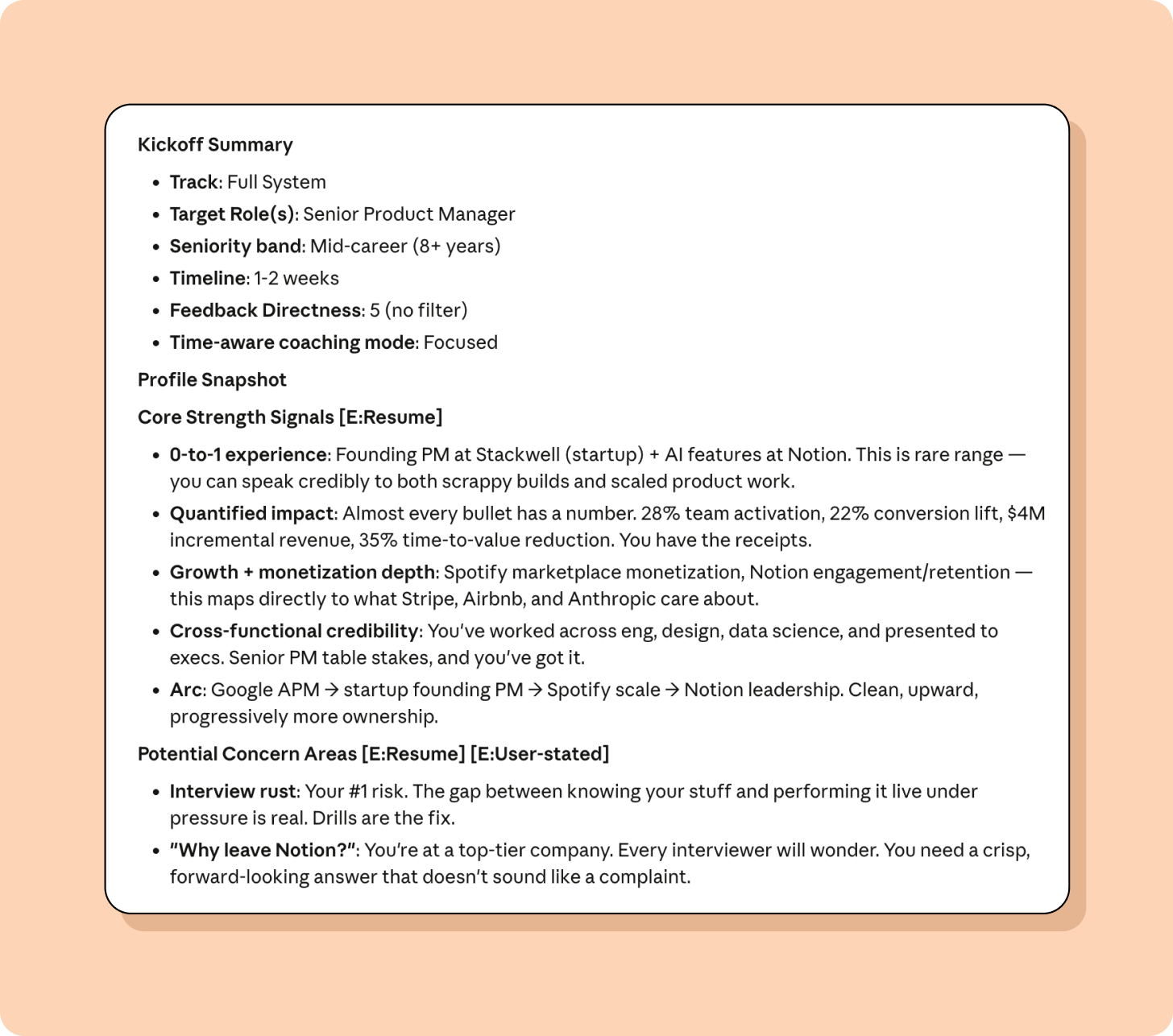
Explore a company early
Interested in a company but don’t have an interview yet? Type research [company name]. Claude pulls together a quick brief on the company’s culture, interview reputation, and how your background maps to what they typically look for. It’s a lighter version of prep, useful when you’re still deciding where to apply or when you want a read on fit before investing in full prep.
Prepare for a specific interview
In the same conversation where you ran kickoff (or a new one):
- Type: prep [company name]
- You’ll be prompted to attach a job description if there is one and be asked some follow-ups.
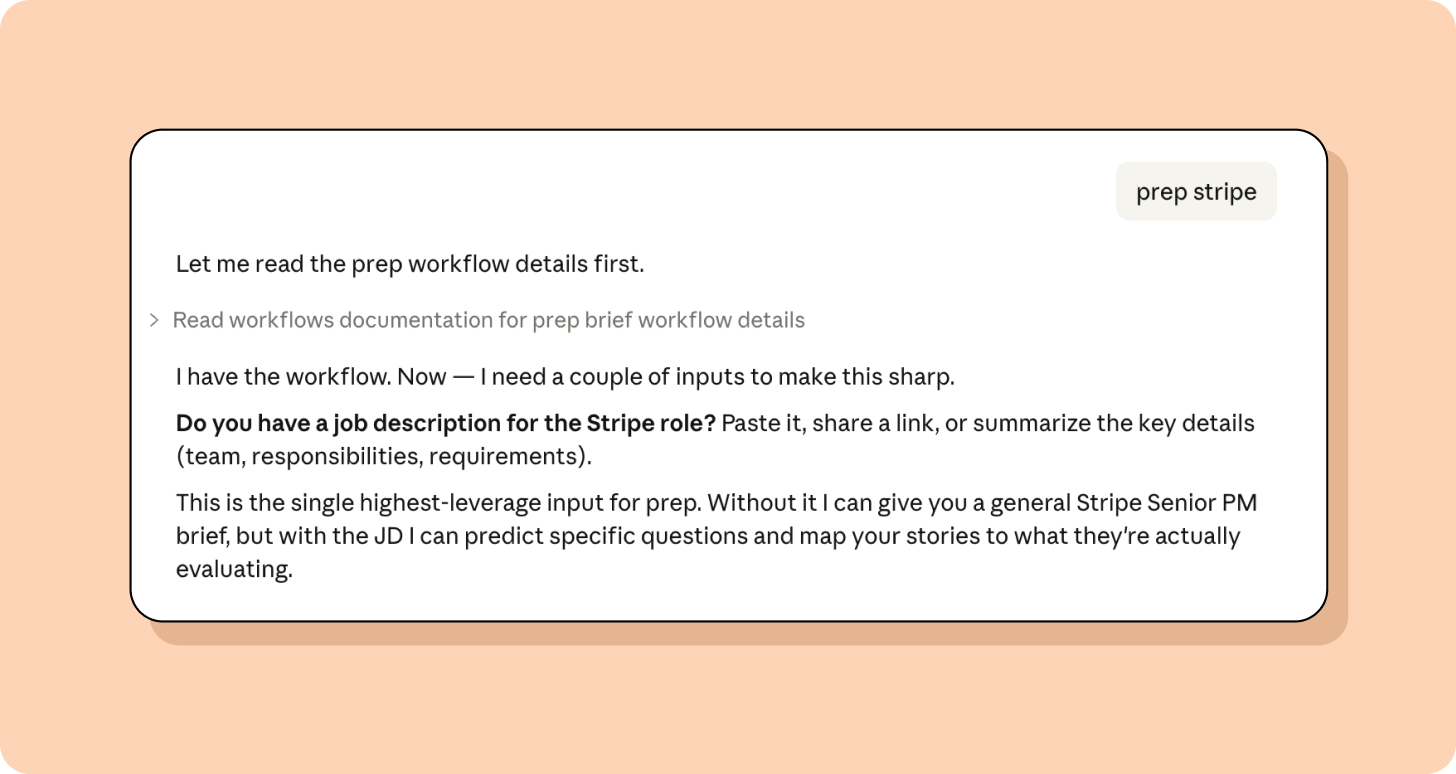 3. Claude Code may request additional information from you. Insider intel is always helpful.
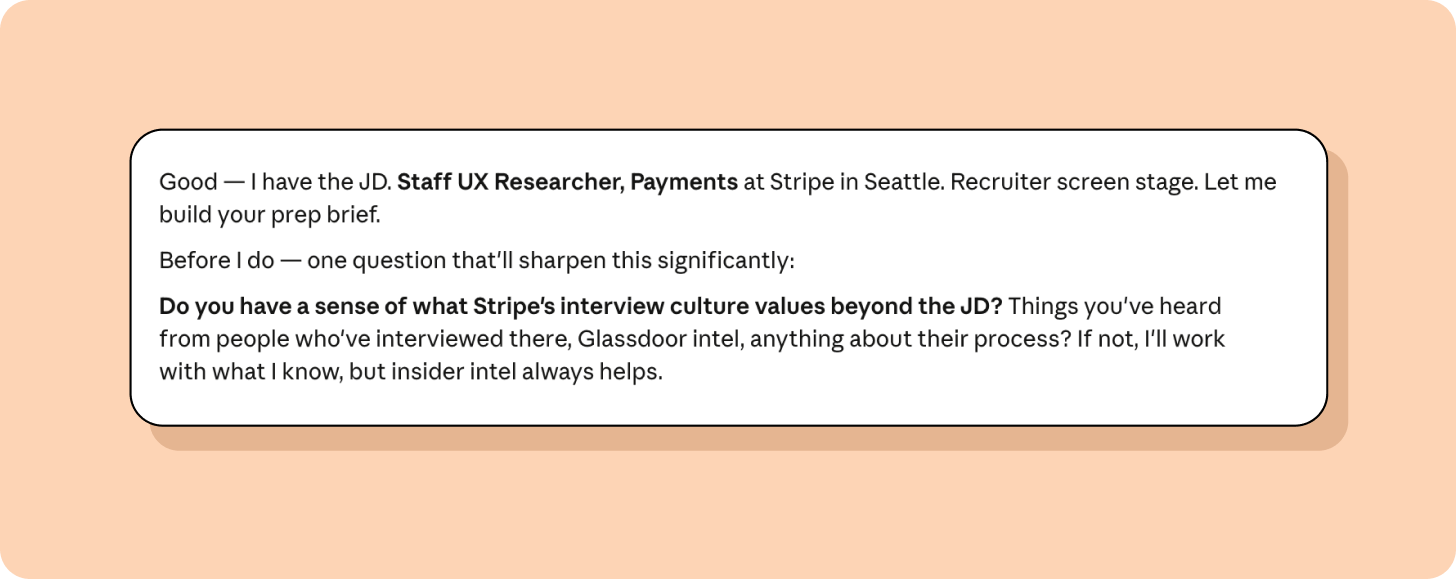
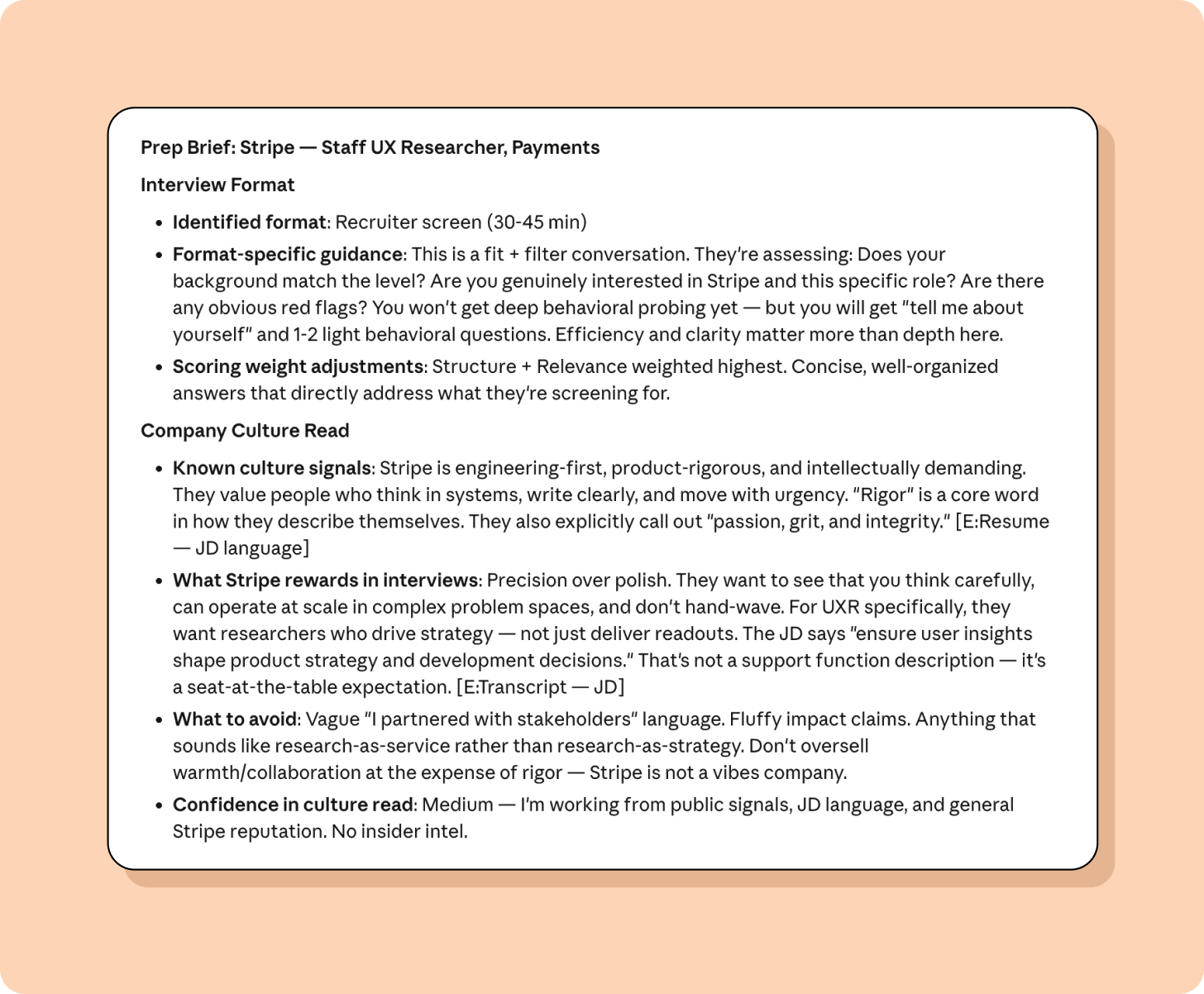
Claude generates a one-page prep brief with what this company optimizes for (based on the JD and their values), your unique positioning for this specific role, 7 to 10 predicted questions tagged by competency with story mapping (which of your stories to use for each, and where the gaps are), likely concerns about your background with one-sentence counters, a culture read on what this company rewards in interviews, and questions for you to ask them.
During prep, you can optionally share LinkedIn profile URLs for your interviewers. The coach needs actual LinkedIn URLs; names alone aren’t reliable enough due to false-match risk. You can include the URLs up front or provide them when the coach asks.
For each interviewer, the coach produces an “Interviewer Intelligence” card covering: their functional lens, career path signals, recent public interests, what you have in common, predicted focus areas, rapport hooks, and watch-for signals (likely interviewing style based on seniority and function). Each card includes a confidence rating so you know how much to rely on it.
If you have a story bank, the coach also maps specific stories to each interviewer—which story to deploy for which person and why. This interviewer intel then flows into other commands: mock calibrates its persona to match the interviewer, hype references their likely focus area, thankyou personalizes your notes, and questions tailors rapport-building questions.
Analyze an interview you just had
Record your interviews using a tool like Granola (available as part of Lenny’s Product Pass) or built-in transcription within Zoom or Google Meet. Then:
- Paste your transcript into the chat
- Type: analyze
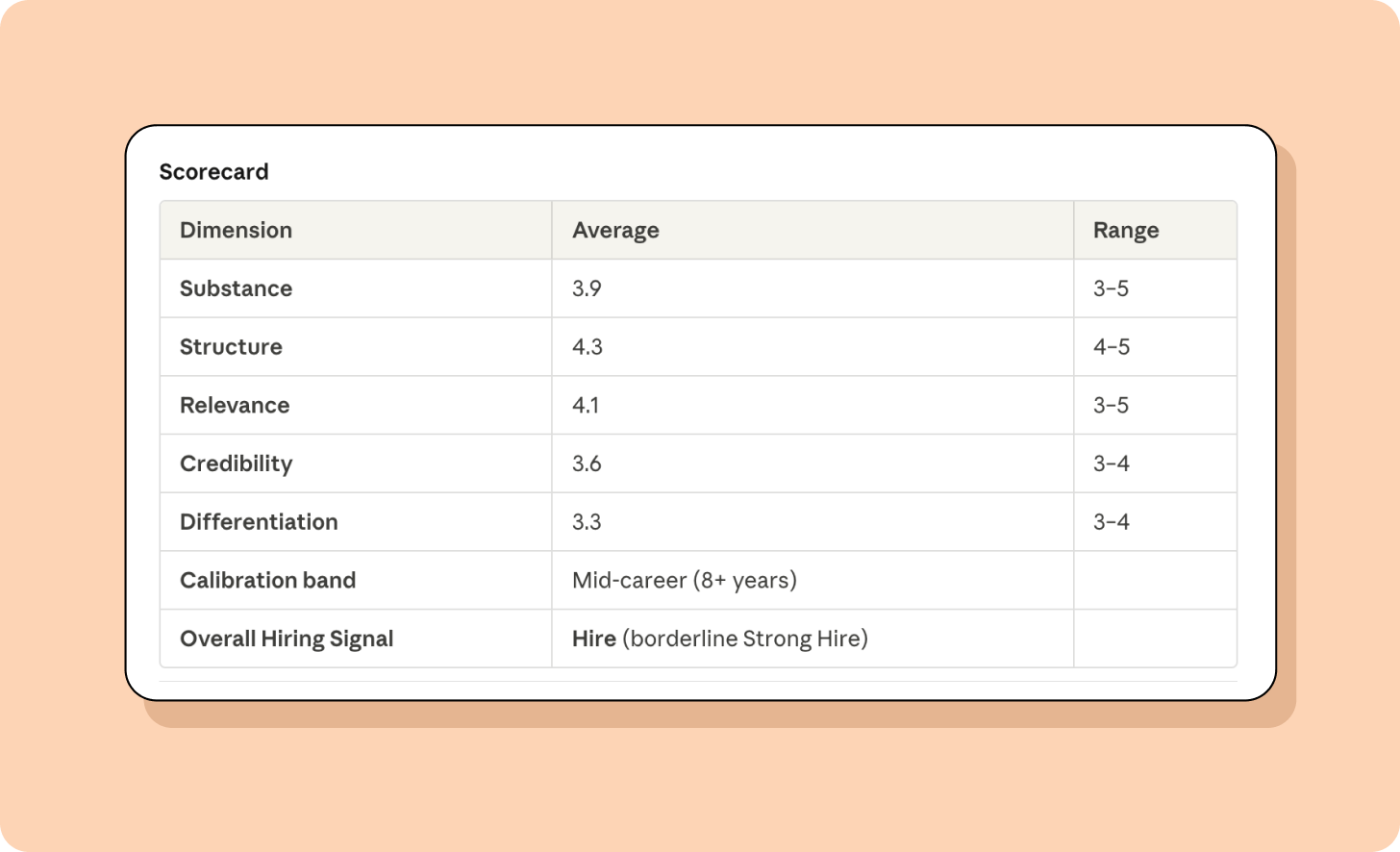
Claude starts by asking how you think it went. Which answers felt strong? Which felt off? Then it scores each answer on five dimensions: substance, structure, relevance, credibility, and differentiation, on a 1-5 scale.
After scoring, it triages: identifies your primary bottleneck, diagnoses the root cause (narrative hoarding? conflict avoidance? status anxiety?), and branches the coaching accordingly. You get a delta sheet with what’s working, what to fix, and which stories to sharpen or retire. If you want, it’ll also give you a side-by-side rewrite of your weakest answer, bringing it up to a quality rating of 4-5.
Then it asks which growth area feels most within your control to change by the next interview. You pick what to work on. This builds the kind of self-awareness that actually shows up in the room.
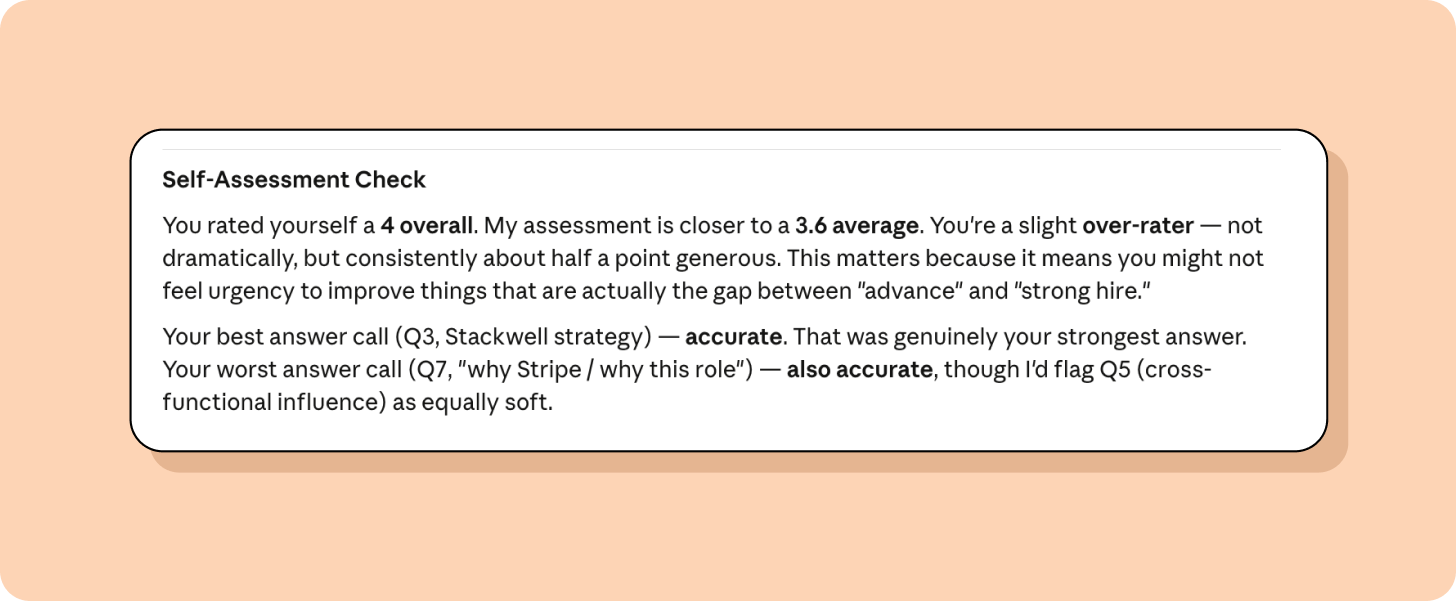
Over time, it tracks the gap between your self-ratings and the coach’s scores. If you consistently rate your structure higher than it actually is, the coach names that pattern. This calibration—knowing where your blind spots are—is often more valuable than any individual score.
Go deeper: Build a system that compounds
The commands above handle one interview at a time. The commands below, which also come with the coach, build a system across your entire job search.
- Build your story bank. Type stories. Claude uses reflective prompts to surface career stories you might overlook. Questions like “When were you at your best at work? What made it different?” and “What’s a decision you’d make differently with hindsight?” It indexes each story by skill, impact, and strength. Most people discover they have more usable material than they thought. Once you have at least 8 stories, you can run a rapid-retrieval drill: Claude throws 10 interview questions at you in rapid succession, and you have 10 seconds per question to name the right story and deliver your opening line. A well-organized story bank is useless if you can’t access it under pressure.
- Practice under pressure. Type practice. Choose from eight drill types in progression order: constraint drills at 30 seconds, 60 seconds, 90 seconds, and 3 minutes (practice ladder), handle skepticism and “so what?” pressure (practice pushback), redirect when a question doesn’t match your prep (practice pivot), handle “I don’t have an example for that” moments (practice gap), face role-specific specialist scrutiny (practice role), manage multiple interviewer personas (practice panel), high-pressure simulation (practice stress), or rapid-fire story matching under time pressure (practice retrieval). Drills are gated: you advance when you hit scoring thresholds, not just when you feel ready. After each round, Claude asks what you’d rate yourself before sharing your scores—strengths first, then gaps, then one specific change for the next round.
- Run mock interviews. Type mock behavioral Stripe (or whatever format and company you’re prepping for). Unlike drills, which build individual skills, mocks simulate a complete 4- to 6-question interview. Claude delivers questions one at a time with no feedback between them. At least one question targets a known gap in your story bank.
Afterward, you get holistic arc feedback: how your energy shifted across questions, whether you reused stories, how you adapted to interviewer cues, and where you were strongest and weakest across the full session. Individual drills build skills. Mocks test the whole package.
Please note that this is the most limited feature of the coach. Interview processes differ across companies, and interviews are changing. There’s no way to support all interview types. Therefore, the coach elicits as much information as possible from you and tries to be helpful, with clear caveats.
If you’re in product, I highly recommend reading Ben Erez’s product sense and analytical thinking articles, or check out his PM interview copilot. 4. Stand out. Type stories. Beyond building your story bank, Claude coaches you on differentiation so you don’t sound like every other candidate who prepped with AI. It extracts “earned secrets” from your experience (insights you can only claim because you lived them), sharpens your point of view, and helps you retire stories that aren’t landing. 5. Anticipate concerns. Type concerns. Claude asks what concerns you expect the interviewer to have, validates the ones you got right, and surfaces the ones you missed—each with counter-evidence and the best story from your story bank to deploy. 6. Prepare questions to ask. Type questions. Claude generates 5 tailored, non-generic questions—each with why it’s strong, who to ask it to, what the interviewer might ask back, and a prepared response for the reversal. 7. Track your progress. Type progress. Claude asks what patterns you’re noticing before showing you the data: which competencies are improving, where you’re stagnant, and what to drill next. It closes by asking what you’ve learned about yourself as a communicator, because that self-knowledge is what transfers to the interview room. 8. Before you walk in. Type hype. Claude generates a 60-second hype “reel” (your biggest wins and strongest metrics, formatted to read aloud), a 3x3 sheet (3 likely concerns with counters, plus 3 questions to ask), a 10-minute physical and mental warmup routine, and mid-interview recovery scripts for when you bomb an answer or get a question you have no story for. 9. Send a strong follow-up. Type thankyou after an interview. Give it context on what you discussed, and it drafts a thank-you note that reinforces your strongest moments from the conversation. 10. Negotiate your offer. Type negotiate after you get an offer. Share the details, your ideal outcome, and your walk-away point. Claude helps you interpret the market data you bring (from sources like Levels.fyi and Glassdoor), identifies the most negotiable components, and gives you exact scripts—not just strategy, but the specific words to say, including fallback language for when they push back. 11. After a rejection. Type debrief. Tell Claude what happened, and it runs a structured debrief to extract what you can learn and carry forward, including what proof points to reinforce and what questions to ask the recruiter. 12. Done with your job search? Type reflect. Whether you accepted an offer or decided to stay put, Claude runs a retrospective on your full journey: what improved, what patterns persisted, what you learned about yourself as a communicator, and what to carry into your next role when the time comes.
One more thing: Make the coach yours
The Interview Coach works out of the box. But it works better when you shape it, both by pushing yourself harder as you use it and by upgrading the coach itself.
Push yourself (and stop sounding like everyone else)
If you use AI on default settings, you’ll sound like every other candidate who prepped with AI. Polished and competent, yet forgettable. Here’s how to avoid that.
Set your coach to maximum pressure. During setup, the coach asks how direct your feedback should be on a 1-5 scale. It defaults to 5, the most direct setting. Try leaving it at 5. You can always dial it back. Most AI assistants default to cheerleader mode. They tell you your answer was “solid” when it was forgettable, or suggest “small tweaks” when the whole story needs to go. Stop letting them be nice.
Instead of “How did I do?” try “What’s the weakest part of that answer?” Instead of “Any feedback?” try “Where would an interviewer lose confidence in me?” One participant asked their AI assistant: “Your job is to find reasons to reject me. What would you tell the hiring committee?” That surfaces the concerns the polite version would never mention.
Lead with unique insights. Patterns you noticed from direct experience. Counterintuitive lessons that most people in your field get wrong. Not “communication is important” (generic) but “The highest-performing teams I led actually had more conflict, not less. We’d institutionalized productive disagreement, and it made our decisions faster” (specific, surprising, defensible).
What did you learn that contradicted conventional wisdom? What would you tell your past self that they wouldn’t believe? Those become your differentiated talking points.
Share spiky points of view. When you catch yourself giving a textbook response, push further. For example:
Safe answer: “I believe in user research before building.”
Spiky POV: “I’ve stopped running user research before building entirely. We ship a stripped-down version in two weeks, watch what people actually do, and iterate from there. Traditional up-front research gave us confidence in the wrong things. Real usage data is faster and more honest.”
The second version has a stance. It might be wrong. That’s what makes it interesting.
Edit the coach itself
The whole point of building this as a Claude Code–based coach instead of writing a list of tips was that instructions can be adapted. A blog post gives everyone the same advice. This coach learns your interviewing needs. But you can go further: open it up and change it.
The coach is just a collection of Markdown files. You can read them, edit them, and make them work for you. Here’s how.
Instead of opening files in a text editor and rewriting prompts by hand, just tell Claude Code what you want changed.
A few ideas to get you started:
- “Make the feedback less verbose—I want bullet points, not paragraphs.”
- “Adjust the scoring rubric to weight communication more heavily.”
- “Customize the research command to pull from sources specific to your industry—earnings calls, product blogs, or regulatory filings.”
Claude Code reads the coach’s files, makes the edits, and your next session uses the updated version. You’re using the tool to improve the tool.
You can also open CLAUDE.md or the files in references/ in any text editor and change them directly; they’re just Markdown. But for most changes, describing what you want is faster than finding the right line to edit.
The participants I interviewed who got the best results were tweaking their AI tools constantly. Every interview taught them something, and they folded that lesson back into their system. That’s the meta-feedback loop: not just getting coached, but improving the coach. You can do that too.
Warnings to keep in mind
A couple of tensions came up repeatedly in my research interviews, and they’re worth sharing.
Recording interviews isn’t always a no-brainer. Tools like Granola transcribe your calls without announcing a bot. Some people see this as note-taking. Others feel uncomfortable with it, especially in two-party consent states. My take: If you’re using the transcript to improve after the fact, that’s fair game. If it feels wrong to you, skip it and use the skill for prep and mock interviews instead.
Authenticity matters. AI can help you predict questions, craft answers, and walk in ready. But the interview still has to be you. The goal is to surface your real experience more effectively, not to manufacture a version of yourself that doesn’t exist. If you’re rehearsing answers you don’t believe or stories you’ve exaggerated, that’s not an AI problem. That’s a you problem.
Your action checklist
Today (10 minutes)
☑️ Download the Interview Coach from GitHub (Download ZIP and unzip, or Git clone)
☑️ In the folder, rename SKILL.md to CLAUDE.md to activate it
☑️ Open the folder in Claude Code within the Claude desktop app and type kickoff
☑️ Claude asks you to choose a track, your target role, feedback preferences, timeline, and resume—one question at a time. Follow the prompts.
This week (1-2 hours)
☑️ Type stories to build your story bank
☑️ Type practice ladder to practice telling the same story at 30 seconds, 60 seconds, 90 seconds, and 3 minutes
☑️ Type practice pushback to face adversarial follow-ups on your stories
☑️ Type practice pivot to practice redirecting when a question doesn’t match your prep
Before your next interview
☑️ Paste the full job description into the chat and type prep [company name] in the same message
☑️ If you know who’s interviewing you, share their LinkedIn profile URLs in a follow-up message
☑️ Right before you walk in, type hype
☑️ If you’ve built your story bank, run mock for a full dress rehearsal—formats include behavioral screen, deep behavioral, panel, bar raiser, and case study
After every interview
☑️ Paste your transcript and type analyze
☑️ Pick one growth area to work on before the next interview
☑️ If you got rejected, type debrief for a structured post-interview capture while it’s still fresh (ideally same day)
☑️ If you got an offer, type negotiate to prep for the compensation conversation
☑️ Type thankyou to draft a strong follow-up note
Weekly (during active search)
☑️ Type progress to see what’s improving, what’s stagnant, and where to focus next
When your search ends
☑️ Type reflect for a retrospective on your full search—what improved, what to carry forward
Give yourself the gift of feedback
The thing that stood out most across my conversations with job seekers was how quickly they improved once they had a feedback loop. Job seekers who’d been stuck for weeks (or months) started landing final rounds and getting offers. It’s the same people, with the same experience and skills, but they could finally see what wasn’t working and fix it.
That’s what this tool gives you: a feedback loop that gets sharper every time you use it. Your first mock interview will surface gaps you didn’t know you had. Your first transcript analysis will show you habits you can’t hear in your own voice. And every interview after that feeds the loop. The skill learns your patterns. It picks up where you left off, tracks your progress over weeks or months, and points you at whatever needs work next.
If you went further and edited the tool itself—by adding your target company’s values, building a custom drill, or changing how feedback works—you did something valuable (and maybe even worth mentioning in your interview). People who are tinkerers and builders are valued on the job market right now. Building AI skills and modifying AI agents to work for you will be a critical piece of any role you land.
Best of luck in your job search!
P.S. Part 2—How AI is changing the hiring manager’s experience—is coming soon.
Thanks, Noam!
Have a fulfilling and productive week 🙏
If you’re finding this newsletter valuable, share it with a friend, and consider subscribing if you haven’t already. There are group discounts, gift options, and referral bonuses available.
Sincerely,
Lenny 👋