Tal Raviv’s last guest post on working “unfairly” as a PM is my fourth most popular of all time, and his podcast episode is a huge fan favorite. Now he’s back with a guide to using AI agents to make PMing fun again, which I predict will be in the top 5 most popular posts of all time. [Editor’s note: this prediction proved to be true].
For more from Tal, check out his 63 free video tutorials on using AI agents at work, and his other guest post on building your AI thinking partner. You can also book Tal for an AI build sprint with your team.
What’s beautiful about product management is that everything is our job.
What’s maddening about product management is that everything is our job.
But while we’re busy with draining-yet-essential tasks (penning updates, wrangling meetings, syncing sources of truth, or acting as mission control), we’re displacing critical time to get up to speed on new tech, immerse ourselves in customer conversations, analyze data, build trust, and be thoughtful about the future: the important parts of our job.
Productivity hacks and cultivating self-reliant teams can help, but with tech orgs flattening, more of these types of repetitive but necessary tasks are falling on fewer product managers.
Enter AI “agents.” Unlike chat-based LLMs, agents can listen to the real world, make basic decisions, and take action. In other words, they’re becoming talented enough to take on our least favorite, least impactful—but still necessary to do—PM tasks.
If you’re like me, you’ve heard the promises and proclamations about how agents will reshape productivity, but your workday hasn’t changed at all yet. It’s not you—operationalizing AI agents for product work is hard. Where to start? What tools? What about security? Costs? Risks? And why is there such a #$@% learning curve?
After interviewing founders of AI agent platforms, running numerous usability sessions with PMs building their first agents, and gathering insights from a hands-on workshop for over 5,000 product managers, I’ve compiled their collective wisdom. This post shares their insights on what works—and what doesn’t—in the real world. We’re first going to learn how to build an AI agent, hands-on. Then I’ll share a unified framework for any PM to plan their second (and third) agent. We’ll cover best practices, pitfalls, powers, and constraints.
While AI agents aren’t magic genies, they can take a lot of repetitive, energy-draining PM tasks off our plate, let us focus on the most important work, and even make our jobs a bit more fun.
What is an AI agent?

The term “AI agent” is admittedly fuzzy. Instead of debating names, it’s more useful to identify behaviors. Think of the term “agent” as a spectrum, where AI systems become “agentic” the more of the following behaviors they exhibit:
- Acts proactively,as opposed to waiting to be prompted.
- Makes a plan,as opposed to being given instructions.
- Leverages context,accessing an internal knowledge base about your company and team, pulling the most up-to-date information regularly.
- Draws on live data such as a web search or a support queue (as opposed to relying on static training or manually uploading a file).
- Takes real-world action. Updates a CRM, runs code, or comments on a ticket, as opposed to only making recommendations.
- Creates its own feedback loop. Watches its own output and iterates without human assistance.
With new startups launching weekly, this framework helps me appreciate each product’s place in the landscape. Each row here is a product category, and each column is a useful behavior.
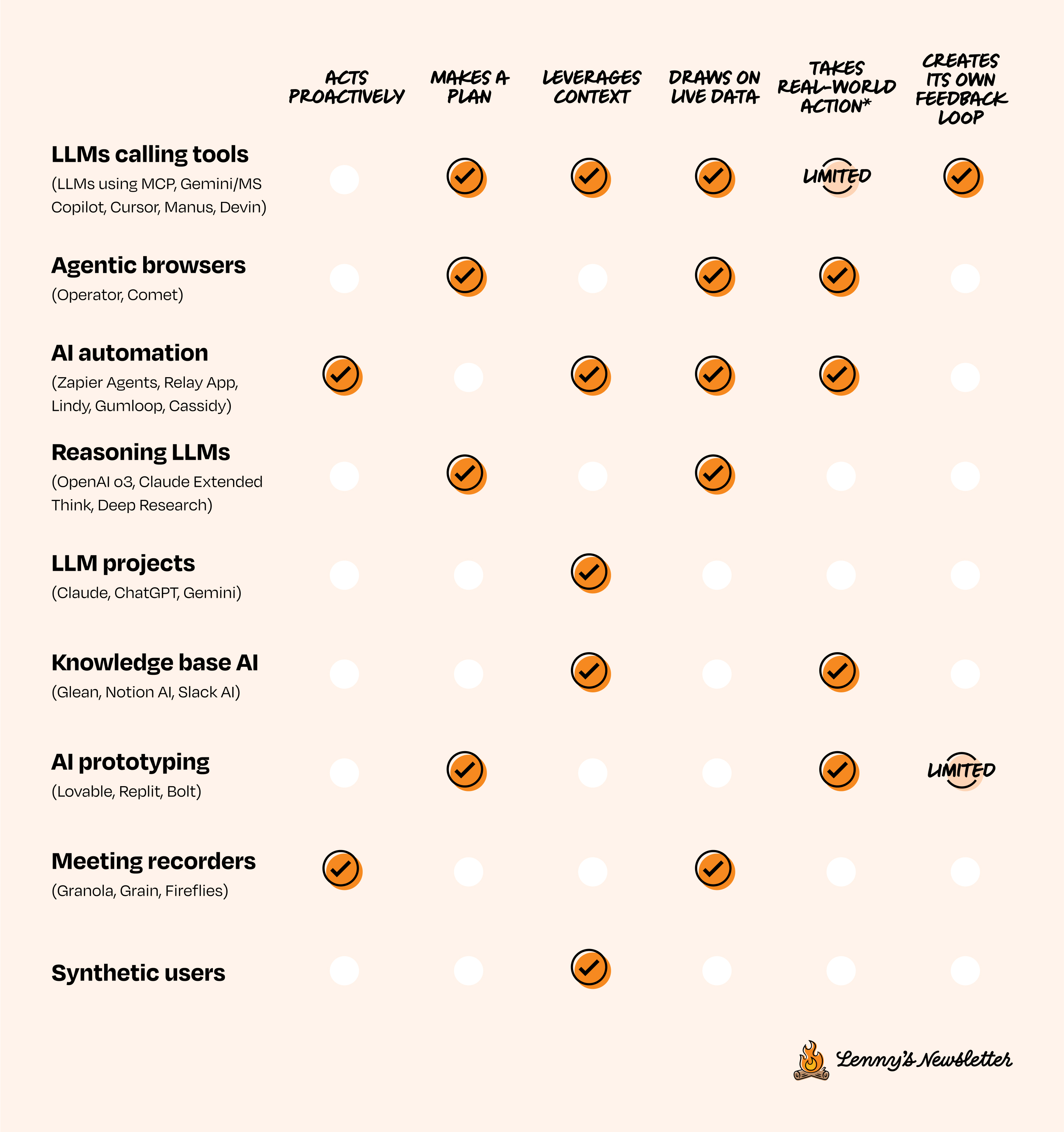
Notice how each row checks some, but not all, boxes. AI systems are still very early, and each category approaches the opportunity from a different starting point.
Of all the flavors and approaches of agents today, the category I refer to as “AI automations” is currently the most practical for helping product managers with monotonous busywork. This includes tools like Zapier, Lindy AI, Relay App, Gumloop, Cassidy AI, and so on. In this post, we’ll focus on this category of agents, but however you define AI agents, the important thing is that they can help us spend more time with our customers, give more attention to our teammates, build better products, and have more fun.
Launch your first AI agent right now
Let’s quickly launch an AI agent that preps you for a customer call, and let it run in the background while you read the rest of this article.
These instructions are for Zapier Agents (note: I have no affiliation with Zapier, I’m just a fan of this tool) and will take just 10 quick steps.
Ingredients
- Zapier Agents
- Google Calendar (or Outlook)
- Slack (or MS Teams)
Instructions
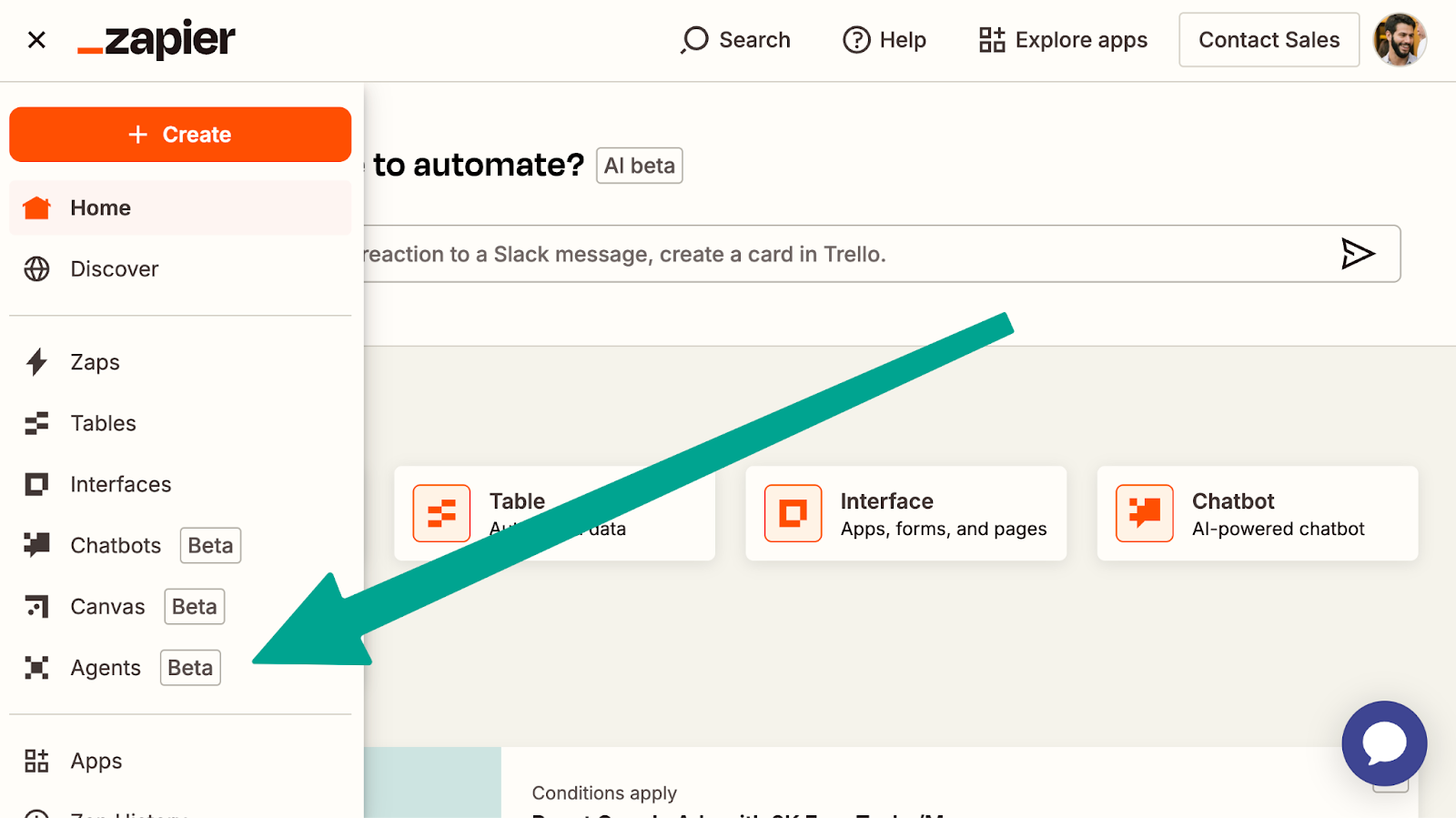
- Create a Zapier account and navigate to “Zapier Agents.”
Note that Zapier Agents is a new, separate product from the classic “Zaps” you may be familiar with.
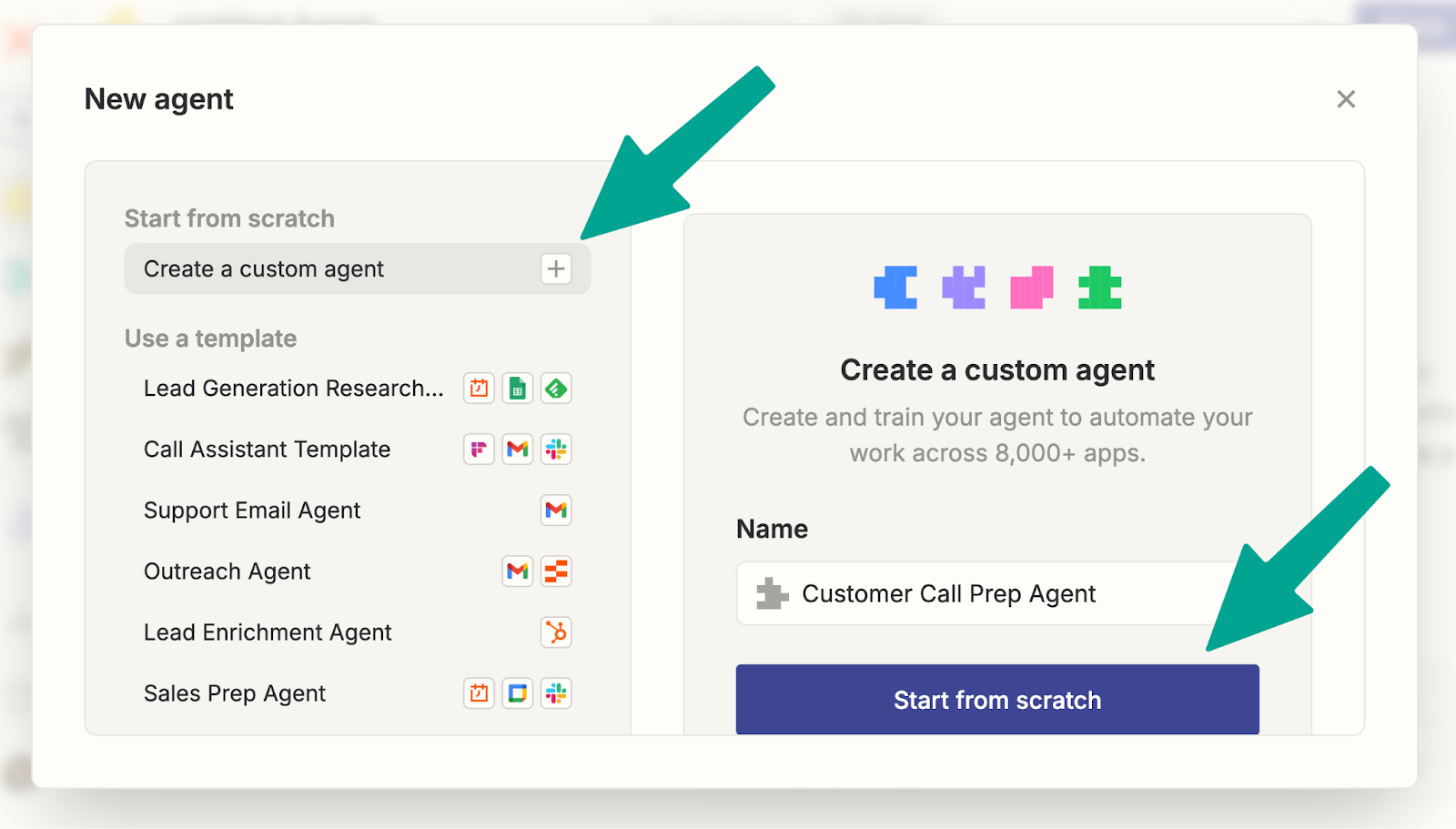
- Select “Create a custom agent,” give it a name, and click “Start from scratch.”
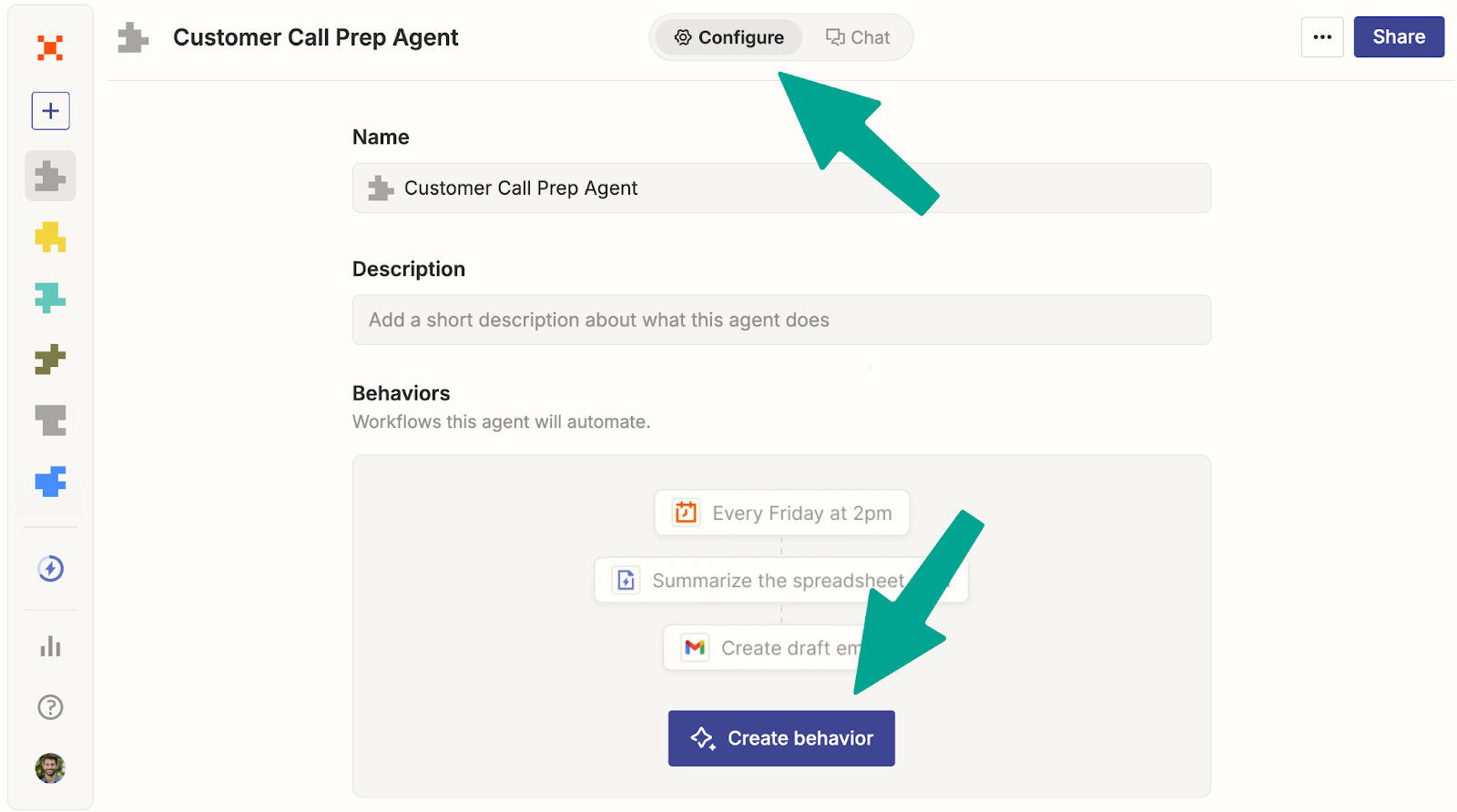
- Click “Configure” at the top and “Create behavior.”
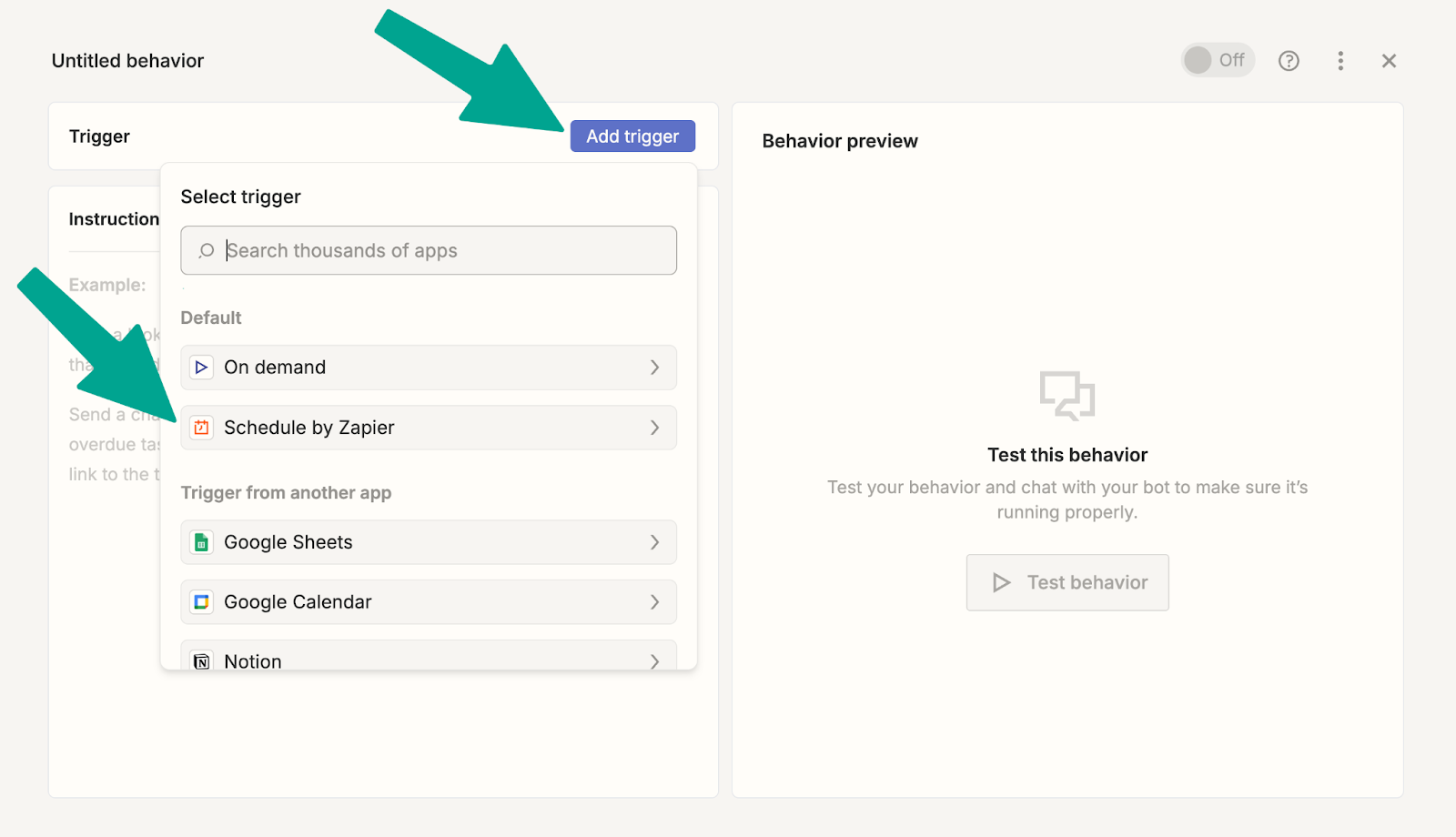
- Set our automation to run every day at 8 a.m.
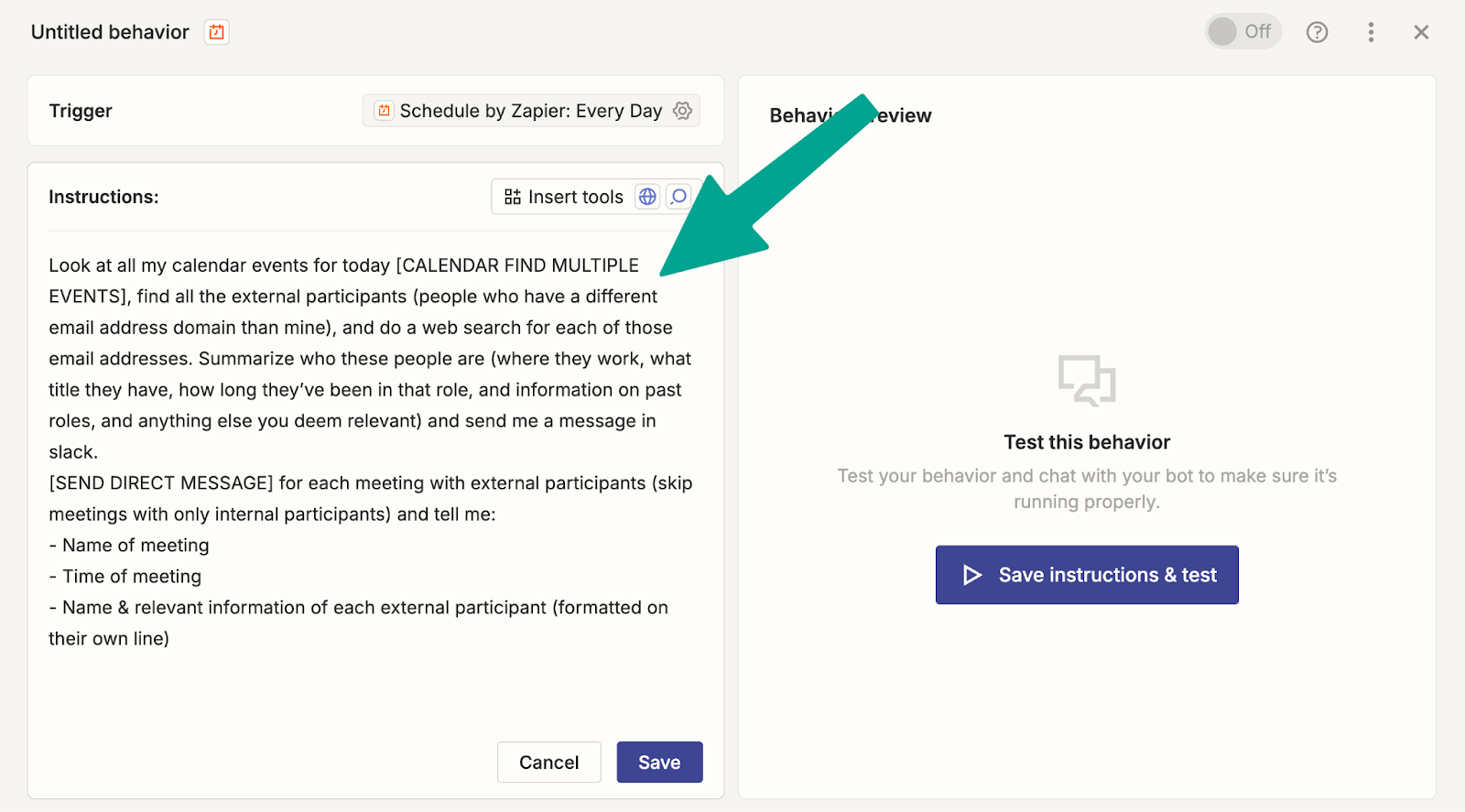
- Paste the following prompt into the instructions field:
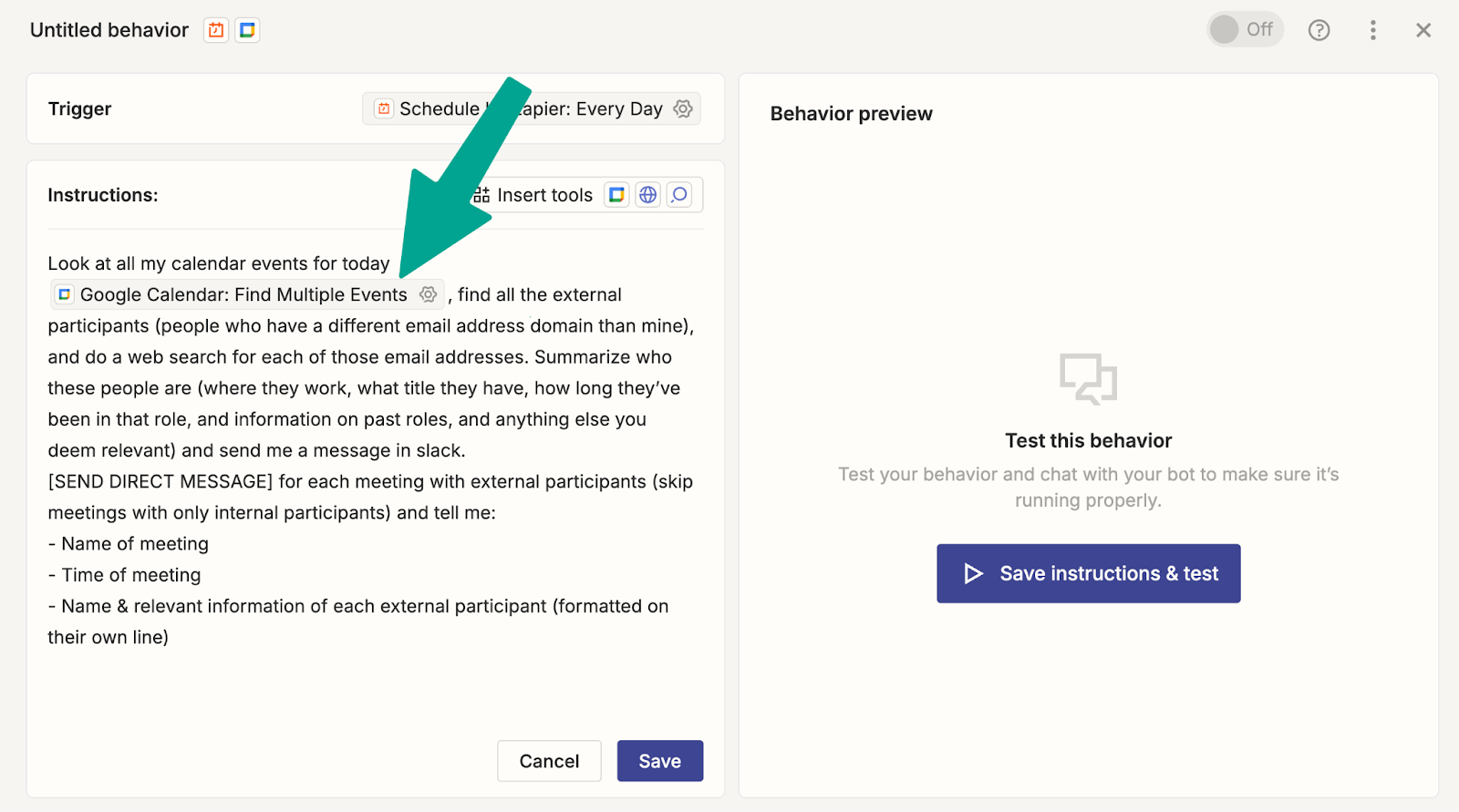
Look at all my calendar events for today [CALENDAR FIND MULTIPLE EVENTS], find all the external participants (people who have a different email address domain than mine), and do a web search for each of those email addresses. Summarize who these people are (where they work, what title they have, how long they’ve been in that role, information on past roles, and anything else you deem relevant) and send me a message in Slack.
[SEND DIRECT MESSAGE] for each meeting with external participants (skip meetings with only internal participants) and tell me:
- Name of meeting
- Time of meeting
- Name and relevant information of each external participant (formatted on their own line)
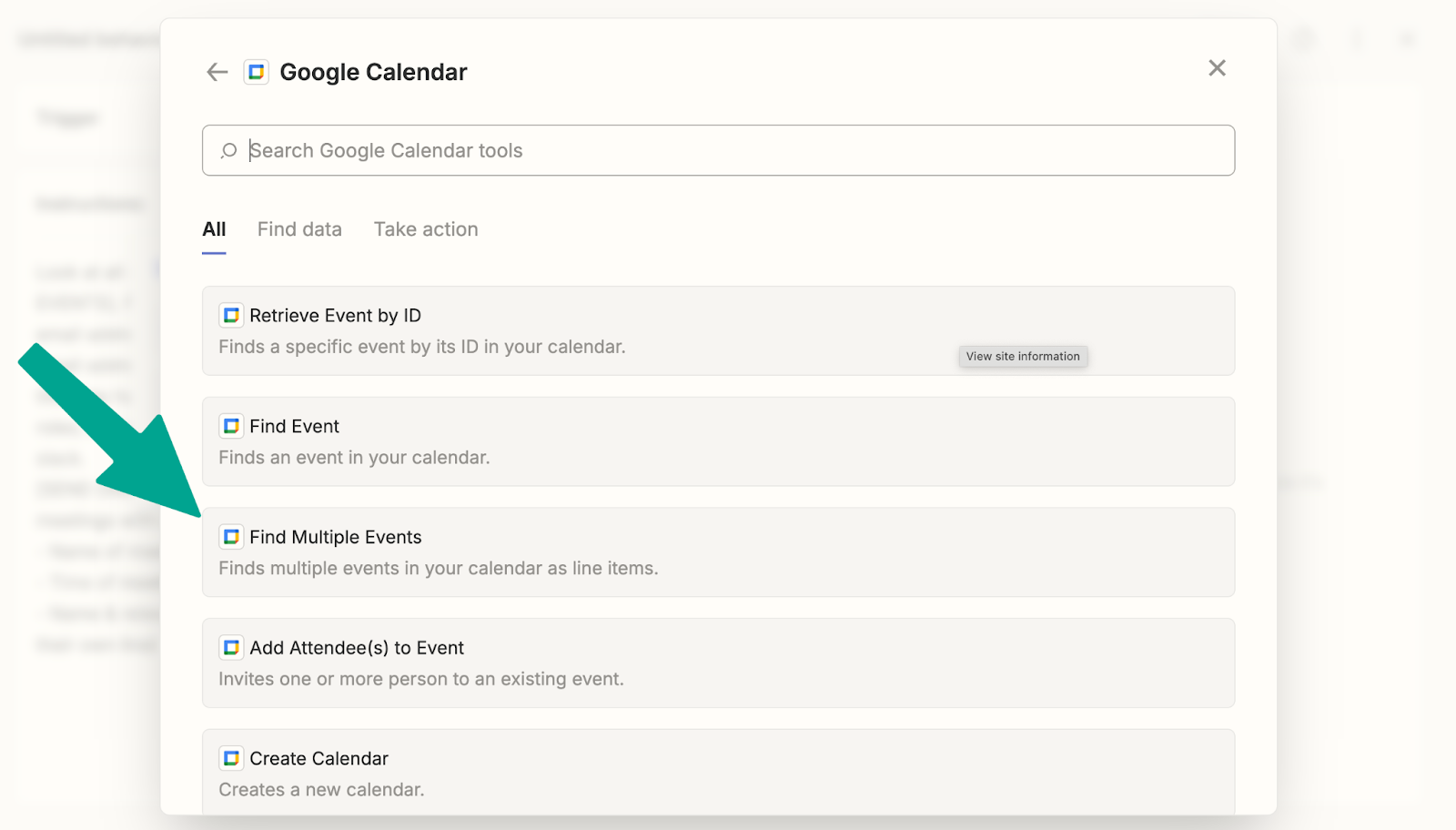
- Delete the placeholder text “[CALENDAR FIND MULTIPLE EVENTS]” and, with your cursor still in that spot, click “Insert tools.”
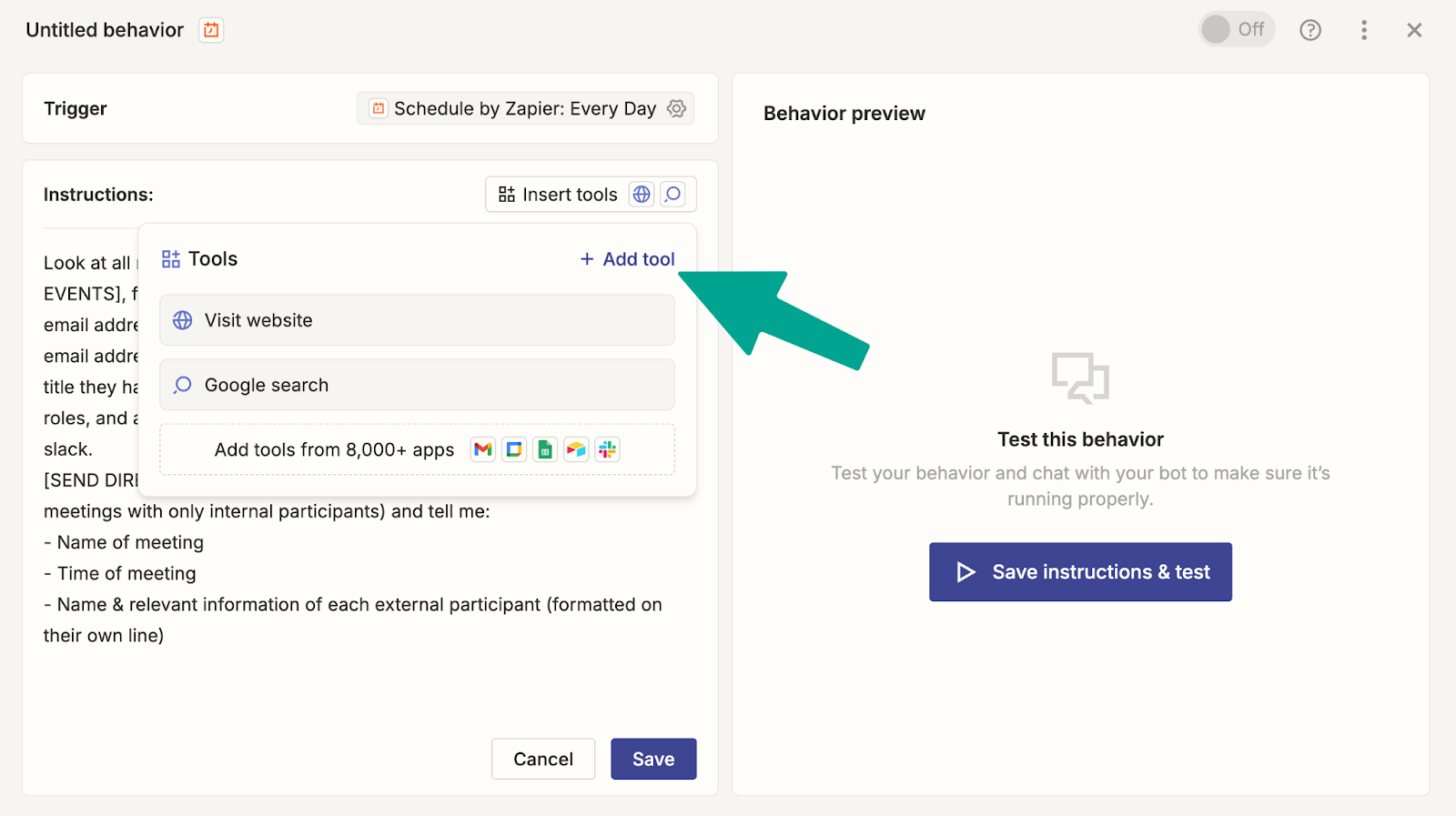
If you’re using Google Calendar, choose “Find Multiple Events.”
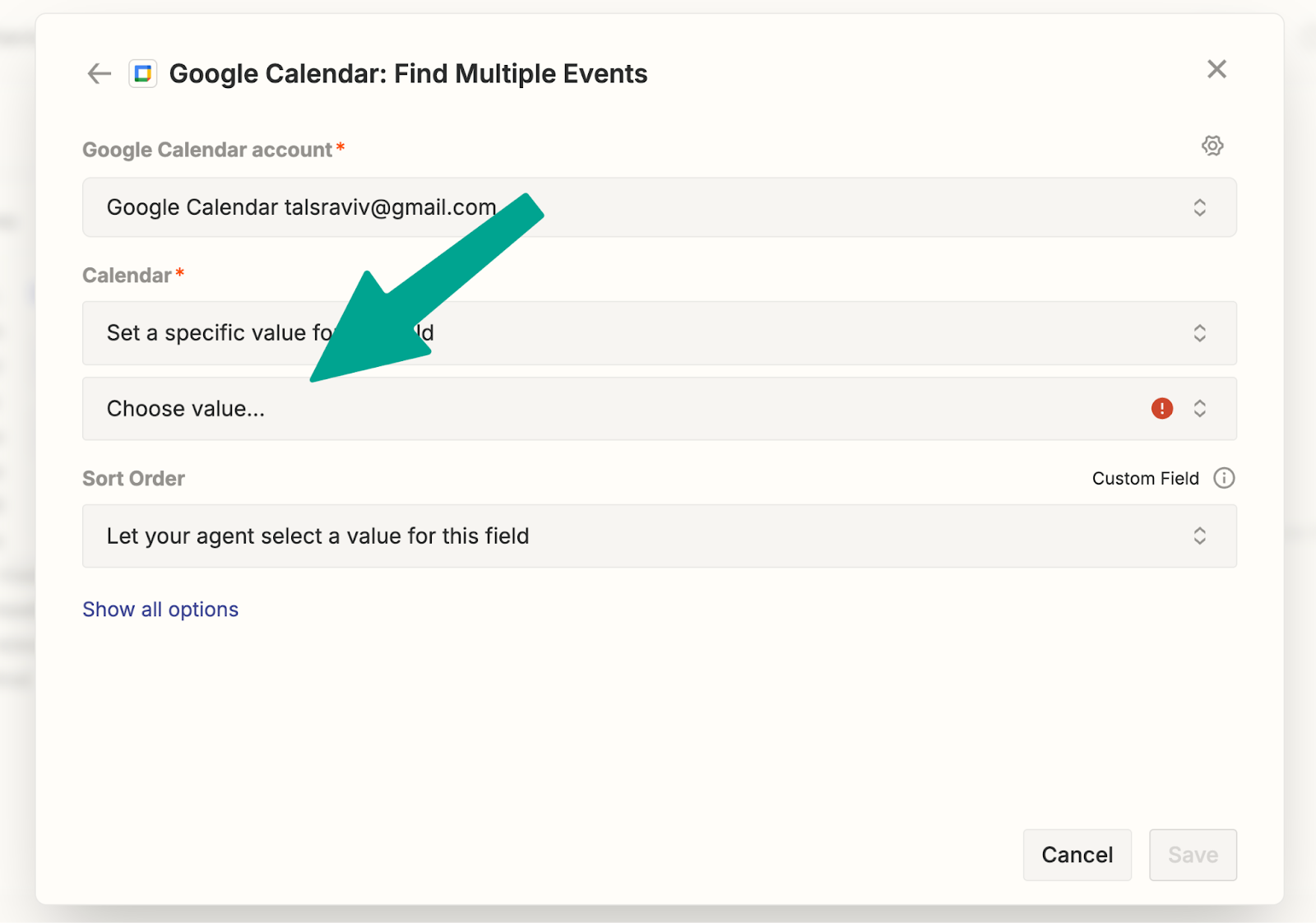
- Link your calendar software, and select your personal calendar.
You should see the calendar block inline with your prompt:
- Delete the placeholder text “[SEND DIRECT MESSAGE]” and, with your cursor still in that spot, use the “Insert tools” menu to connect your favorite messaging service.
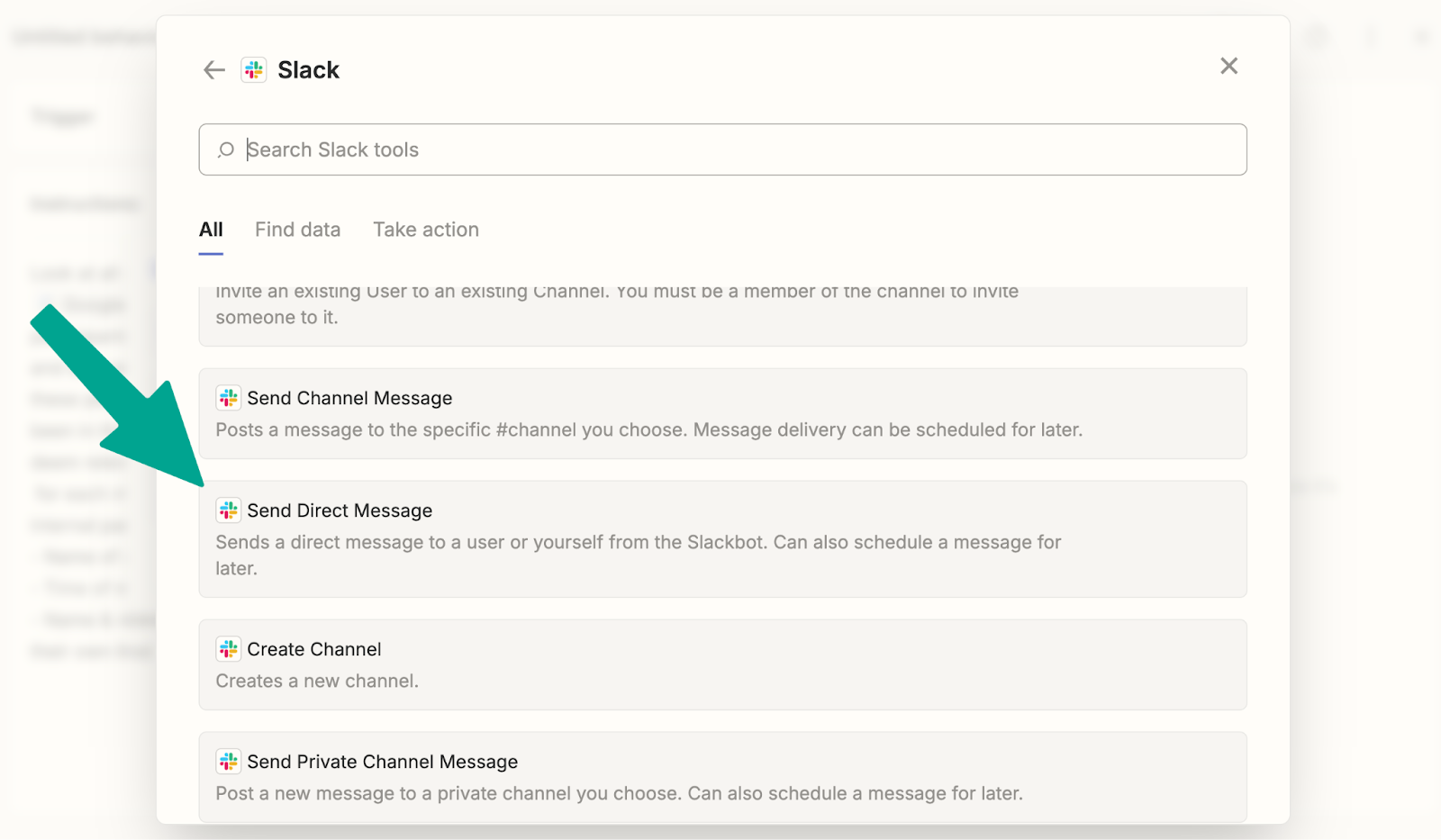
I’m using Slack, and I’ll set it to be able to send me a direct message.
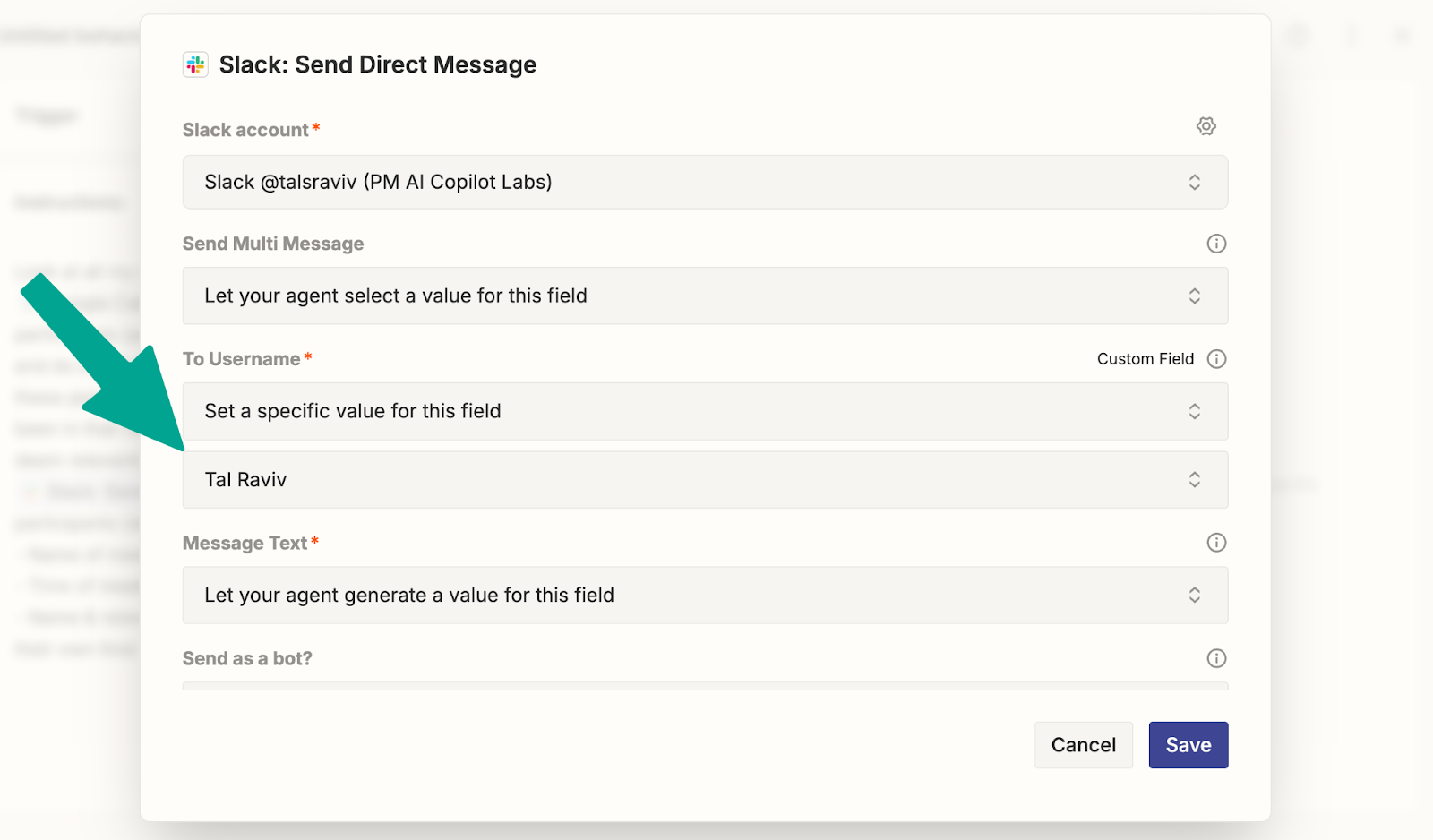
Constraining the agent to only DM frees us for worry-free experimentation.
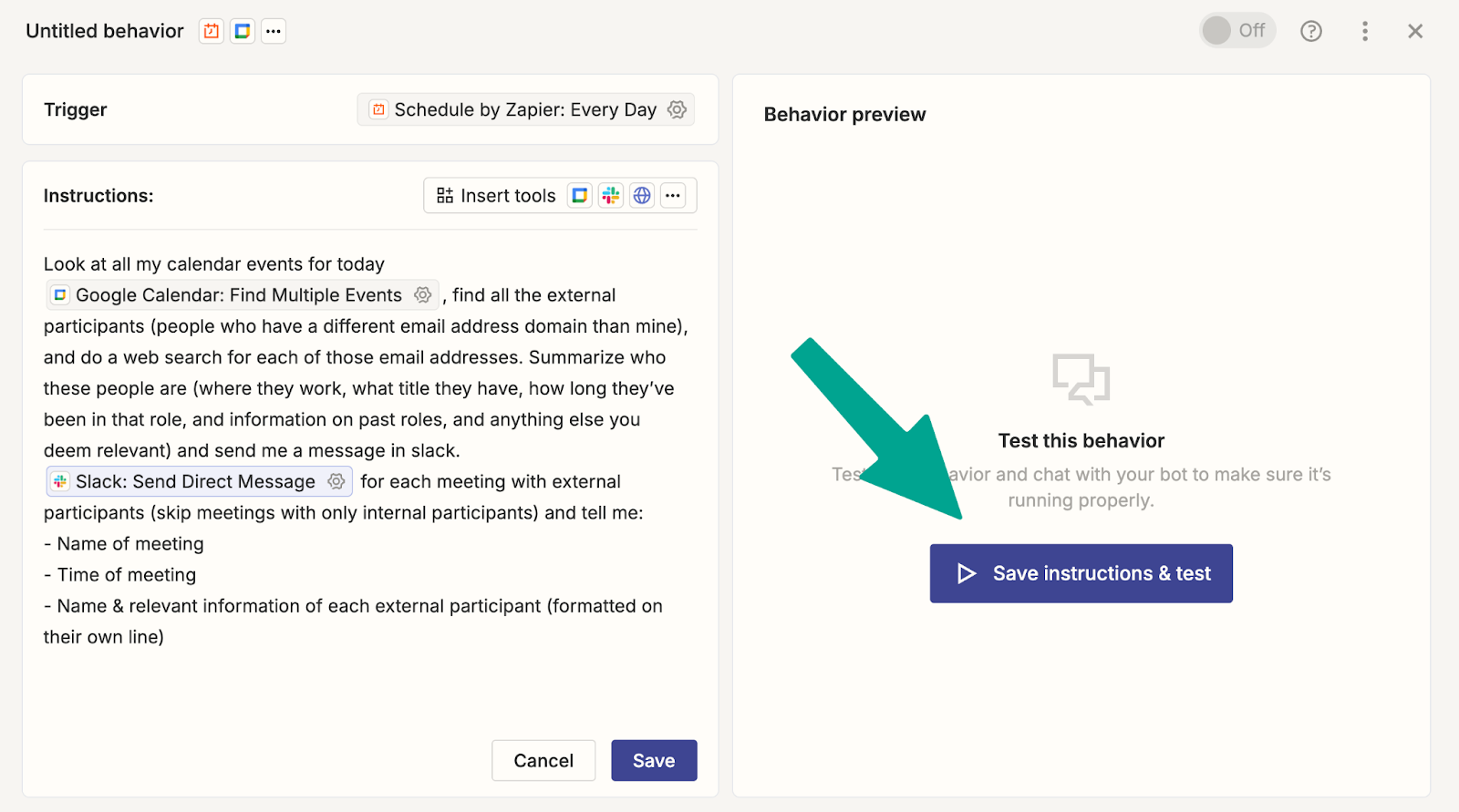
- Woo! We’re ready to run. Click “Save instructions & test.”
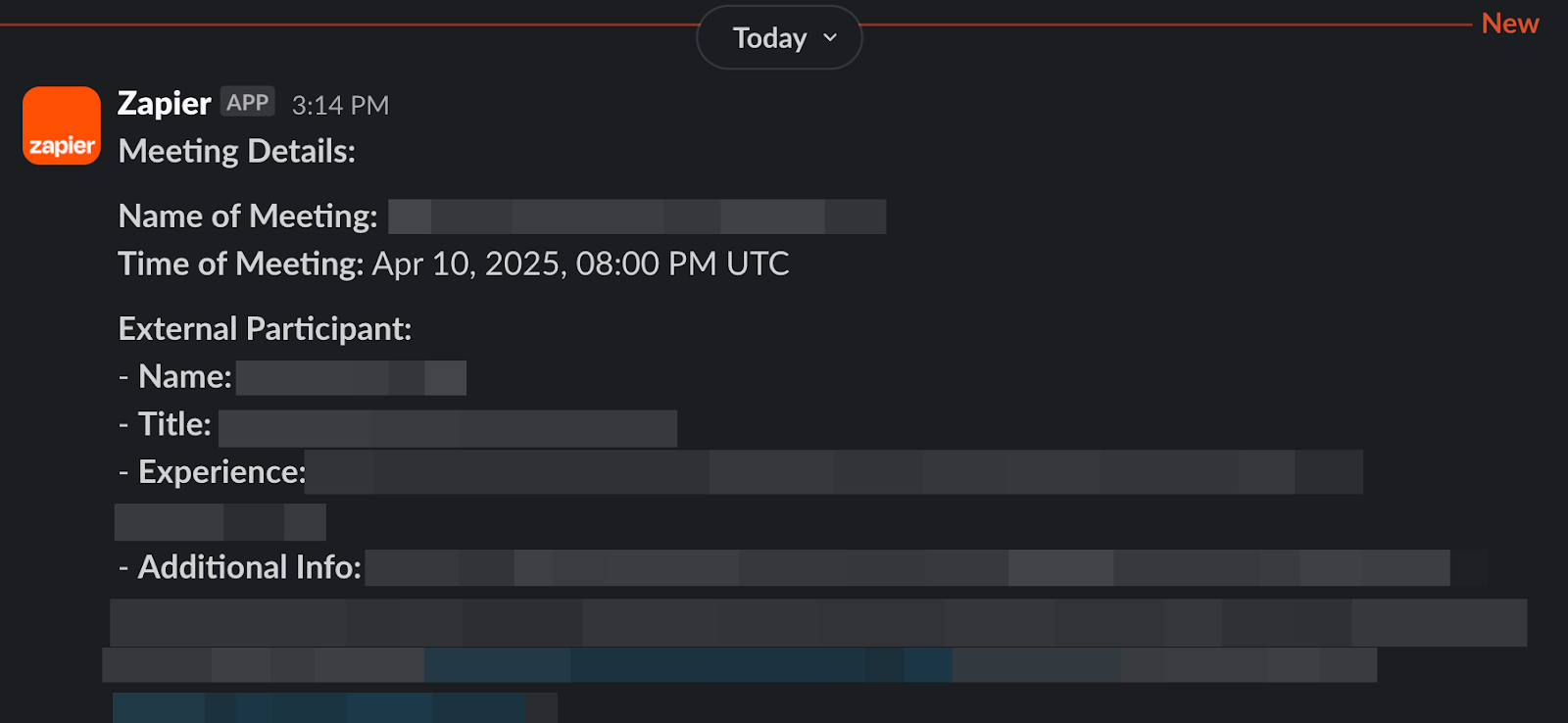
You’ll get a message like this:
- If you’re happy with this, go ahead and turn it on. (Don’t sweat this decision, since the only action it can take is privately DMing you.)
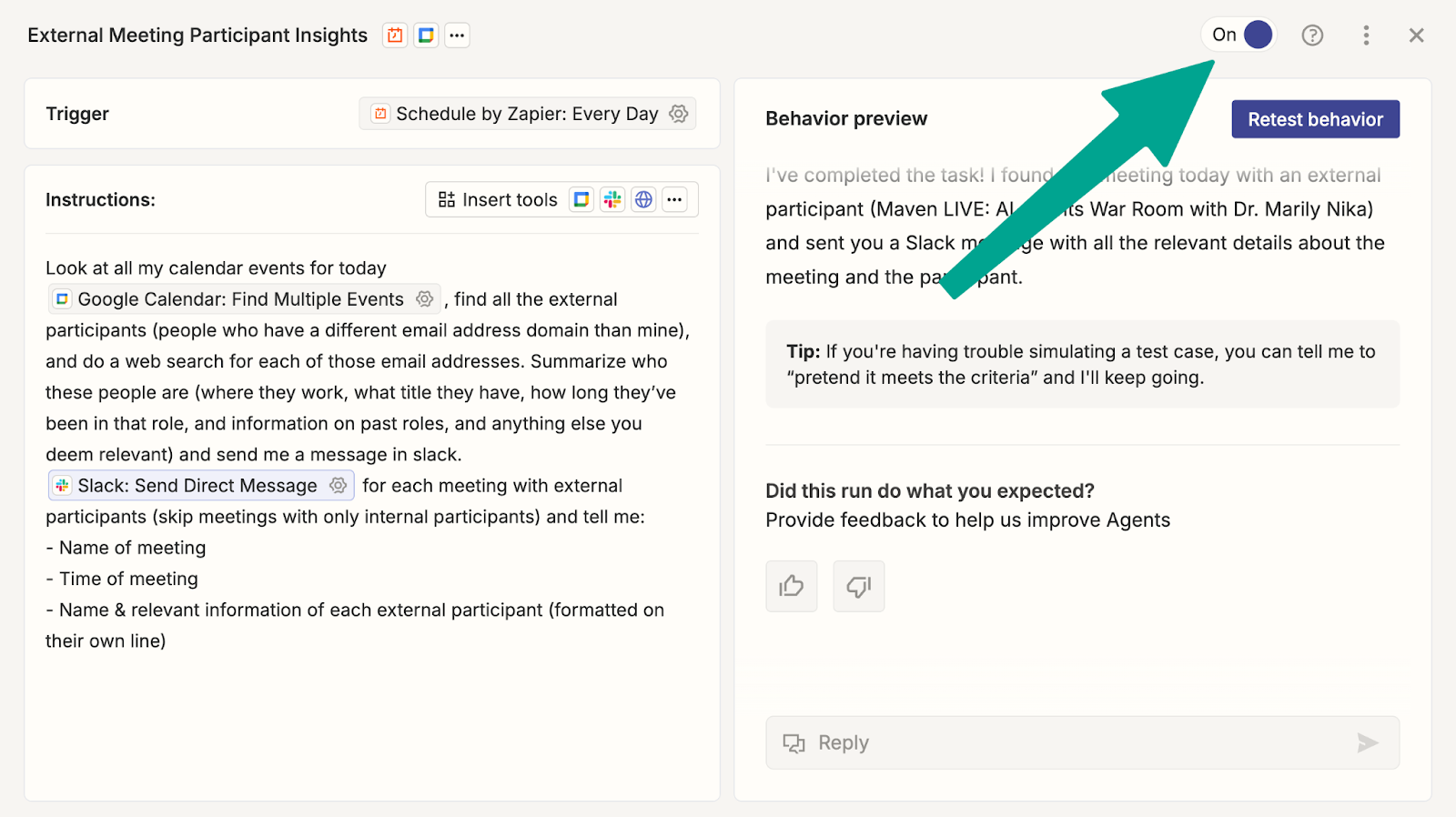
Congratulations. You’ve set up your first PM AI agent, now running in the background while you sit back and read Lenny’s Newsletter.
Plan your second AI agent
With our new agent running in the background, let’s unpack what we did . . . by planning our second AI agent.
The first step is deciding what problem we want to solve. For this exercise, we’ll focus on opportunities that pre-AI automations couldn’t address.
Ask yourself: What ongoing work requires some judgment and writing abilities—but not your full expertise and intuition? Put another way, if my company assigned me a junior intern, what would I have them do?
Below are examples of use cases where product managers have gotten a lot of value from AI agents. (If any of them jump out at you, feel free to copy.)
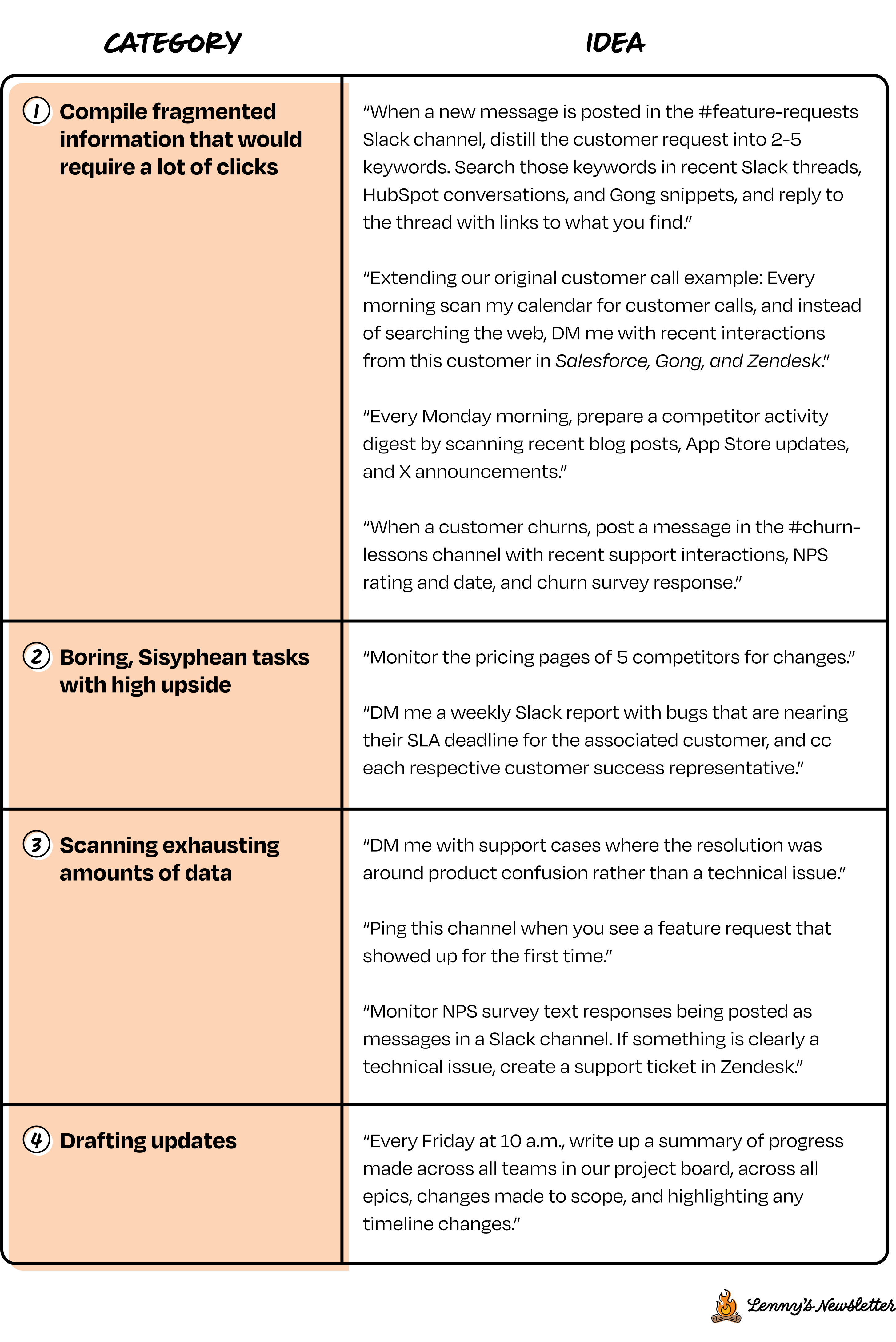
Note: Try to phrase this goal in one or two sentences, exactly the way you would in a Slack message to a junior intern.
I recommend choosing ongoing tasks that arrive continually. AI automations shine in one-at-a-time, repetitive tasks.
In contrast, I don’t recommend designing for a big, one-time “batch” task (e.g. sifting through dozens of emails that already arrived). For batch tasks, consider working directly from an AI system:
- Export the data and manually upload to Claude, Gemini, or ChatGPT.
- Use a built-in tool like Slack AI, Notion AI, Gemini for Workspace, or Microsoft Copilot.
- Connect directly to software apps with MCP integrations.
Design how your agent is going to work
Now that we’ve chosen what to delegate, let’s design how it’s going to work. Below is a checklist for planning an agent, regardless of what platform we’ll choose. Keep your chosen task in mind as you work through the list:
☑️ Do I understand this task?
☑️ Could I start even smaller?
☑️ Can I keep the downside low?
☑️ Am I giving enough context?
☑️ Am I staying close to raw customer signals?
1. Do I understand this task?
Just as when delegating to people, the fanciest AI will perform only as well as the instructions it’s given.
Are you clear on how you would accomplish this task manually, with mouse, keyboard, and coffee? Do you know where the key information lives? Can you clearly put it in words? The first step is looking inward.
As Max Brodeur-Urbas, the CEO of Gumloop, put it, “Understanding a problem should be the only prerequisite to solving it.”
The best way to gain this clarity is to do the task once or twice. That way, you can provide examples of what success looks like. In our customer prep call example, think of the last time you prepared for a customer call. What sources did you intuitively consult? What information were you primarily looking for? (And what wasn’t relevant?)
And if you’ve already been doing this task manually for a while, you’ve got this step covered. For example, when I watched a colleague set up a “weekly updates” agent, he already had a channel full of examples he could copy and paste as templates.
2. Could I start even smaller?
Since AI agents evoke the image of a magical genie, it’s tempting to ask for all of our wishes at once.
It’s more realistic to approach our agent like a new product, or a new process. As PMs, we know that to make both successful, we need to start small and cut scope. (Ironically, as PMs, it’s hard to cut scope when it’s for ourselves.)
Ask yourself, what’s the worst part? The step you dread the most? Let’s start by delegating only that. We’ll do the rest of the steps manually first.
If your dream is to monitor five competitor websites, first launch with one.
In our customer prep call example, it would have been tempting to have it scan the web, our Slack, Gong, Zendesk, Mixpanel, and HubSpot. However, we launched it with one data source to keep it simple to start, which allows us to build from there.
3. Can I keep the downside low?
Murphy’s Law is as true for AI as it is for people: Anything that can go wrong, will go wrong. To sleep well at night, let’s ensure that any mistakes don’t really cost anything.
Don’t try to predict how much a model will hallucinate (it will) or if your workflow will get it right the first time (it won’t). Instead, design your agent in a way that gives you all the upside and caps the downside.
Examples of keeping a low downside, with high benefit:
- Instead of pinging a Slack channel → Send me a DM that I can copy-paste
- Instead of sending an email → Create a draft and star the thread for my review
- Instead of making a decision → Make a recommendation
- Instead of modifying a document → Append suggestions at the bottom
Keeping a low downside is also a matter of physically restricting access with permissions (and even more granular). This is where agent platforms that have hard access constraints can really shine, because those physically limit the AI system’s behavior.
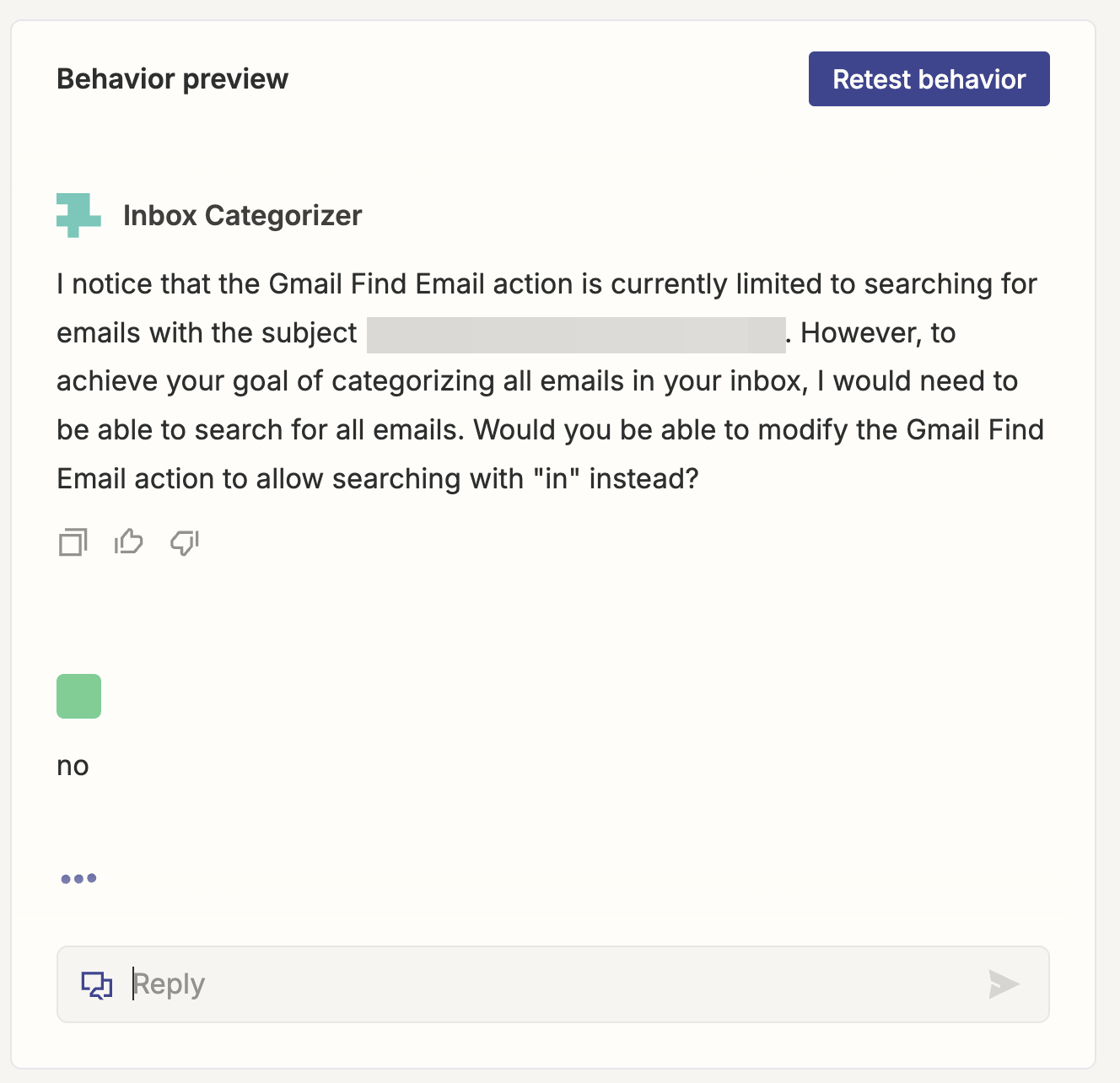
4. Am I giving enough context?
Your AI agent most likely doesn’t need an in-depth competitive-landscape presentation, the three-year vision, or the entire company org chart.
It probably does need to know where to access the right data, get your guidance for making decisions, and understand how to identify people on your team.
Setting AI up for success looks a lot like what it takes to set up a human for success. For example, if you wanted an intern to “scan all Slack messages for feature requests about two-factor authentication shared by someone on the customer success team” . . . well, they’d need a way to know who is on the customer success team. If you expect your agent to make a decision on prioritization, share your prioritization framework.
5. (Danger zone) Am I staying close to raw customer signals?
It feels obvious that an AI model with more raw training data will have better judgment. Yet when it comes to our own brains as PMs, it’s very tempting to fill our days with AI summaries—and deprive our own brains of “training data.”
If I use AI to summarize everything, I’m gonna quickly degrade my customer intuition. In other words, product managers: AI isn’t endangering your job, but letting AI read for you is.
What’s the middle ground? Use AI to traverse, roam, navigate, cluster, and clean up large amounts of data, but don’t let it blur your vision with summaries. Stay in the weeds by insisting on exact quotes and direct links to the original support tickets, sales call snippets, and screen recordings.
Max Brodeur-Urbas shares another strategy. If you’ve ever tried to glean feedback from a support thread, you know that not only is it a ton of scrolling but also that the key insights are often at the end. Gumloop uses AI to get insights from their helpbot chat threads. But instead of summarizing, the role of AI is to reason about the root cause to better classify:
“We use AI to analyze each chat and ask, ‘What is this person struggling with? What is the main complaint?’ We take those thoughtful analyses of the thread and we create a report that references the original issue, so we can go back and look at the raw conversation.”
Now that we know what we want to build, let’s decide how we’ll build it.
Construct your agent with a prompt (platform-agnostic)
The elephant in the room around AI agents isn’t hallucinations, security, or costs (though we’ll address those soon). It’s the learning curve. As product managers, the last thing we need is one more hard thing to figure out.
Many AI agent platforms require building blocks, subroutines, systems thinking. It may not be “coding,” but it sure is programming.
At the same time, we’ve been spoiled with AI prototyping tools that let us build with natural language conversations.
When I was running AI agent usability sessions with PMs, several of the PMs had the same clever thought: “Why don’t I build this with an AI prototyping tool instead?”
The short answer is “tempting, but not recommended.” While API integrations aren’t Nobel Prize–worthy work, you are building a third-party app. That creates bureaucracy for (1) registering your app with each SaaS service and (2) obtaining IT permission internally. (I haven’t even gotten to compliance or security reviews.)
And real talk: using AI prototyping tools for production apps is still a lot of maintenance, babysitting bugs, and regressions. Just imagine building (and maintaining) our simple customer prep call agent, with Slack and Calendar integration, by vibe coding. It would take a lot of attention to get it working reliably over time.
So how can we enjoy (1) building in plain English and (2) the pre-built integrations and security of existing platforms? The answer, of course, is to let AI help.
Tools like Cassidy, Relevance, and Zapier Agents (in contrast to Zaps) have begun to let you prompt in natural language. Gumloop has “Gummie,” a chatbot that will guide you. Manus impresses at making a plan but lacks key workplace integrations or the ability to listen to triggers.
None of these feel as smooth as giving instructions to a person, so I’ve created a prompt that transforms your natural language into step-by-step guidance. (File this under “prompts I hope will become obsolete very soon.”)
Paste the following into your favorite LLM tool that has web search abilities and, ideally, reasoning. I recommend OpenAI’s o3 Deep Research or Perplexity Deep Research for this prompt.

AI agent builder prompt
Below are my objectives for an AI agent workflow. You’re an expert explainer of how to build an AI agent that is excellent at explaining to newbies. I want to build an agent in either Relay App or Lindy AI or Zapier Agents (not Zaps) or Cassidy AI or Gumloop or Relevance AI.
For each platform, using only their official documentation or tutorials or videos, create step-by-step, explicit, hand-holding walkthroughs for me on how to create it in each platform (each one separately, without combining platforms).
Keep it as simple as possible. No recommendation should ever require coding. (If you have no choice but to recommend a direct API call or webhook, make it super-clear and explicit how to make that work.) Use only the minimum necessary access permissions to achieve the task.
Don’t gloss over any step; assume I don’t know anything and need even the smallest steps spelled out for me. If a step requires an LLM prompt, write the prompt for me. Same for any query strings (e.g. Gmail search query or otherwise).
When you suggest a feature or functionality, ensure that this ability truly exists in that platform! If the web results don’t directly support your recommendation, It’s OK to still recommend it, but note your uncertainty inline in the step itself, using a “🚨” emoji, and provide alternatives in case it doesn’t exist, marked by “♻️.”
For each service, spell out for me any components I’d need to have in place outside the platform I choose. Also, highlight any risks why these instructions might not actually work and questions to ask myself before I get started to save me time.
If there’s a better tool you recommend for this job (AI agent, automation, or other no-code solution), repeat this process for that tool. If you recognize this is a batch task and not a continuous task (i.e. one-time vs. trigger-driven), then suggest better ways to do this potentially with an LLM even if it’s a bit more manual effort.
🌅 OPPORTUNITY
[If your boss gave you a junior intern (smart, motivated, zero experience), what would you have them do? Why is it valuable and impactful?]
🪖 INSTRUCTIONS FOR AI AGENT TO FOLLOW
[Tell your new junior intern how you would go about it at the level of naming the services, clarifying decisions, etc. that a human would need to perform the task. Use the format ❝Whenever ______ happens, I want you to decide ______, based on this data _______ and/or using web research, compare it to previous data from last time, and then go ahead and do ________.”]
Ping me before the final action by [DMing me/Create a draft/etc.].
The results of this prompt are sometimes delightful, sometimes imperfect.
But even when I need to fill in gaps, I’ve found it to be a much-needed boost over the intimidating learning barrier. As one founder candidly put it, “Today our platform makes smart people feel dumb.”
With this prompt, I can focus more on what I want done and a little less on the how.
I used it to review NPS survey responses that arrived in a Slack channel and decide if any of them hint at a technical issue that warrants proactively creating a Zendesk ticket.
Here I’ve implemented it in Lindy AI:
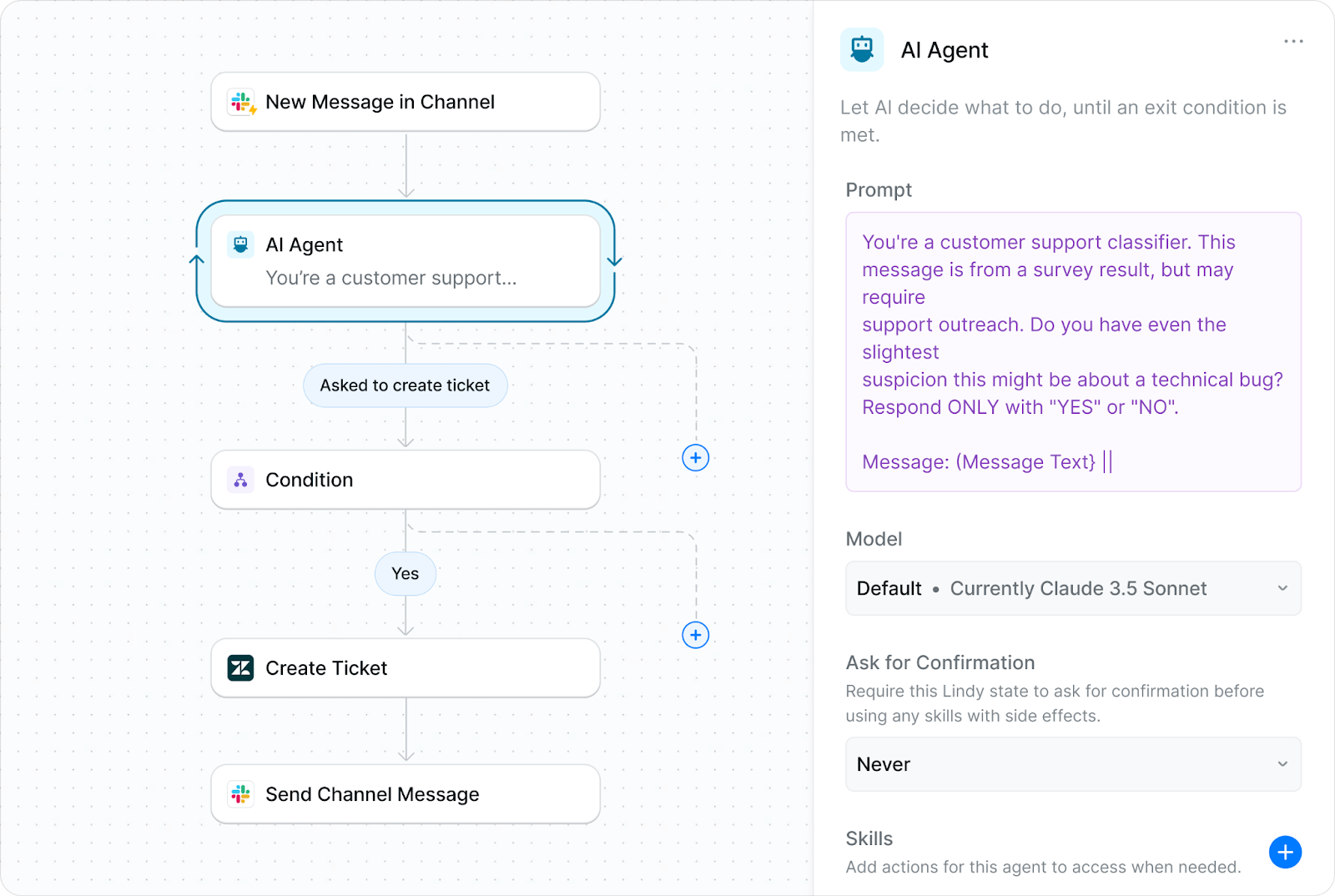
Not every tool will have what you need, but there’s usually a creative workaround. In Cassidy, there wasn’t a Zendesk “create ticket,” so I had it post in a channel instead:
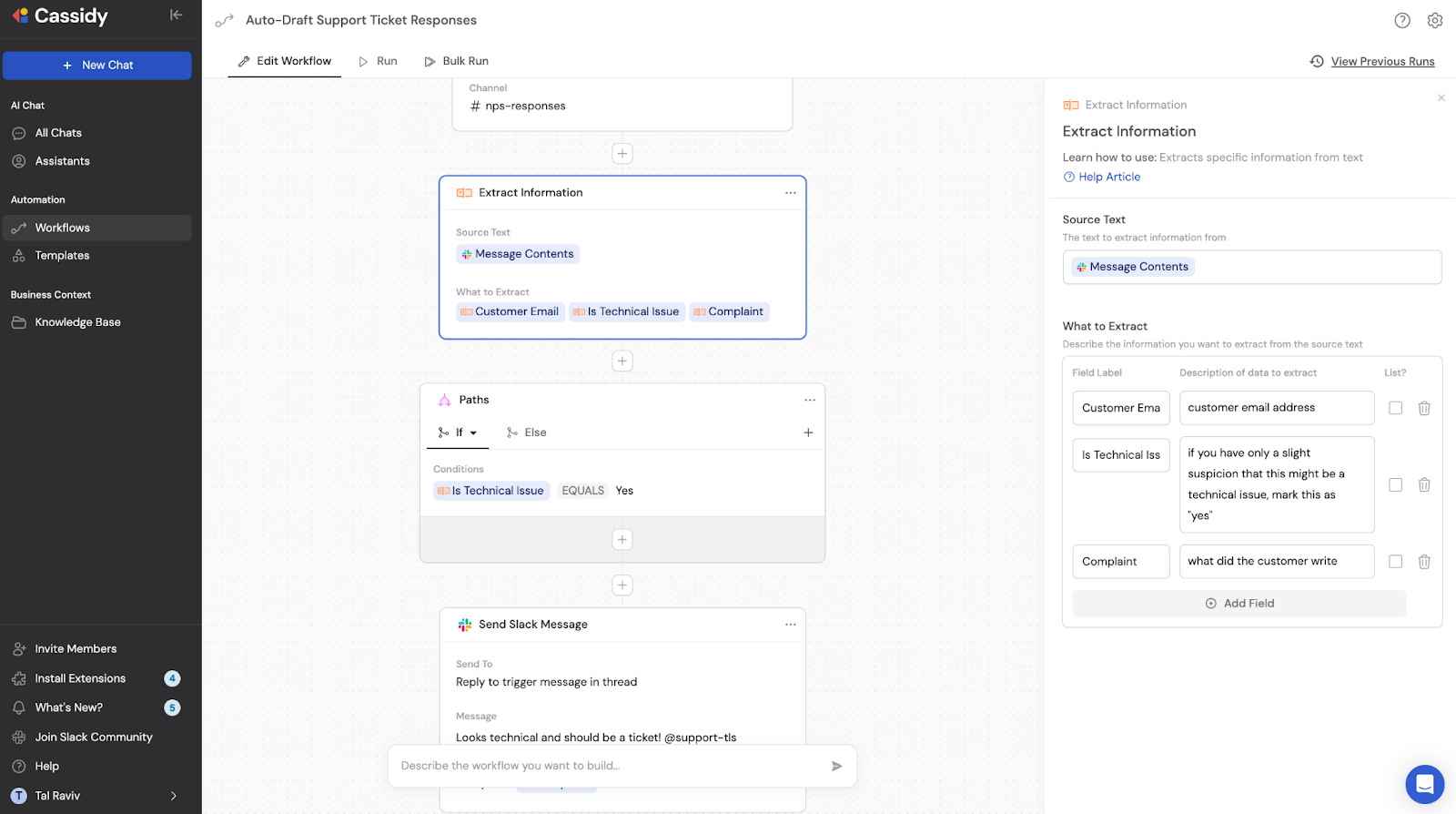

Choose a platform
The best AI agent platform is the one that your company already uses and trusts.
If the marketing team has already connected something like Zapier to something sensitive like HubSpot, then your best bet is leveraging that instead of trying to pick a whole new tool.
Another important criterion is whether it supports the integrations you need. It’s worth checking if a platform both integrates with the service you want to use and if it supports the action (e.g. several platforms can read Zendesk tickets but not create them).
All else being equal, I recommend choosing the tool that can achieve your goal in the fewest moving parts. How to figure that out quickly? You guessed it: AI.
Continue the same thread above:
Based on the platforms above and the methods chosen, please create a platform comparison table on all of the critical aspects required to make them happen. Each column should be a different platform, and each row should be a different functionality relevant to the steps you outlined. Focus the rows on concrete functionalities rather than abstract concepts or subjective traits or guesses. In each table cell, cite web sources where possible. Use emojis sparingly to draw attention to critical differences.
Finally, if I could choose only one platform, based only on your answers above for this specific use case only and no web results or marketing claims, which platform do you recommend I choose to implement this specific objective based on simplicity and likelihood of not needing technical skills, fastest to set up, and easiest learning curve?
Releasing your agent into the wild
By now, you’ve chosen a platform and built your first draft of an agent. Let’s test it out and give our junior intern a quick win.
Since we’ve designed our AI agent with low downside (see above), launching this is not a dramatic decision. It’s just a test in a bigger environment.
Be forgiving and compassionate
This is good advice for AI as much as for people. If AI is acting weird in 2025, it’s worth searching for bugs in our inputs.
One PM in an AI agent usability session I was running noticed the agent was hallucinating sprint numbers in Slack updates. He traced it back to the fact that his examples had “Sprint 5” in the titles but his project management board didn’t mention “sprints” at all. (It was an easy fix to remove “Sprints” from the examples.)
The same PM noticed the AI was mislabeling tasks as done. He realized his project management board only had an estimated “end date” but there was no “task status.” This was fine when everyone accessing the board met daily. The AI (reasonably) assumed that anything past that date was “done.” (Again, easy fix: he added a “done” checkbox, which instantly improved the results.)
Before getting frustrated with AI, ask yourself if you threw it any curveballs, or shared enough context to make the right decision.
Trust is gained in drops
After a few cycles, you’ll start to get a sense for how much you trust the AI.
If the results generally look good, consider increasing its scope and responsibility. Dare you allow it to send that draft without approval? Perhaps add that additional data source to the flow?
If things aren’t going well, be candid with your feedback. Process, people, and product have one thing in common: they require iteration. (Even the smartest person in the world needs feedback to know if they’re heading in the right direction.)
Some tools can accept the feedback and translate it directly to their own instructions:
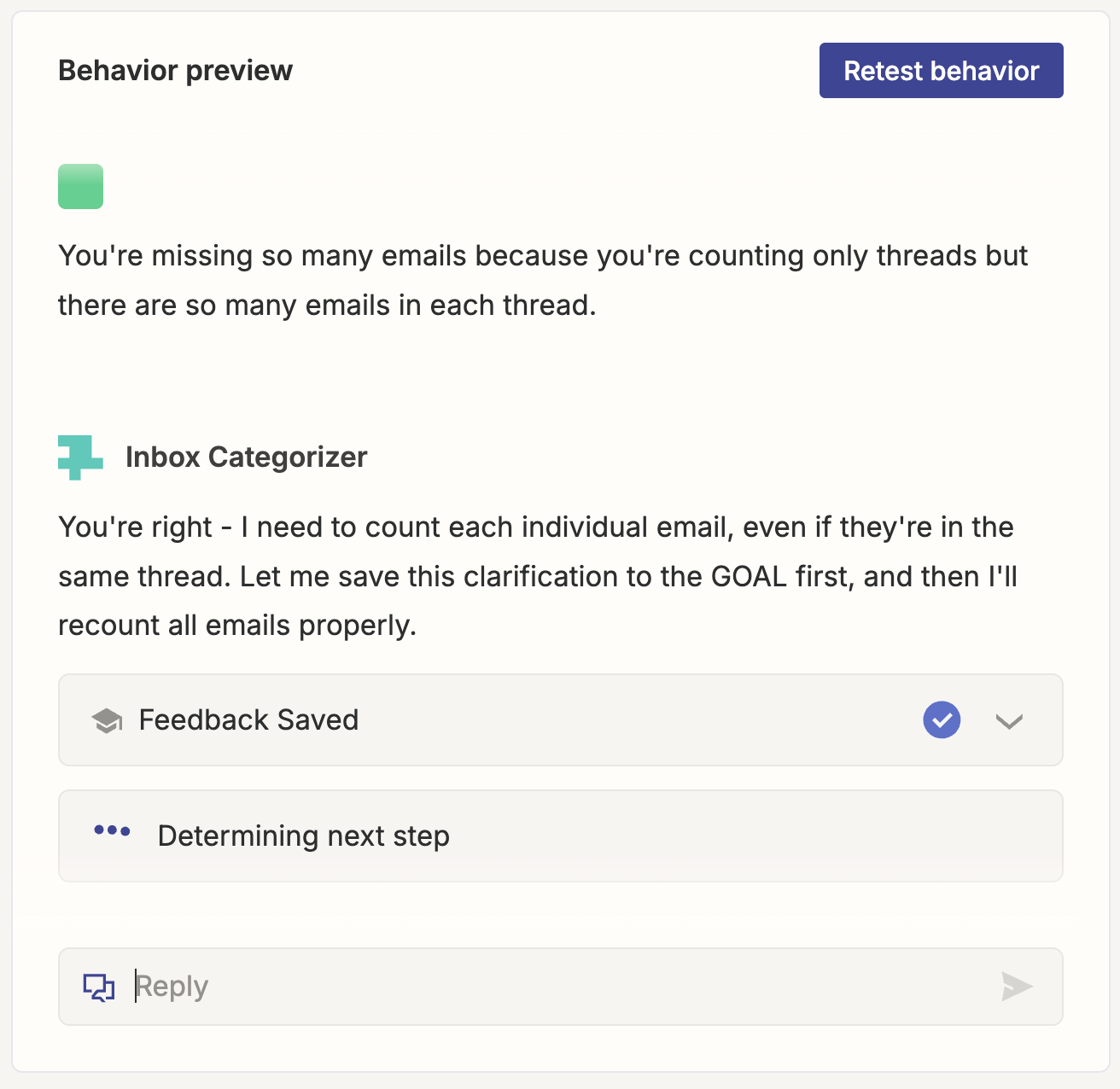
For other tools, what you can do is go back to the original AI thread above, and clarify and update your original prompt instruction (using the ✏️ icon). Then re-run it with the clarification.
Another way to think of this is, you’re building a product with a customer of one. It’s natural for things not to work on the first shot. Fortunately, when they do, you’ll be able to push a lot of your least favorite work off your plate—it’s worth it.
Optimizing costs
PMs’ biggest concern about AI agents isn’t something we saw in the Terminator series. It’s cost. This is understandable—we’re creating a proactive, continuous process that decides when to run. At the same time, many of these platforms price based on usage. (Btw, Skynet’s monthly invoice must’ve been huge.)
Like any business, AI agent companies aspire to price based on value. And hopefully the value of AI agents will grow past that of a junior intern.
Flo Crivello of Lindy: “Companies have millions and millions of dollars in payroll and then they spend a thousand dollars on an AI. It’s like, you actually want these lines to cross. You should be happy to spend on the AI agent platform, because every dollar you spend on the AI agent platform is saving you $10 that a human would have done otherwise.”
Meanwhile, competition will drive prices closer to cost. And the cost to run foundation models is steadily dropping.
Setting down the economics textbook, here’s some super-practical advice on cost no matter where things go, from Jacob Bank of Relay.app: “When you’re working with an AI step, there are two ways to reduce cost. You pick a cheaper model or you feed it less data. I typically recommend first getting the thing working with a good model and lots of data. [Then] if it’s not that frequent of a use case, I just don’t even bother with cost optimization. If it’s something that’s going to run 100 times a day and cost $10 each time, then those are the two levers I pull.”
Security
Security was already on everyone’s mind with original chat interfaces, so understandably, security is a consideration with AI agents too.
One top concern is around AI absorbing and learning from company data. Fortunately, every AI system provider has an option not to train with queries. (Whether that’s good enough depends on your company policy.)
Another concern is having third-party SaaS accessing company data. I recommend evaluating this risk according to the alternatives:
- Are you using third-party automations already (regardless of AI)? If so, how much more risk does AI itself add to your workflow?
- How many human employees have been granted those permissions? Keeping recent scandals in mind, much more risk does AI truly add to the picture?
To quote Jacob Bank again: “People are way too casual about hiring employees and giving them lots of information, and way overly strict about SaaS products that have security best practices.”
All that said, I’m not a security expert. Consult your local CISO.
Where might agents evolve next?
So far, we’ve built one AI agent and a framework for creating more. Now let’s imagine how these tools might evolve from eager interns to capable colleagues.
Closing the feedback loop without a human
I’ve run agents that made an intelligent decision but then proceeded to implement it like a blindfolded kid hitting a piñata.
When humans make a silly mistake (overwrite the headers of a spreadsheet or append an unreadable, ugly block of text to a Google doc), it’s instantly obvious to us. AI agents don’t have this instinct, and it’s not always for lack of intelligence.
A big barrier is permissions. Companies are more comfortable giving “write access” than they are allowing apps to view company data. This may feel counterintuitive, but it makes sense that letting a third party “create a contact in Salesforce” is a safer permission than “view all my existing contacts.” Same for posting in a Slack channel vs. reading the contents of a Slack channel.
Where AI cannot close the loop, humans bear the steps of (1) observing an error and (2) communicating that error to the AI system. In the “build/test/learn” cycle, “build” is way stronger than the other two.
Solutions won’t come from better AI models or tools but rather from creative solutions on how to modularize and orchestrate them. Replit’s Agent recently became able to take screenshots of its own virtual browser and analyze what it sees, which saves a lot of error reporting for me as a user. For Slack and Salesforce, I can imagine an internal trusted AI agent that sits inside the destination app, has access to the same instructions, and gives feedback to the third-party agent.
However this gets solved, having agents view results and improve their own instructions (much as people improve their operational checklists) will lift a big burden off humans, and be a giant step forward for AI.
AI copilots, AI prototyping, and AI agents will start to blend
Remember how this post began with a chart of “What is an agent?”? Each row had its unique gaps. I expect the rows to close the gaps and fill up with checkmarks.
I expect that high-context thought partners (AI copilots), natural language app builders (AI prototyping), and proactive decision-makers (AI agents) will all start to borrow elements from each other.
It only makes sense that the AI tools of the future will have a ton of context on your company and role, connect to real-world inputs and outputs, and operate by natural conversation.
Putting it all together
AI agents aren’t magical genies (yet), but they represent a genuine opportunity to reclaim our energy, focus, and ultimately our joy in product work. Taking a step toward using AI agents in your own work is doable if you take the right steps. To recap:
- Start small: Pick a task you know well, and scope it down.
- Design for limited downside: Create safety nets for inevitable mistakes.
- Build with words: Leverage AI to leapfrog the learning curve.
- Iterate with compassion: Even the smartest colleague needs feedback.
- Slowly build trust: Gradually increase scope and responsibility.
The most exciting part about AI is where we invest the time and energy we reclaim. We can immerse ourselves in customer problems, build deeper relationships with our teams, and enjoy creating. (You know—all the reasons we chose PMing in the first place.)
So implement your ~~first~~ second agent today. Then your third. Not only will you build product intuition for agentic AI (a skill every PM needs in 2025), but maybe, just maybe, product management will get a little more fun again.
Special thanks
-
PMs
-
Ursula Sage
- Amir Klein
- Tony Privitelli
- Eliran Zagbiv
- Aviram Marom
- Orr Weil
-
AI agent product leaders
-
Jacob Bank (Relay App)
- Justin Fineberg and Jake Rosenthal (Cassidy AI)
- Max Brodeur-Urbas (Gumloop)
- Flo Crivello (Lindy AI)
- Bryce Vernon (Zapier Agents)
Thank you, Tal! For more, check out his AI PM course and his upcoming free 45-minute lightning lesson, “How AI PMs Slice Open Great AI Products,” on May 13th. You can find Tal on LinkedIn and X.
Have a fulfilling and productive week 🙏
If you’re finding this newsletter valuable, share it with a friend, and consider subscribing if you haven’t already. There are group discounts, gift options, and referral bonuses available.
Sincerely,
Lenny 👋