P.S. Don’t miss my PM recruiting service (to hire your next Sr. PM or VP), Lennybot (an AI chatbot trained on my newsletter posts, podcast interviews, and more), and my swag store**(great gifts for your favorite PM, or yourself!)
Q: How do I become more technical?
A technical background is a superpower for product managers, as I’ve said before. You’ll make better decisions, understand trade-offs, make more accurate estimates, and communicate with engineers with more confidence, while also creating more career opportunities for yourself. And now that AI is increasingly infused into products, it’s even more important that product managers understand the basics.
To help you level up, I teamed up with Colin Matthews, instructor of the very popular Maven course Technical Foundations for Product Managers. Below, Colin breaks down in the simplest way possible—and with hands-on practice—APIs, code deployments, system architectures, branches, databases, unit tests, and much more. If you’ve been embarrassed, or too busy, to ask your engineers how all this works—this post is for you.
For more from Colin, check out Colin’s Maven course—the next cohort kicks off on May 6! Use this link to get 25% off.

Building a strong foundation of technical skills improves your ability to bridge technical and business domains, uncover implementation issues before they’re in production, and improve your working relationships with your technical counterparts. This quick guide will help get you up to speed and start building your skills with hands-on practice.
Application architecture and APIs
Almost every software product is built with the same three parts: a client, a server, and a database. Things can get a lot more complicated as you grow, but these fundamental ideas stay the same.
The client is your website or app that’s used by the end user.
The server processes requests from the client.
The database is your permanent storage of data.
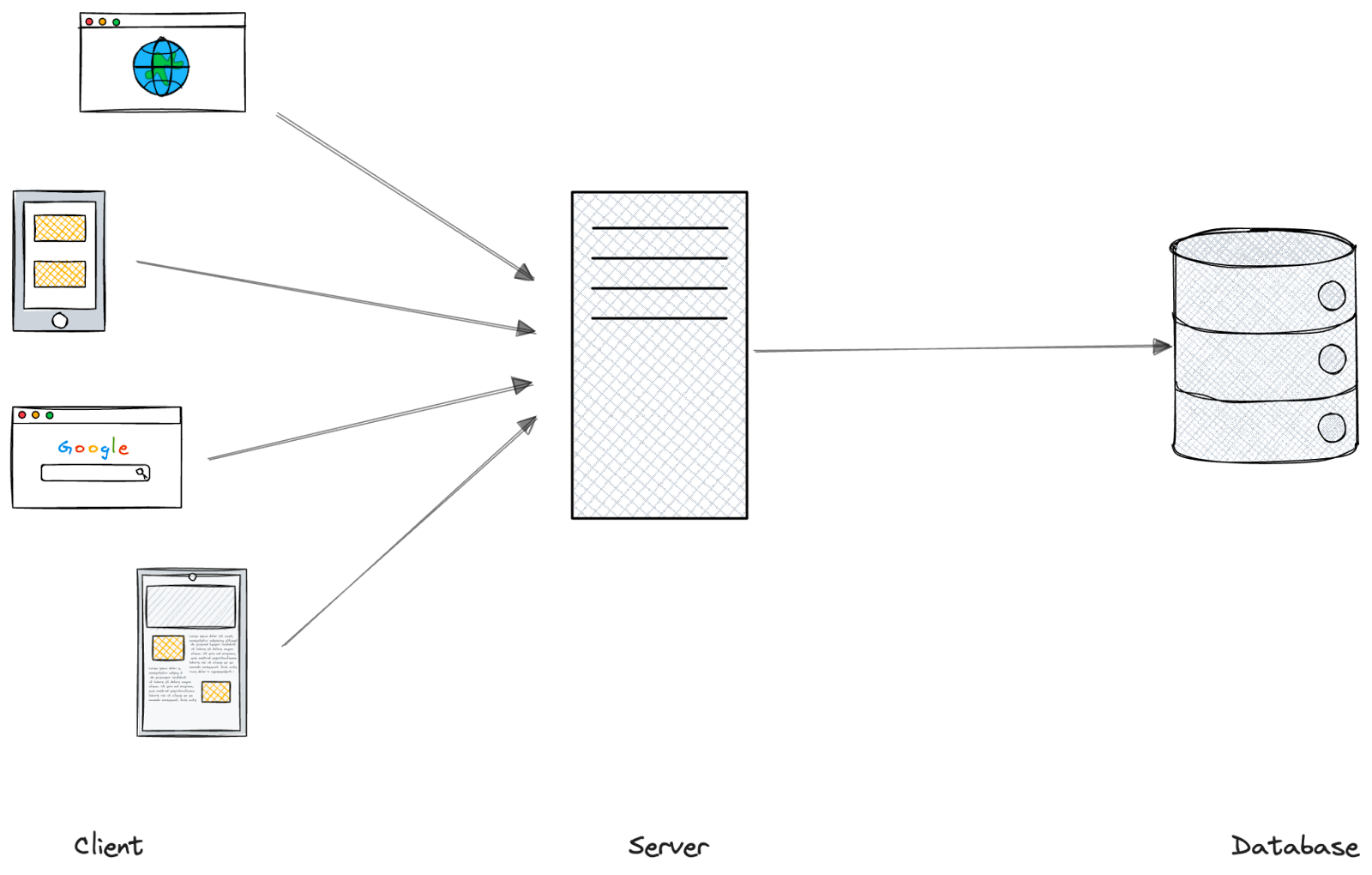
Your client communicates with your server through an application programming interface, or API.
What is an API?
For most software product managers, we’re talking about web APIs. This is the front door to your server that allows other applications to access data or trigger events.
APIs are everywhere—Meta, Etsy, OpenAI, your bank, your doctor, the weather. These kinds of public APIs are meant to be used by developers outside of the company that built them. Anyone who has permission can start making API calls to get data, submit new information, or even interact with AI.
APIs can also be private. These are intended to be used only within that application or product (versus by third parties).
As a quick example, let’s look at how Airbnb might fetch listings to show you when you search for Toronto.
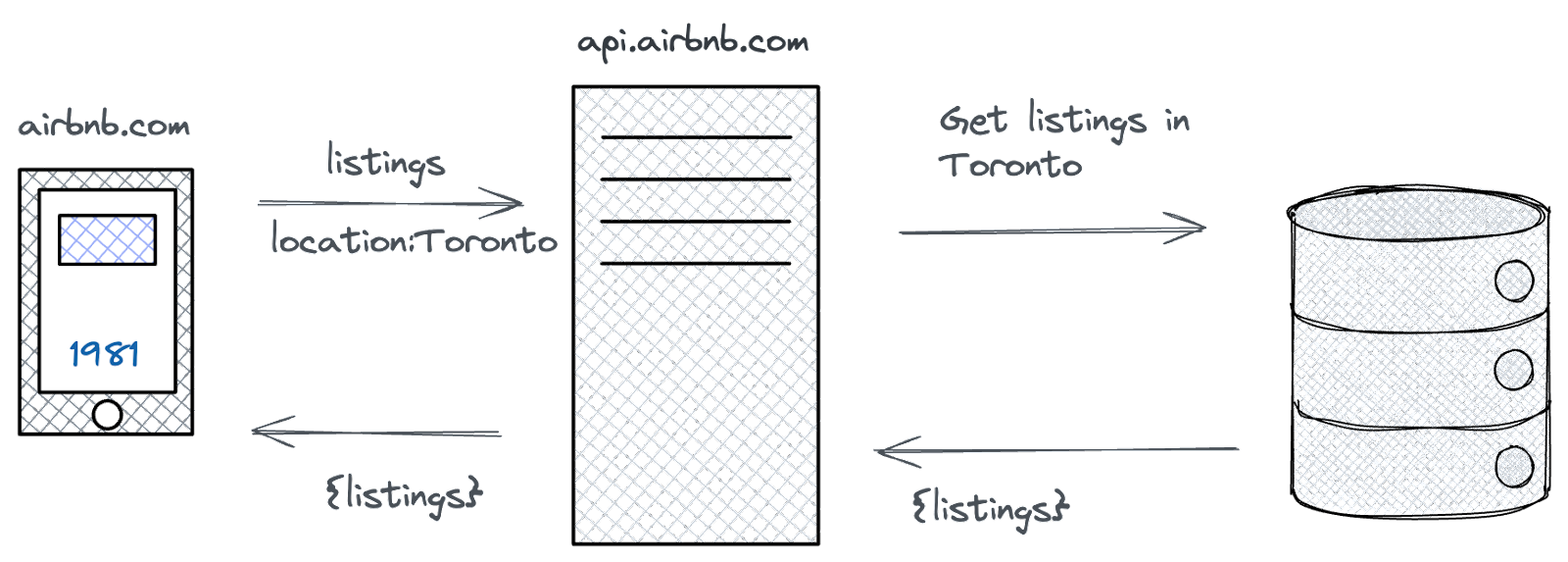
Breaking this down, we can see that:
- The client sends a request to listings at the URL api.airbnb.com and specifies the location as Toronto
- The server gets the listings in Toronto from the database
- The database returns listings to the server
- The server returns listings to the client
Wait, so what exactly is the API?
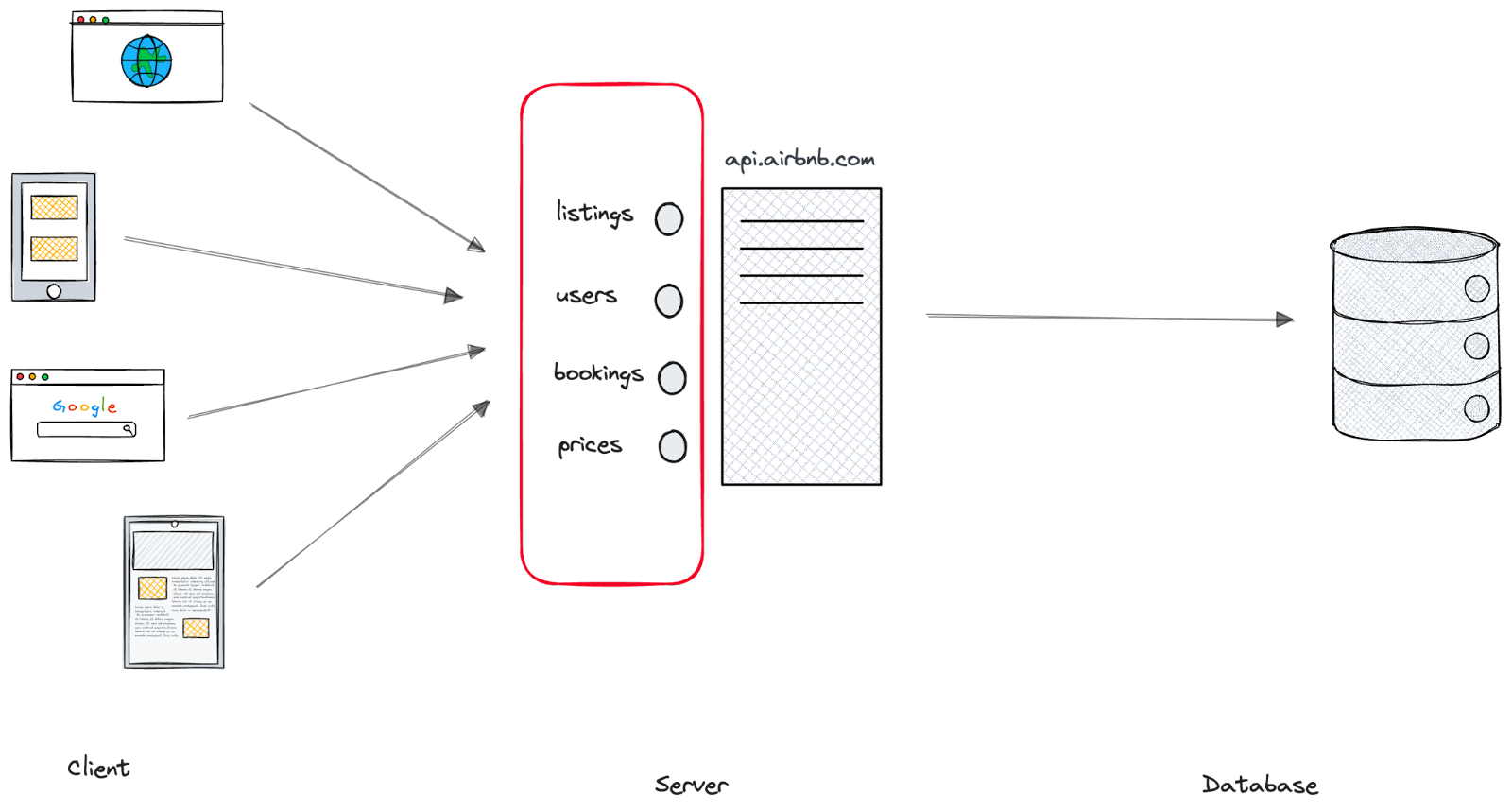
Is the API the server? Kind of. As we said above, the API is the server’s front door—it’s the set of actions that are available to clients. The API (hosted on a server) will either process the request itself or pass it downstream to be processed.
Going back to our Airbnb example, in addition to fetching Listings, you could imagine the API also allows a client to access Users, Bookings, Prices, and more. We commonly call these endpoints or resources.
Let’s take a look at another example: OpenAI. OpenAI supports a wide range of actions via their API. You can create images, transcribe audio, and get chat responses. Here’s what their API endpoints look like:
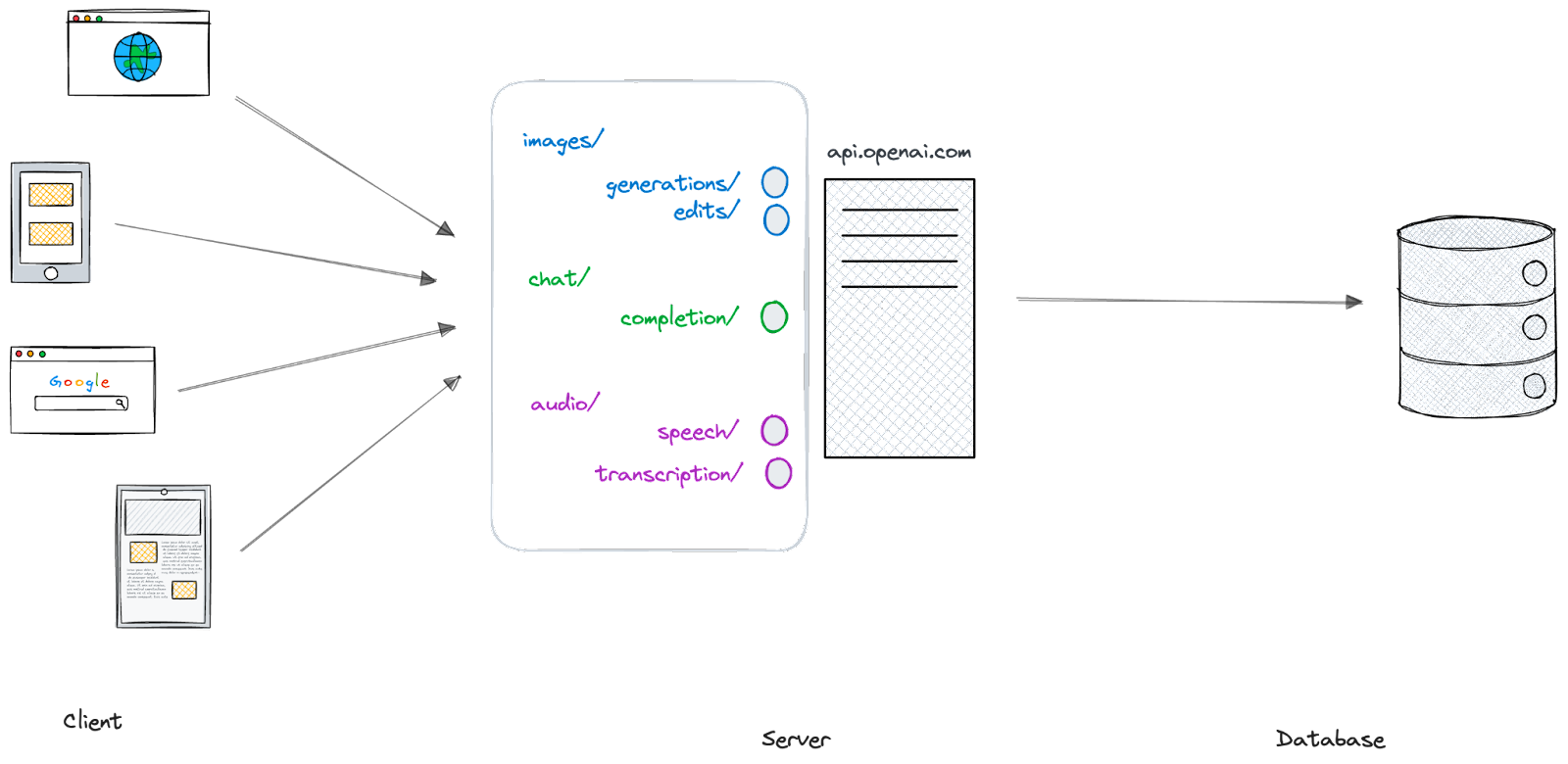
OpenAI has organized their API into a few groups—images, chat, and audio. Within each, there are a few endpoints that allow you to take different actions. For example, you could send a request to /audio/speech to create an MP3 file of text-to-speech with the AI voice of your preference.
Here’s an example:
What are some common patterns with APIs?
Once you understand a few basic patterns with APIs, you’ll be able to breeze through technical documentation in no time.
First, there are three main types of APIs:
- SOAP: This is a legacy design, still used mostly in health care and financial services.
- REST: This is the most popular design pattern; we’ll get into more details below.
- GraphQL: This is a newer design created at Meta, most commonly used in private APIs within your own application. It uses the same request types but in different ways.
As mentioned, REST is by far the most popular design for APIs. It supports many different request types, but there are two we’ll focus on today—GET and POST.
GET requests
GET requests do what you think they would: get stuff. Every time you open a web page, your browser sends a GET request to the server at the URL you’ve entered and the server returns some content to be rendered.
In its simplest form, this content can be an HTML file that your browser displays, or it can be a more complex format that needs to be interpreted, like JSON.
Let’s update our Airbnb example above to specify the request type.
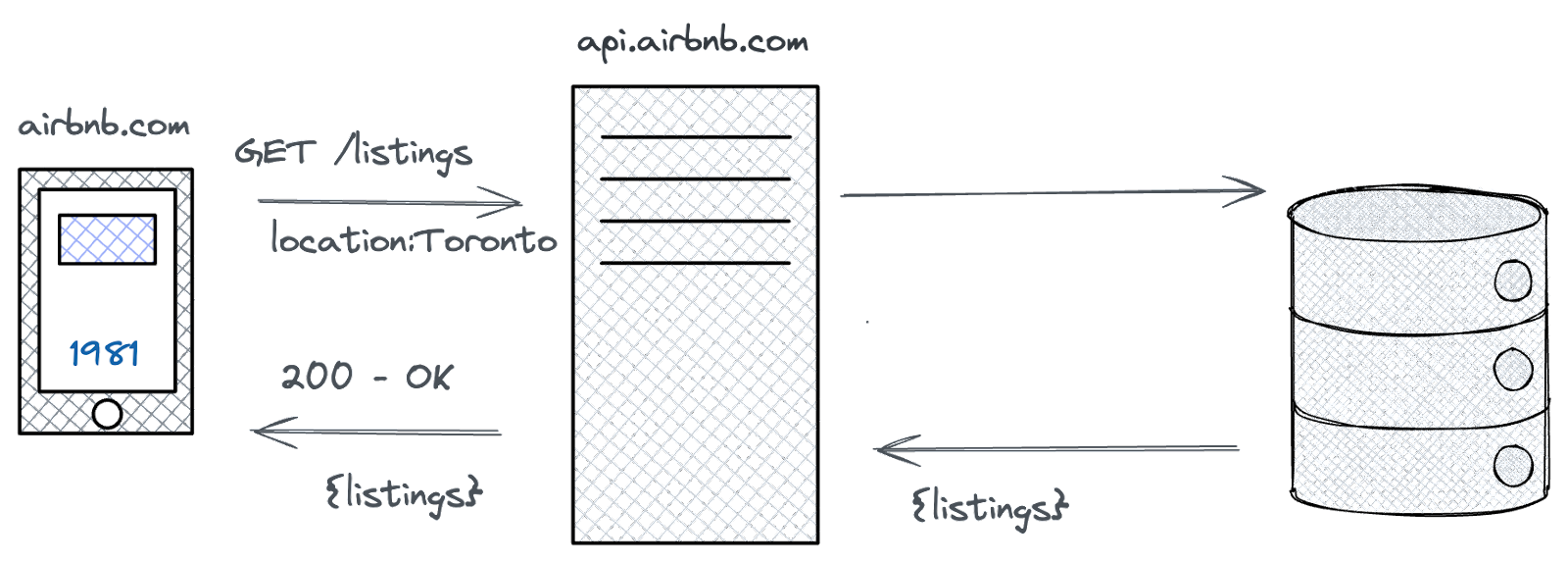
Now we can see that we’re sending a GET request to the /listings endpoint. We also specified that we only want listings in Toronto.
Let’s break the request down into its components:
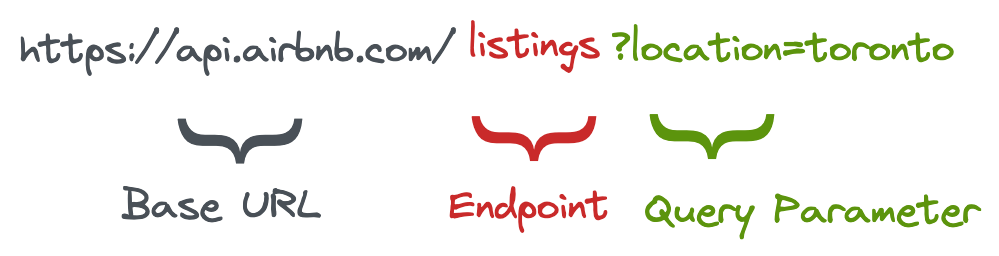
- Base URL: The “home” for all API endpoints
- Endpoint: The specific resource we want to access
- Query parameter: Additional data passed in with our requests
POST requests
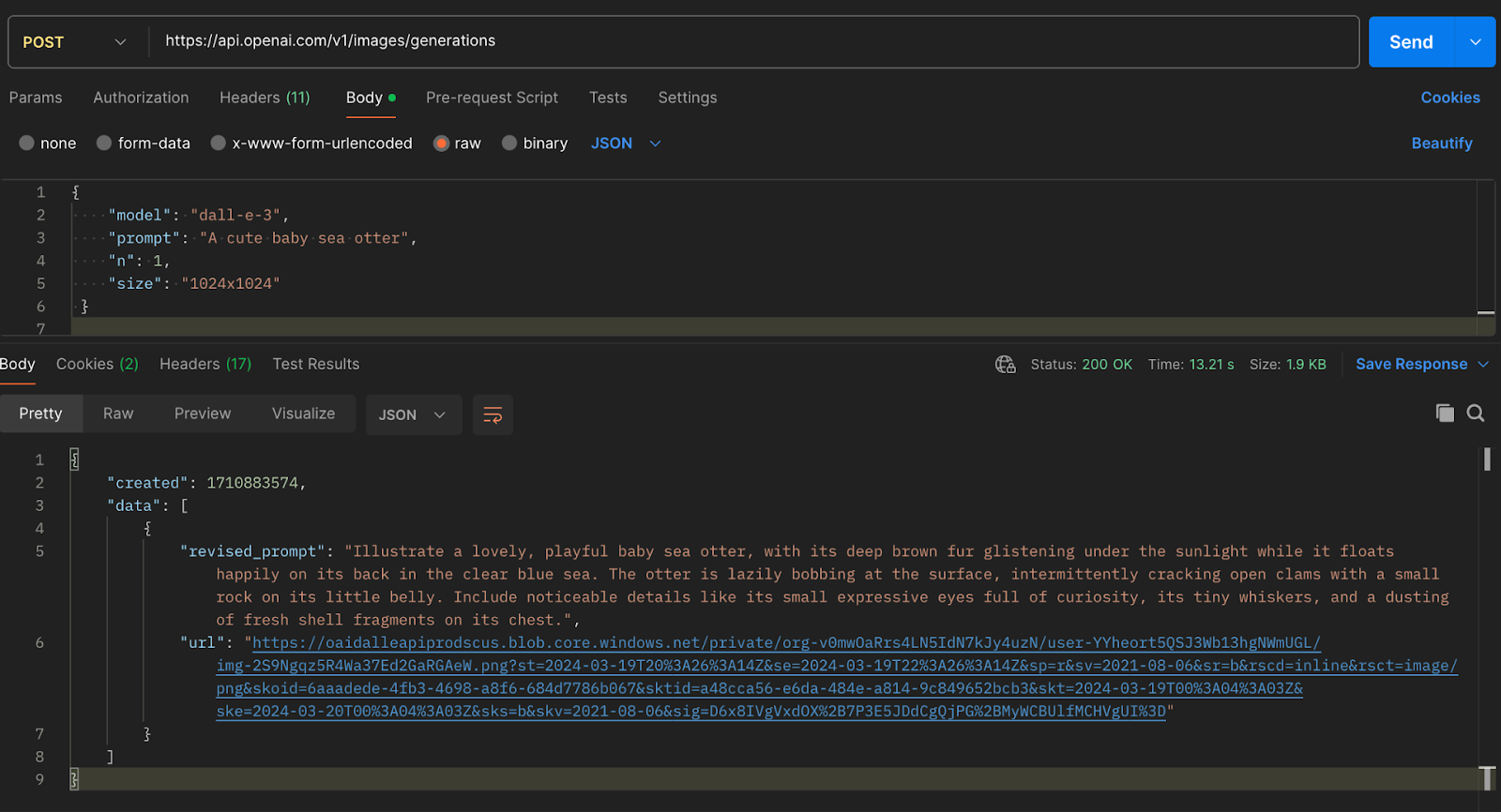
POST requests are used to submit new data to the server. For example, we would use a POST request on Open AI’s /images/generations endpoint to create a new image.
We would also include a body with the request, which contains data to be processed by the server. Here’s what that might look like:
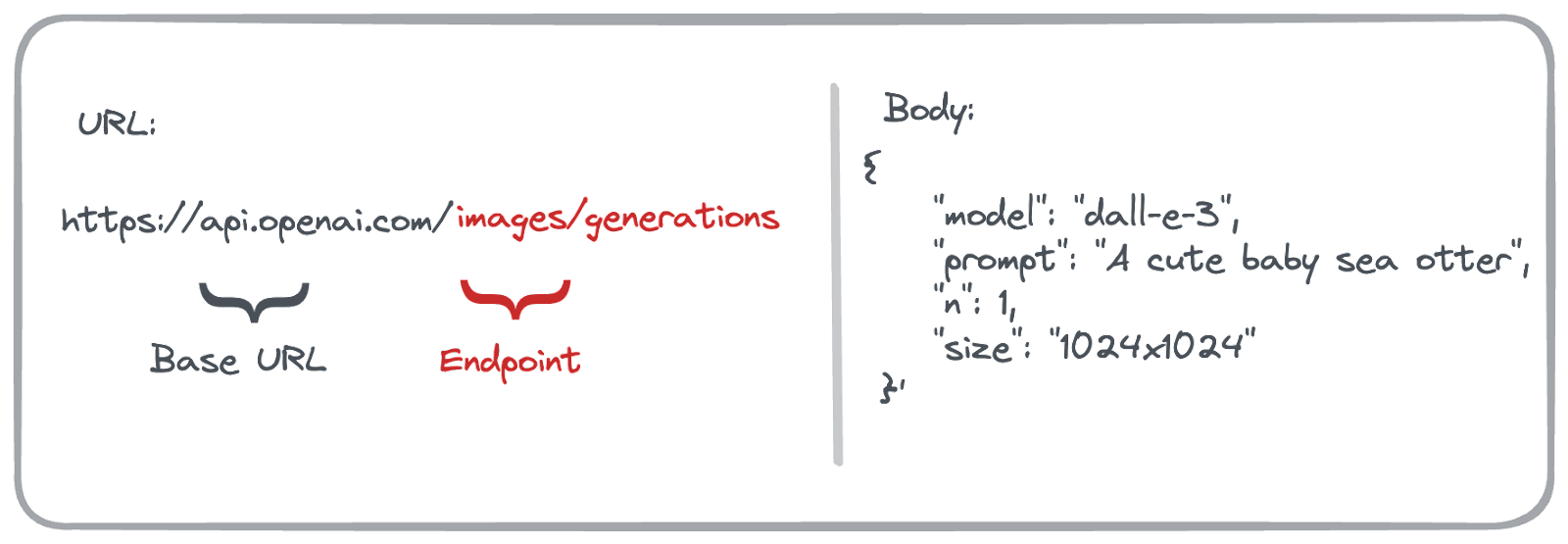
As long as we have access, OpenAI will respond to this request with the cutest baby sea otter you’ve ever seen.

Remember that text-to-speech example with an AI-generated voice that we got from OpenAI’s API? Well, that was a POST request.
To generate this, we sent a POST request to https://api.openai.com/v1/audio/speech with the following body:
{
"model": "tts-1",
"input": "Did you know subscribers to Lenny's Newsletter get exclusive discounts with partners? Pretty cool! And there's a Slack channel!",
"voice": "alloy"
}
In response to this request, the API sends back an MP3 file with the text-to-speech phrase.
How can I practice?
Want to try a request for yourself? Follow along to generate your own images using DALL-E and OpenAI’s API.
- Sign up for an API account at https://platform.openai.com/signup
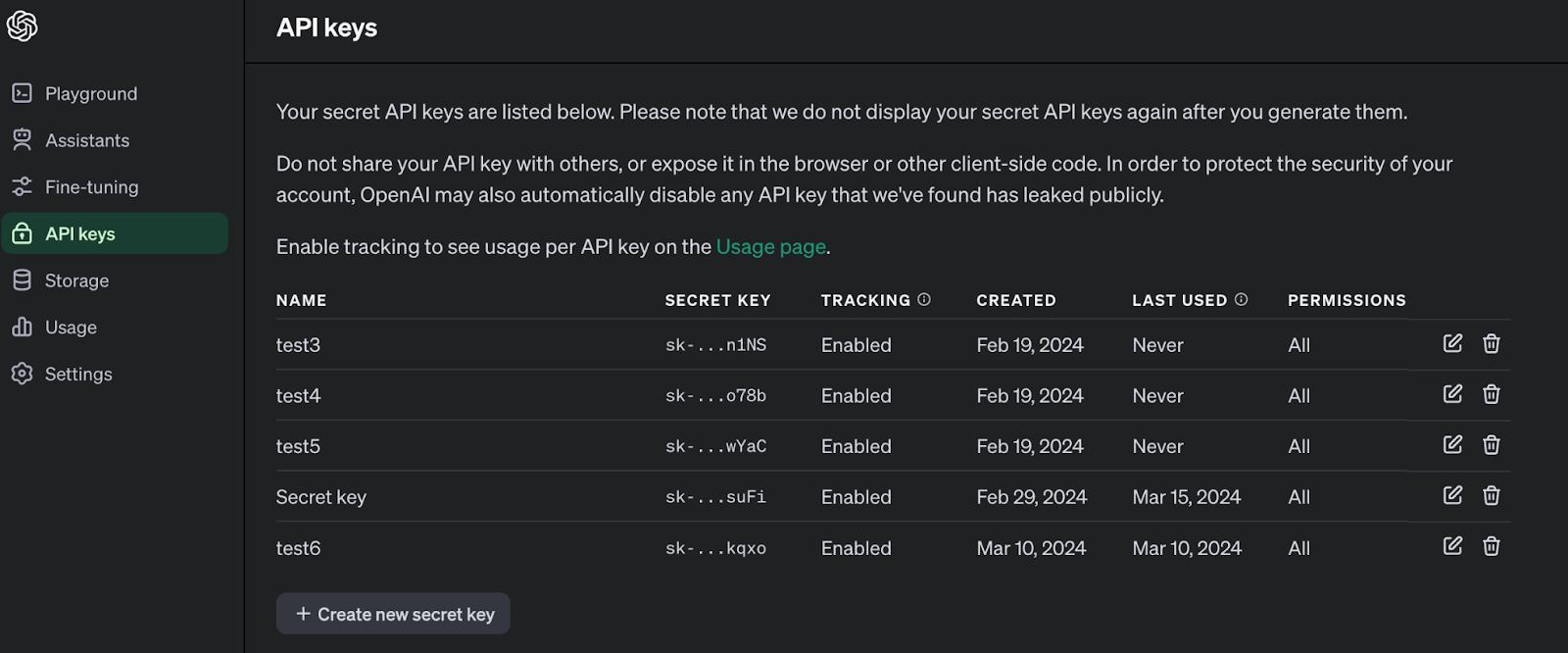
- Navigate to API Keys. Verify your account and create your first API key. Make sure you copy it!
- Using Postman or a web-based API request tool (here’s a free one), make a POST request to https://api.openai.com/v1/images/generations
-
Add the following Headers
-
Authorization: Bearer [your-api-key]
-
Content-Type: application/json
-
Add the following body in JSON
{
"model": "dall-e-3",
"prompt": "A cute baby sea otter",
"n": 1,
"size": "1024x1024"
}
- Send your request!
Software development lifecycle
Now that we understand the basics of application architecture and APIs, we can talk about how engineers actually build software. Chances are you’re following some version of the software development lifecycle, or SDLC. This follows a familiar process:
-
Plan
-
What outcome are you trying to achieve?
- What solution(s) will get you there?
- What customer problems align to business goals?
- How will customers know you offer the solution?
-
Design
-
What will you build?
- How will it work?
-
Implement
-
Engineers write the code
-
Test
-
Does the code match the specifications?
- Do our systems work together as intended?
- Can customers use our feature to accomplish their goal?
-
Deploy
-
Move code from local through dev, staging, and production
-
Maintain
-
Resolve bugs
- Handle customer support
You’re likely familiar with Planning and Design, but how well do you understand the processes of Implementation, Testing, and Deployment that engineers go through?
Implementation
We all use tools like Google Docs to collaborate. We can comment on others’ work, track changes over time, and share work publicly once it’s ready. Engineers have a similar tool for code: Git.
Git is a version-control system that tracks changes as they are made to code. Products like GitHub allow engineers to move those changes from their local machine to online storage, where others can view and edit as well. This is similar to the idea of moving your local text file over to Google Docs so others can collaborate with you.
The home for all their code is a repository, or repo. This is like a Google Drive folder that tracks changes to files.
When an engineer wants to make a change, they commit it from their local copy to the copy in GitHub.
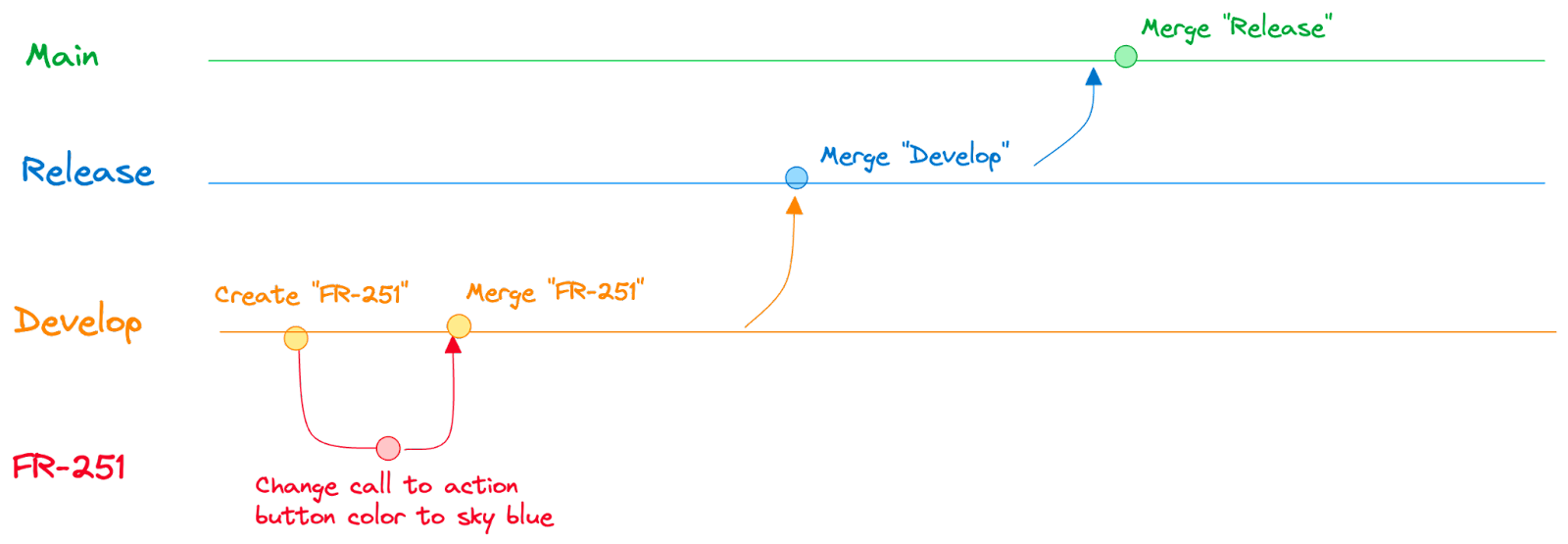
But having a bunch of disorganized commits would be like everyone changing a Google Doc at the same time—an absolute mess. To solve for this, engineers create branches. A branch is a copy of the code. Engineers use these to make their changes in isolation from each other.

Once they’re done, they submit a pull request from their branch back into the main branch. This request will be reviewed by other engineers, who can suggest improvements before it is accepted.
Once the pull request is approved, the independent branch will be merged back into the main branch.
Another style of version control typically found in legacy workflows is called Gitflow. This has many more layers of branches, such as Develop and Release. It usually requires specific approvals to move code up from a lower branch to a higher branch, until it eventually reaches the main branch after a scheduled release.
Testing
You might be surprised to learn that any one engineer doesn’t actually know how the whole codebase works at any given time. Each engineer has a high-level view of the product and a more detailed understanding of the last few components they worked on. Because many engineers work on the same codebase, they often have to learn (or re-learn) how specific sections work before implementing new changes. On top of that, they may not have context beyond what you’ve provided to gut-check if what they’re building makes sense. This makes testing essential to successfully shipping new features the first time.
There are many types of testing, but we’ll focus on the following:
- Unit tests
- Integration tests
- End-to-end tests
- User acceptance tests
Testing is a high-leverage area for PMs to quickly improve your product quality. A quick round of end-to-end testing with your engineering team before a major release will help them build context on the workflow and catch issues before you ship to production.
Unit tests
Unit tests are code written in combination with new functions, to test a variety of functionality. For example, we might have a function called Double, which doubles any number we send it. A unit test would provide 4 and check that the result is 8.

This is the lowest level of testing. The percentage of the code base that has associated unit tests is called coverage.
Integration tests
Integration tests are tests between different components of the software. For example, we might test that the new feature we added to upsell customers at checkout properly works with our tax calculation service. This is targeted testing between components that are independent but closely related.
End-to-end tests
End-to-end (E2E) tests are a full walkthrough of the desired workflow and interact with all relevant systems. E2E testing is more time-intensive but often reveals issues you otherwise might not find. This is especially true if the workflow is dependent on many services working together correctly.
User acceptance tests
User acceptance tests are typically in the domain of product or design. These tests require users to use the current version of your feature from beginning to end with minimal intervention. From this, you’ll learn if the interaction design is intuitive or if more work is needed before making the feature available.
Deployment
Once our feature is ready, we need to make it available to customers. Usually you would move your current version of the code to at least two of these environments:
- Dev: Servers dedicated for developers to use
- Staging: A close replica of production for testing and internal use
- Production: The main environment used by customers every day
Deployment practices follow one of two patterns: scheduled or continuous. Scheduled deployments happen on a recurring cadence, like once a week, once a month, or once a quarter.
Continuous deployment (CD) allows developers to automatically deploy their code to one or more environments when it is merged into a branch. For example, any approved pull requests to the main branch would automatically deploy to the production environment.
Continuous deployment is usually paired with continuous integration (CI), which refers to running tests automatically every time new code is added to a branch. This can include unit tests, integration tests, vulnerability assessments, and more. CI helps developers ensure that their changes work without manual testing.
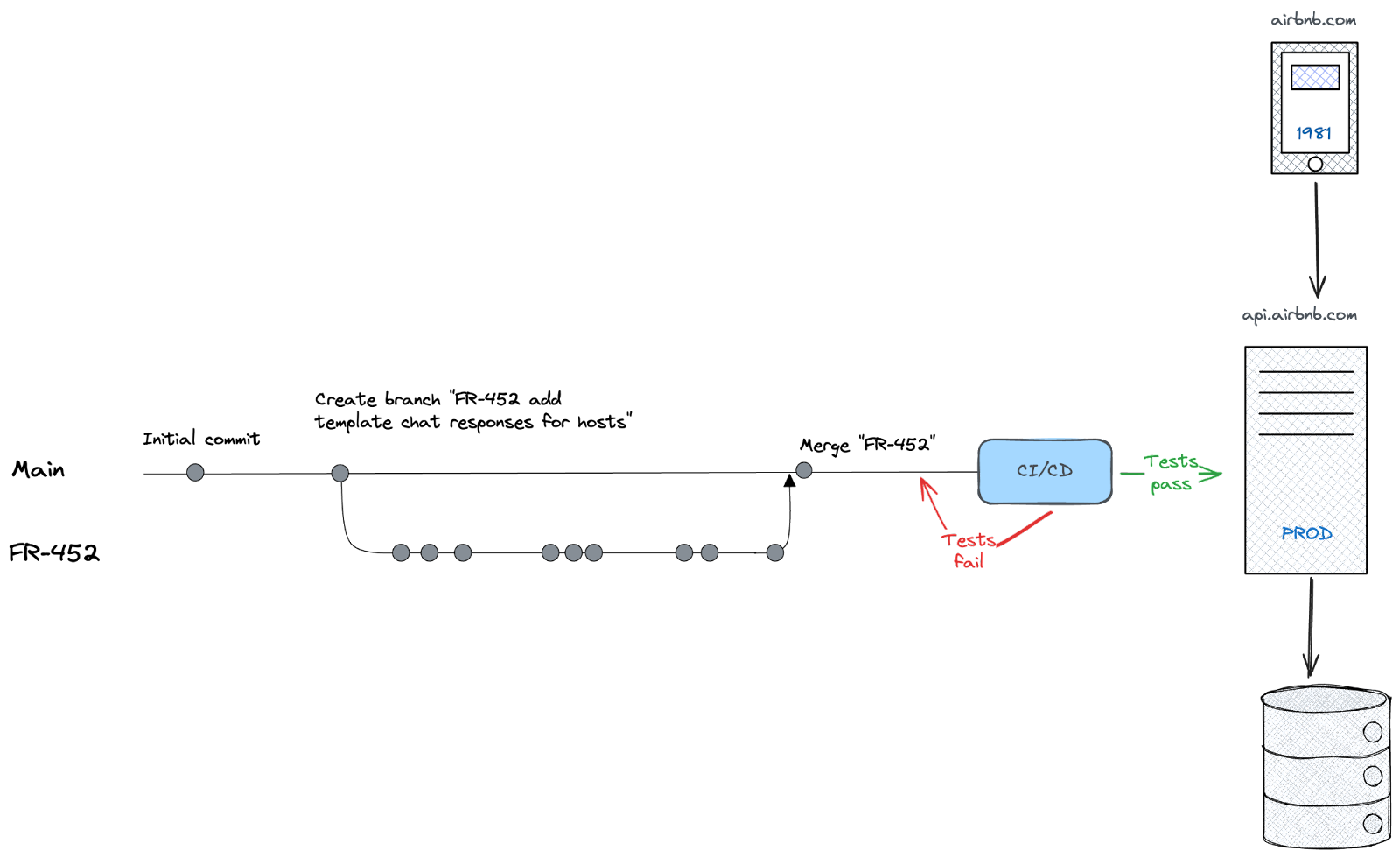
Popularized by Eric Ries, CI/CD helps teams move quickly and keep the pace of shipping code to production high. For example, Stripe’s annual letter highlights their robust deployment and testing methodologies, with more than 400 deployments per day and 1.4 million automated tests!
How can I practice?
Want to learn how to create a new pull request yourself? Check out this free practice exercise, where I’ll walk you through each step of creating your own branch, creating commits, and ultimately submitting a pull request. It includes five videos covering every step along the way.
All you’ll need is a GitHub account and about 15 minutes!
Putting it all together
Here are a few questions to consider the next time you write a PRD or work on a feature:
Application architecture
- What changes need to be made to each tier for your new feature?
- Ask the engineer to walk you through implementation at a high level. Does it align with what you were expecting?
APIs
- Have you tested your API from the perspective of your customer?
- How well does your API support customer workflows?
- Test internal and external APIs yourself. Do they perform the way you expect? What bottlenecks are there (if any)?
SDLC
- How can you reduce implementation risk through closer collaboration with technical stakeholders?
- How much testing, and what types of testing, are appropriate for the change you’re pushing to production?
The purpose of this isn’t to micromanage engineers or take responsibility for feasibility. It’s to help you be a better collaborator with your technical team by reducing communication overhead between you and them.
Thank you, Colin! For more from Colin, check out his Maven course—the next cohort kicks off on May 6. Use this link to get 25% off.
Have a fulfilling and productive week 🙏
👀 Hiring? Or looking for a new job?
I’m piloting a white-glove recruiting service for product roles, working with a few select companies at a time. If you’re hiring for senior product roles, apply below.
If you’re exploring new opportunities yourself, use the same button above to sign up. We’ll send over personalized opportunities from hand-selected companies if we think there’s a fit. Nobody gets your info until you allow them to, and you can leave anytime.
If you’re finding this newsletter valuable, share it with a friend, and consider subscribing if you haven’t already. There are group discounts, gift options, and referral bonuses available.
Sincerely,
Lenny 👋