Datasette 1.0a20 is out with the biggest breaking API change on the road to 1.0, improving how Datasette's permissions system works by migrating permission logic to SQL running in SQLite. This release involved 163 commits, with 10,660 additions and 1,825 deletions, most of which was written with the help of Claude Code.
- Understanding the permissions system
- Permissions systems need to be able to efficiently list things
- The new permission_resources_sql() plugin hook
- Hierarchies, plugins, vetoes, and restrictions
- New debugging tools
- The missing feature: list actors who can act on this resource
- Upgrading plugins for Datasette 1.0a20
- Using Claude Code to implement this change
- Starting with a proof-of-concept
- Miscellaneous tips I picked up along the way
- What's next?
Understanding the permissions system
Datasette's permissions system exists to answer the following question:
Is this actor allowed to perform this action, optionally against this particular resource?
An actor is usually a user, but might also be an automation operating via the Datasette API.
An action is a thing they need to do - things like view-table, execute-sql, insert-row.
A resource is the subject of the action - the database you are executing SQL against, the table you want to insert a row into.
Datasette's default configuration is public but read-only: anyone can view databases and tables or execute read-only SQL queries but no-one can modify data.
Datasette plugins can enable all sorts of additional ways to interact with databases, many of which need to be protected by a form of authentication Datasette also 1.0 includes a write API with a need to configure who can insert, update, and delete rows or create new tables.
Actors can be authenticated in a number of different ways provided by plugins using the actor_from_request() plugin hook. datasette-auth-passwords and datasette-auth-github and datasette-auth-existing-cookies are examples of authentication plugins.
Permissions systems need to be able to efficiently list things
The previous implementation included a design flaw common to permissions systems of this nature: each permission check involved a function call which would delegate to one or more plugins and return a True/False result.
This works well for single checks, but has a significant problem: what if you need to show the user a list of things they can access, for example the tables they can view?
I want Datasette to be able to handle potentially thousands of tables - tables in SQLite are cheap! I don't want to have to run 1,000+ permission checks just to show the user a list of tables.
Since Datasette is built on top of SQLite we already have a powerful mechanism to help solve this problem. SQLite is really good at filtering large numbers of records.
The new permission_resources_sql() plugin hook
The biggest change in the new release is that I've replaced the previous permission_allowed(actor, action, resource) plugin hook - which let a plugin determine if an actor could perform an action against a resource - with a new permission_resources_sql(actor, action) plugin hook.
Instead of returning a True/False result, this new hook returns a SQL query that returns rules helping determine the resources the current actor can execute the specified action against.
Here's an example, lifted from the documentation:
from datasette import hookimpl

from datasette.permissions import PermissionSQL


@hookimpl

def permission_resources_sql(datasette, actor, action):

    if action != "view-table":

        return None

    if not actor or actor.get("id") != "alice":

        return None


    return PermissionSQL(

        sql="""

            SELECT

                'accounting' AS parent,

                'sales' AS child,

                1 AS allow,

                'alice can view accounting/sales' AS reason

        """,

    )
This hook grants the actor with ID "alice" permission to view the "sales" table in the "accounting" database.
The PermissionSQL object should always return four columns: a parent, child, allow (1 or 0), and a reason string for debugging.
When you ask Datasette to list the resources an actor can access for a specific action, it will combine the SQL returned by all installed plugins into a single query that joins against the internal catalog tables and efficiently lists all the resources the actor can access.
This query can then be limited or paginated to avoid loading too many results at once.
Hierarchies, plugins, vetoes, and restrictions
Datasette has several additional requirements that make the permissions system more complicated.
Datasette permissions can optionally act against a two-level hierarchy. You can grant a user the ability to insert-row against a specific table, or every table in a specific database, or every table in every database in that Datasette instance.
Some actions can apply at the table level, others the database level and others only make sense globally - enabling a new feature that isn't tied to tables or databases, for example.
Datasette currently has ten default actions but plugins that add additional features can register new actions to better participate in the permission systems.
Datasette's permission system has a mechanism to veto permission checks - a plugin can return a deny for a specific permission check which will override any allows. This needs to be hierarchy-aware - a deny at the database level can be outvoted by an allow at the table level.
Finally, Datasette includes a mechanism for applying additional restrictions to a request. This was introduced for Datasette's API - it allows a user to create an API token that can act on their behalf but is only allowed to perform a subset of their capabilities - just reading from two specific tables, for example. Restrictions are described in more detail in the documentation.
That's a lot of different moving parts for the new implementation to cover.
New debugging tools
Since permissions are critical to the security of a Datasette deployment it's vital that they are as easy to understand and debug as possible.
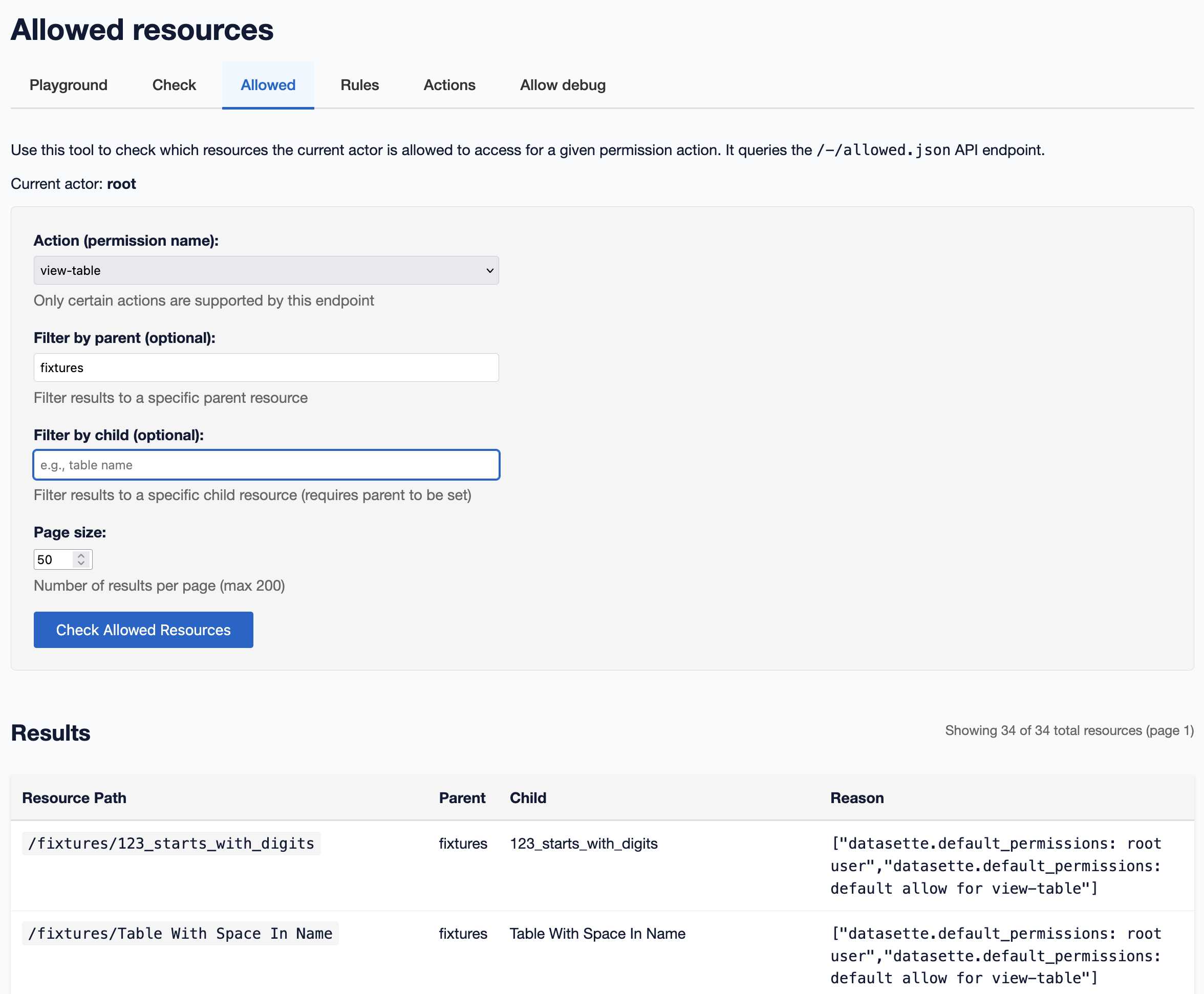
The new alpha adds several new debugging tools, including this page that shows the full list of resources matching a specific action for the current user:
And this page listing the rules that apply to that question - since different plugins may return different rules which get combined together:
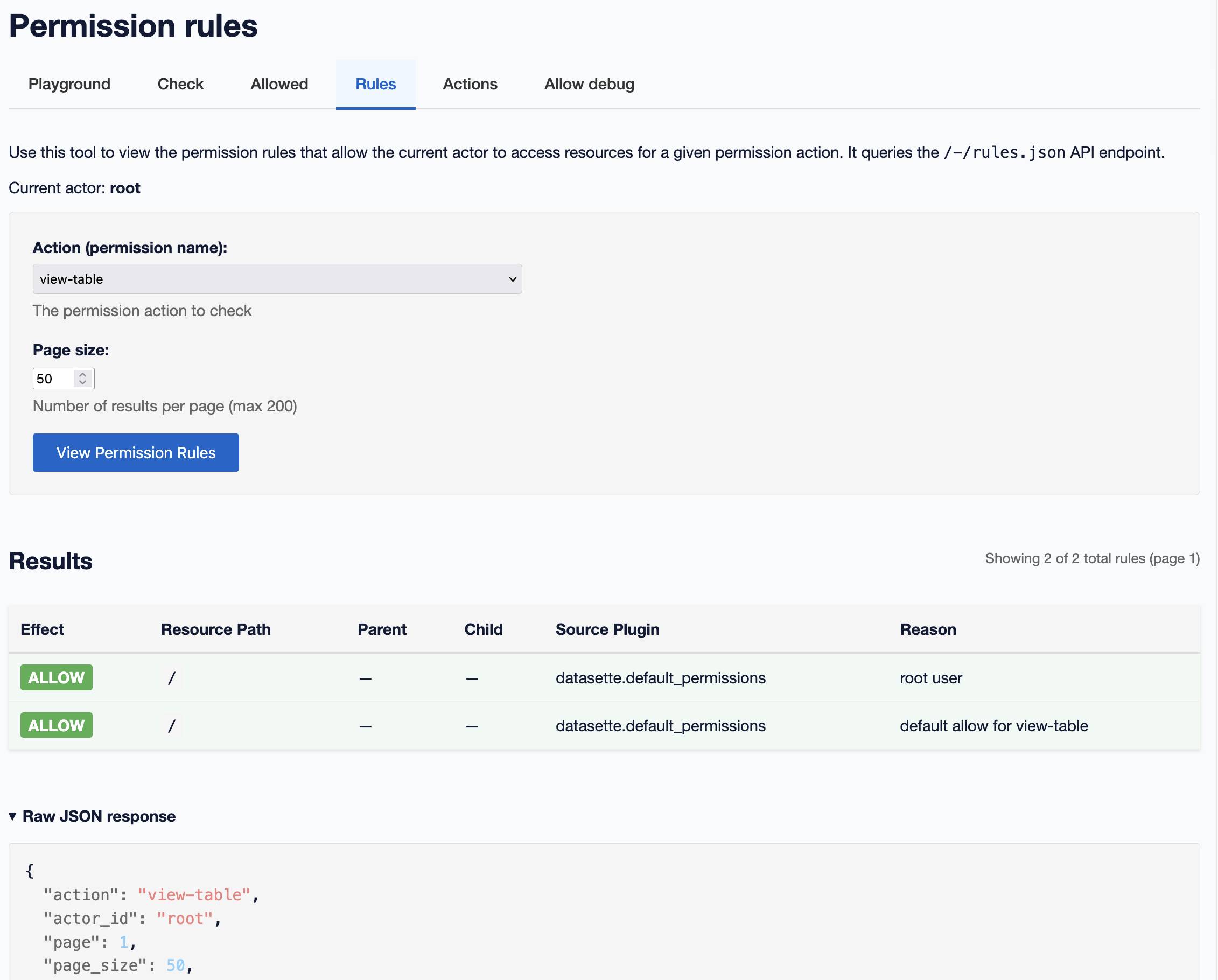
This screenshot illustrates two of Datasette's built-in rules: there is a default allow for read-only operations such as view-table (which can be over-ridden by plugins) and another rule that says the root user can do anything (provided Datasette was started with the --root option.)
Those rules are defined in the datasette/default_permissions.py Python module.
The missing feature: list actors who can act on this resource
There's one question that the new system cannot answer: provide a full list of actors who can perform this action against this resource.
It's not possibly to provide this globally for Datasette because Datasette doesn't have a way to track what "actors" exist in the system. SSO plugins such as datasette-auth-github mean a new authenticated GitHub user might show up at any time, with the ability to perform actions despite the Datasette system never having encountered that particular username before.
API tokens and actor restrictions come into play here as well. A user might create a signed API token that can perform a subset of actions on their behalf - the existence of that token can't be predicted by the permissions system.
This is a notable omission, but it's also quite common in other systems. AWS cannot provide a list of all actors who have permission to access a specific S3 bucket, for example - presumably for similar reasons.
Upgrading plugins for Datasette 1.0a20
Datasette's plugin ecosystem is the reason I'm paying so much attention to ensuring Datasette 1.0 has a stable API. I don't want plugin authors to need to chase breaking changes once that 1.0 release is out.
The Datasette upgrade guide includes detailed notes on upgrades that are needed between the 0.x and 1.0 alpha releases. I've added an extensive section about the permissions changes to that document.
I've also been experimenting with dumping those instructions directly into coding agent tools - Claude Code and Codex CLI - to have them upgrade existing plugins for me. This has been working extremely well. I've even had Claude Code update those notes itself with things it learned during an upgrade process!
This is greatly helped by the fact that every single Datasette plugin has an automated test suite that demonstrates the core functionality works as expected. Coding agents can use those tests to verify that their changes have had the desired effect.
I've also been leaning heavily on uv to help with the upgrade process. I wrote myself two new helper scripts - tadd and radd - to help test the new plugins.
-
tadd= "test against datasette dev" - it runs a plugin's existing test suite against the current development version of Datasette checked out on my machine. It passes extra options through topytestso I can runtadd -k test_nameortadd -x --pdbas needed. -
radd= "run against datasette dev" - it runs the latest devdatasettecommand with the plugin installed.
The tadd and radd implementations can be found in this TIL.
Some of my plugin upgrades have become a one-liner to the codex exec command, which runs OpenAI Codex CLI with a prompt without entering interactive mode:
codex exec --dangerously-bypass-approvals-and-sandbox \

"Run the command tadd and look at the errors and then

read ~/dev/datasette/docs/upgrade-1.0a20.md and apply

fixes and run the tests again and get them to pass"
There are still a bunch more to go - there's a list in this tracking issue - but I expect to have the plugins I maintain all upgraded pretty quickly now that I have a solid process in place.
Using Claude Code to implement this change
This change to Datasette core by far the most ambitious piece of work I've ever attempted using a coding agent.
Last year I agreed with the prevailing opinion that LLM assistance was much more useful for greenfield coding tasks than working on existing codebases. The amount you could usefully get done was greatly limited by the need to fit the entire codebase into the model's context window.
Coding agents have entirely changed that calculation. Claude Code and Codex CLI still have relatively limited token windows - albeit larger than last year - but their ability to search through the codebase, read extra files on demand and "reason" about the code they are working with has made them vastly more capable.
I no longer see codebase size as a limiting factor for how useful they can be.
I've also spent enough time with Claude Sonnet 4.5 to build a weird level of trust in it. I can usually predict exactly what changes it will make for a prompt. If I tell it "extract this code into a separate function" or "update every instance of this pattern" I know it's likely to get it right.
For something like permission code I still review everything it does, often by watching it as it works since it displays diffs in the UI.
I also pay extremely close attention to the tests it's writing. Datasette 1.0a19 already had 1,439 tests, many of which exercised the existing permission system. 1.0a20 increases that to 1,583 tests. I feel very good about that, especially since most of the existing tests continued to pass without modification.
Starting with a proof-of-concept
I built several different proof-of-concept implementations of SQL permissions before settling on the final design. My research/sqlite-permissions-poc project was the one that finally convinced me of a viable approach,
That one started as a free ranging conversation with Claude, at the end of which I told it to generate a specification which I then fed into GPT-5 to implement. You can see that specification at the end of the README.
I later fed the POC itself into Claude Code and had it implement the first version of the new Datasette system based on that previous experiment.
This is admittedly a very weird way of working, but it helped me finally break through on a problem that I'd been struggling with for months.
Miscellaneous tips I picked up along the way
- When working on anything relating to plugins it's vital to have at least a few real plugins that you upgrade in lock-step with the core changes. The
taddandraddshortcuts were invaluable for productively working on those plugins while I made changes to core. - Coding agents make experiments much cheaper. I threw away so much code on the way to the final implementation, which was psychologically easier because the cost to create that code in the first place was so low.
- Tests, tests, tests. This project would have been impossible without that existing test suite. The additional tests we built along the way give me confidence that the new system is as robust as I need it to be.
- Claude writes good commit messages now! I finally gave in and let it write these - previously I've been determined to write them myself. It's a big time saver to be able to say "write a tasteful commit message for these changes".
- Claude is also great at breaking up changes into smaller commits. It can also productively rewrite history to make it easier to follow, especially useful if you're still working in a branch.
- A really great way to review Claude's changes is with the GitHub PR interface. You can attach comments to individual lines of code and then later prompt Claude like this:
Use gh CLI to fetch comments on URL-to-PR and make the requested changes. This is a very quick way to apply little nitpick changes - rename this function, refactor this repeated code, add types here etc. - The code I write with LLMs is higher quality code. I usually find myself making constant trade-offs while coding: this function would be neater if I extracted this helper, it would be nice to have inline documentation here, this changing this would be good but would break a dozen tests... for each of those I have to determine if the additional time is worth the benefit. Claude can apply changes so much faster than me that these calculations have changed - almost any improvement is worth applying, no matter how trivial, because the time cost is so low.
- Internal tools are cheap now. The new debugging interfaces were mostly written by Claude and are significantly nicer to use and look at than the hacky versions I would have knocked out myself, if I had even taken the extra time to build them.
- That trick with a Markdown file full of upgrade instructions works astonishingly well - it's the same basic idea as Claude Skills. I maintain over 100 Datasette plugins now and I expect I'll be automating all sorts of minor upgrades in the future using this technique.
What's next?
Now that the new alpha is out my focus is upgrading the existing plugin ecosystem to use it, and supporting other plugin authors who are doing the same.
The new permissions system unlocks some key improvements to Datasette Cloud concerning finely-grained permissions for larger teams, so I'll be integrating the new alpha there this week.
This is the single biggest backwards-incompatible change required before Datasette 1.0. I plan to apply the lessons I learned from this project to the other, less intimidating changes. I'm hoping this can result in a final 1.0 release before the end of the year!